
The First Urgent Ticket Should Not Become a Scavenger Hunt
A new client calls because the internet is down. The technician asks for the ISP account number, router location, modem model, authorized contact, and support phone number. Nobody has the details. The first hour disappears before troubleshooting begins.
A new-client IT onboarding checklist prevents that scramble. It creates a usable starting record for contacts, devices, vendors, support rules, and secure-access tasks before the next urgent request reaches the calendar.
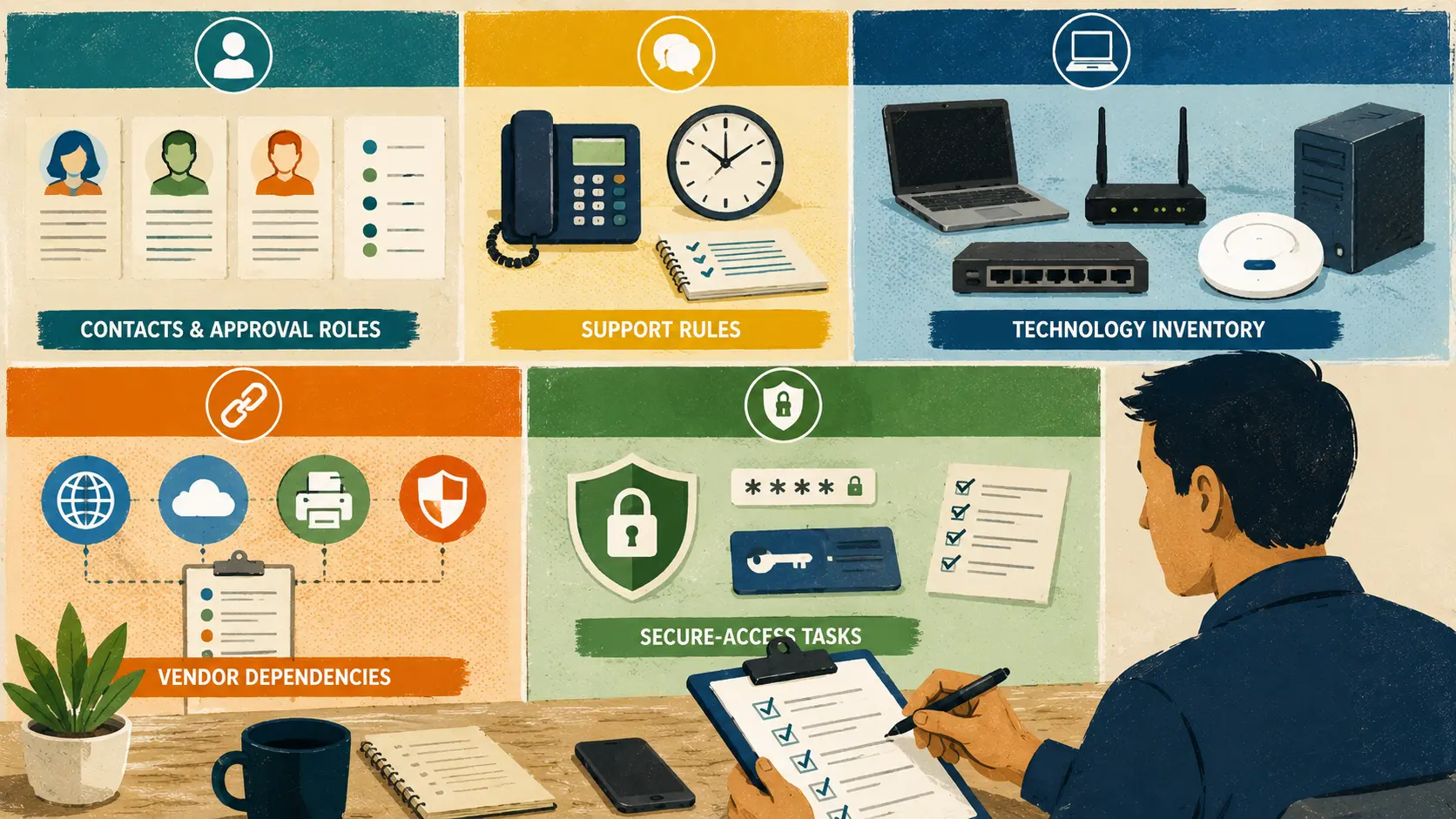
Your New-Client Onboarding Map
- The First Urgent Ticket Should Not Become a Scavenger Hunt
- New-Client IT Onboarding at a Glance
- Build Five Records Before Routine Support Begins
- Keep Access Collection Secure and Deliberate
- Complete the First Onboarding Pass in 60 Minutes
- Turn the Checklist Into a Repeatable Client Handoff
- A Good Onboarding Record Saves Time Later
- Suggested Follow-Up Articles
- Frequently Asked Questions
- References
New-Client IT Onboarding at a Glance
- Best for: Solo IT consultants, freelance sysadmins, network installers, and micro-MSPs beginning a recurring or project-based relationship with a small-business client.
- Main takeaway: Create five records before routine support begins: contacts, support rules, technology inventory, vendor dependencies, and secure-access tasks.
- Time, cost, or effort: A first onboarding pass can often be completed in 60 to 90 minutes for a modest office. A more complex environment may need a separate paid assessment.
- Best result to expect: Faster ticket handling, fewer missing details, cleaner quotes, and less unpaid detective work.
- When not to use this: Do not treat a short onboarding checklist as a full security audit, network assessment, compliance review, or migration plan.
Client onboarding should answer the questions that appear repeatedly during support work.
Who can approve labor? Which location is affected? Where is the network equipment? Which ISP supports the office? Which devices matter most? How should the client report an emergency? Which access tasks still need to be completed securely?
The first version does not need to document every setting. It needs to make the next ticket easier to understand.
Build Five Records Before Routine Support Begins
Organize the onboarding process into five records. Each record has a different purpose, and each one prevents a different kind of delay.
Record 1: business contacts and approval roles
Do not rely on one person’s phone number. Small businesses often need several roles.
| Contact Role | What to Record | Why It Matters |
|---|---|---|
| Primary contact | Name, role, email, phone, preferred contact method | Handles ordinary communication |
| Billing contact | Name, email, invoice preference | Prevents billing questions from returning to the technician |
| Authorized approver | Name and approval limit if used | Clarifies who can approve extra labor or equipment |
| Emergency contact | Name, phone, after-hours rules | Helps route urgent issues without guessing |
| Vendor contact | ISP, software, copier, alarm, or building contact | Reduces time spent searching for external support details |
A small client may use one person for several roles. Record the roles anyway. The point is to make responsibility visible.
Record 2: support rules
Clients need a clear front door for help.
Record:
- Normal support hours
- Emergency contact path
- Preferred request method
- Expected response window
- Remote-support process
- Site-visit policy
- Travel policy
- After-hours policy
- Approval threshold for hourly work
- What requires a separate quote
Do not bury support rules inside a long agreement that nobody checks during an urgent call. Keep a short operational summary in the client record.
Record 3: technology inventory
Start with the systems that change troubleshooting and scheduling.
| Inventory Area | Minimum Useful Details |
|---|---|
| Locations | Office address, rooms, branch locations, access instructions |
| Internet service | ISP, account contact, modem or handoff location, backup connection if any |
| Network equipment | Router, firewall, switches, access points, UPS units, visible labels |
| Computers | Device name, user, model, operating system, age or purchase year if known |
| Shared devices | Printers, scanners, conference-room equipment, phones, cameras |
| Business applications | Email provider, cloud storage, accounting system, scheduling tools, line-of-business apps |
| Backup systems | What is backed up, where it goes, who checks it, last known restore test |
| Domains and websites | Registrar, DNS provider, website host, renewal contact |
The first inventory can be lightweight. Record enough detail to prevent repeated questions and identify unknowns that require a paid assessment.
Record 4: vendor dependencies
A technician can lose an hour waiting for the right support contact.
Create a vendor list with:
- Provider name
- Service provided
- Account number or customer identifier when appropriate
- Support phone number or portal
- Authorized client contact
- Renewal date if relevant
- Notes about escalation
- Whether the provider requires the client to join the call
Common vendor categories include:
- Internet service provider
- Email and cloud provider
- Domain registrar
- Website host
- Copier or printer vendor
- Security or alarm company
- Software vendor
- Building management
- Phone or VoIP provider
- Backup provider
Keep confidential details inside the approved system, not inside an unsecured shared note.
Record 5: secure-access tasks
Document the access requirement without turning the onboarding form into a password collection sheet.
Track:
- Which system needs access
- Why access is needed
- Who authorizes it
- Whether an individual account can be created
- Whether MFA is enabled
- Whether admin access is separate from daily use
- Which secure method will be used to exchange or grant access
- Who reviews access when the relationship ends
NIST’s small-business cybersecurity guidance recommends MFA on accounts that offer it, strong passwords, considering a password manager, and testing backups. The onboarding process is a good time to record whether those basics are in place without pretending that a checklist is a full cybersecurity review.
Mini scenario: the printer ticket that reveals the missing record
A new client reports that the front-office printer stopped working. The technician connects remotely and discovers three printers with nearly identical names. One belongs to the copier vendor, one uses a reserved network address, and one is an older USB printer attached to a workstation.
Without onboarding notes, the ticket begins with guesswork.
With a basic inventory, the technician sees:
- Front-office copier: vendor-supported network device
- Shipping printer: reserved network address
- Back-office printer: USB device attached to workstation PC-04
- Copier vendor contact: listed in the client record
The ticket is still a printer problem. The difference is that the technician starts from a map instead of a fog.
Keep Access Collection Secure and Deliberate
The onboarding checklist should identify access needs. It should not encourage clients to send passwords through ordinary email, text messages, or a general intake form.
A safer process separates documentation from credential exchange.
Use this access workflow
- List the system that requires access.
- Confirm the business reason.
- Ask the client to create an individual account when the platform supports it.
- Use the least access needed for the task.
- Enable MFA when the platform offers it.
- Record who authorized the access.
- Store credentials only through the approved secure method.
- Review or remove access during offboarding.
Shared passwords may still appear in small-business environments. Treat them as a problem to improve, not as the default process.
Avoid these onboarding mistakes
- Requesting passwords inside the onboarding form: The form becomes a sensitive-data dump. Record the access task and move the exchange to an approved secure method.
- Using one shared admin login for everything: Individual accounts create a clearer record of access and make offboarding easier.
- Skipping MFA because the office is small: A small client still depends on email, cloud storage, billing, and vendor portals.
- Collecting more access than the work requires: Broad access increases risk and makes later cleanup harder.
- Forgetting the exit plan: Every access decision should have an offboarding step.
Compare three access approaches
| Access Approach | Best for | Advantage | Tradeoff |
|---|---|---|---|
| Individual account with MFA | Ongoing support and recurring administration | Easier to review and remove later | Requires initial setup |
| Time-limited access | One-time project or vendor session | Reduces long-term exposure | May need to be recreated for follow-up |
| Shared credential stored securely | Legacy system with no better option | Sometimes unavoidable | Harder to audit and remove cleanly |
Use the most limited workable option. When a system only supports a shared login, record that limitation and identify a future improvement path.
Complete the First Onboarding Pass in 60 Minutes
A modest onboarding record does not need to become a week-long documentation project. Use a timed first pass, then add detail when real work reveals what matters.
Minutes 0 to 10: confirm contacts and support rules
- Record the primary, billing, approval, and emergency contacts.
- Confirm normal support hours.
- Confirm the request path.
- State the emergency route.
- Record the approval threshold for added hourly work.
Minutes 10 to 25: map the environment
- List office locations.
- Record the internet provider.
- Identify the router, modem, firewall, switches, and access points.
- Count computers and shared devices.
- List critical business applications.
- Record obvious unknowns.
Minutes 25 to 40: document vendors and renewals
- Add the ISP support contact.
- Record domain, email, website, backup, copier, and software vendors.
- Add renewal dates when they affect continuity.
- Note which vendor calls require the client to participate.
Minutes 40 to 50: create the access-task list
- Identify systems that require access.
- Separate everyday accounts from administrator accounts.
- Confirm the secure exchange method.
- Record MFA status where relevant.
- Avoid storing passwords in the checklist itself.
Minutes 50 to 60: assign follow-up work
- Mark missing details.
- Separate quick documentation gaps from paid assessment work.
- Send the client a short summary.
- Schedule the next review point.
- Store the record where future tickets can reach it.
The first onboarding pass should create a usable record. It does not need to solve every unknown on day one.
Use this quote-readiness decision guide
- If the client has one small office and a visible setup, complete the basic onboarding record and begin routine support.
- If the environment includes multiple locations, unknown network equipment, or several vendors, quote a paid assessment.
- If the client requests security review, compliance guidance, or a migration, treat that as a separate scoped service.
- If access cannot be granted safely, pause the affected work until an approved method is available.
- Skip a recurring support promise when the device count, locations, or responsibilities are still unclear.
Turn the Checklist Into a Repeatable Client Handoff
The onboarding record should live where support work happens.
Odoo’s Contacts application allows customer contact records to store business information. ERPNext also supports customer contacts and optional user invitations for relevant portal access. Odoo, ERPNext, Zoho One, or any other ERP or helpdesk platform can support the process after the checklist is defined.
The tool should make the record easier to find. It should not create extra complexity.
Keep the client record in six sections
- Company profile
- Contacts and approval roles
- Support rules
- Technology inventory
- Vendors and renewals
- Secure-access tasks and open items
Add links to approved documents, tickets, quotes, and project notes when the system supports them.
Review onboarding records at useful moments
Update the record when:
- A new location opens
- A major device is replaced
- The ISP changes
- A new cloud service is added
- A key employee leaves
- A recurring support plan changes
- A project reveals undocumented equipment
- An outage exposes a missing vendor contact
- A quarterly review identifies stale information
Do not wait for the entire record to become outdated. Update the section affected by the change.
A Good Onboarding Record Saves Time Later
New-client IT onboarding is not administrative decoration. It is the map used when the next ticket arrives under pressure.
Build five records: business contacts, support rules, technology inventory, vendor dependencies, and secure-access tasks. Keep the first version practical. Record the unknowns honestly. Move sensitive access exchange into an approved secure process.
The best onboarding checklist is not the longest one. It is the checklist that helps the next support call begin with useful facts.
Frequently Asked Questions
Q1. What should a new-client IT onboarding checklist include?
A1. Start with contacts, support rules, technology inventory, vendor dependencies, and secure-access tasks. Keep the first version short enough to complete, then add detail when real support work reveals what matters.
Q2. Should an IT provider collect passwords during onboarding?
A2. The checklist should identify access requirements, but it should not collect passwords through ordinary email, text messages, or a general intake form. Use an approved secure method and prefer individual accounts with appropriate access when the system supports them.
Q3. How long should IT client onboarding take?
A3. A first pass for a modest office can often fit into 60 to 90 minutes. Multiple locations, undocumented equipment, security review, or migration planning may require a separate paid assessment.
Q4. Does the onboarding checklist need to be inside an ERP?
A4. No. A structured document or spreadsheet can work for the first version. Odoo, ERPNext, or any other ERP or helpdesk platform can store the stable process once the fields are clear.
By: Marcus Irizarry
Why trust this: This post is written for solo IT operators and micro-MSPs, using a practical onboarding framework and current documentation for client records and small-business security basics.
Last updated: 2026-06-11
Disclosure: No paid placement influenced this post.
References
- NIST: Cybersecurity Basics — Recommends MFA, strong passwords, considering password managers, and testing backups for small-business cybersecurity.
- Odoo Documentation: Contacts — Documents customer contact records used to store vital business information.
- ERPNext Documentation: Contact — Documents customer and supplier contacts and optional user invitations for relevant portal access.




0 Comments