
Two Similar-Looking Ports Can Solve Different Problems
A rack switch may have two RJ-45-shaped ports sitting only a few inches apart. One is a management Ethernet port. The other is a serial console port. They can look similar while serving different jobs.
The management Ethernet port is designed for network-based administration. The serial console port is a direct maintenance path. Confusing the two can lead to the wrong cable purchase, a failed support visit, or a recovery plan that disappears during the exact outage it was supposed to solve.
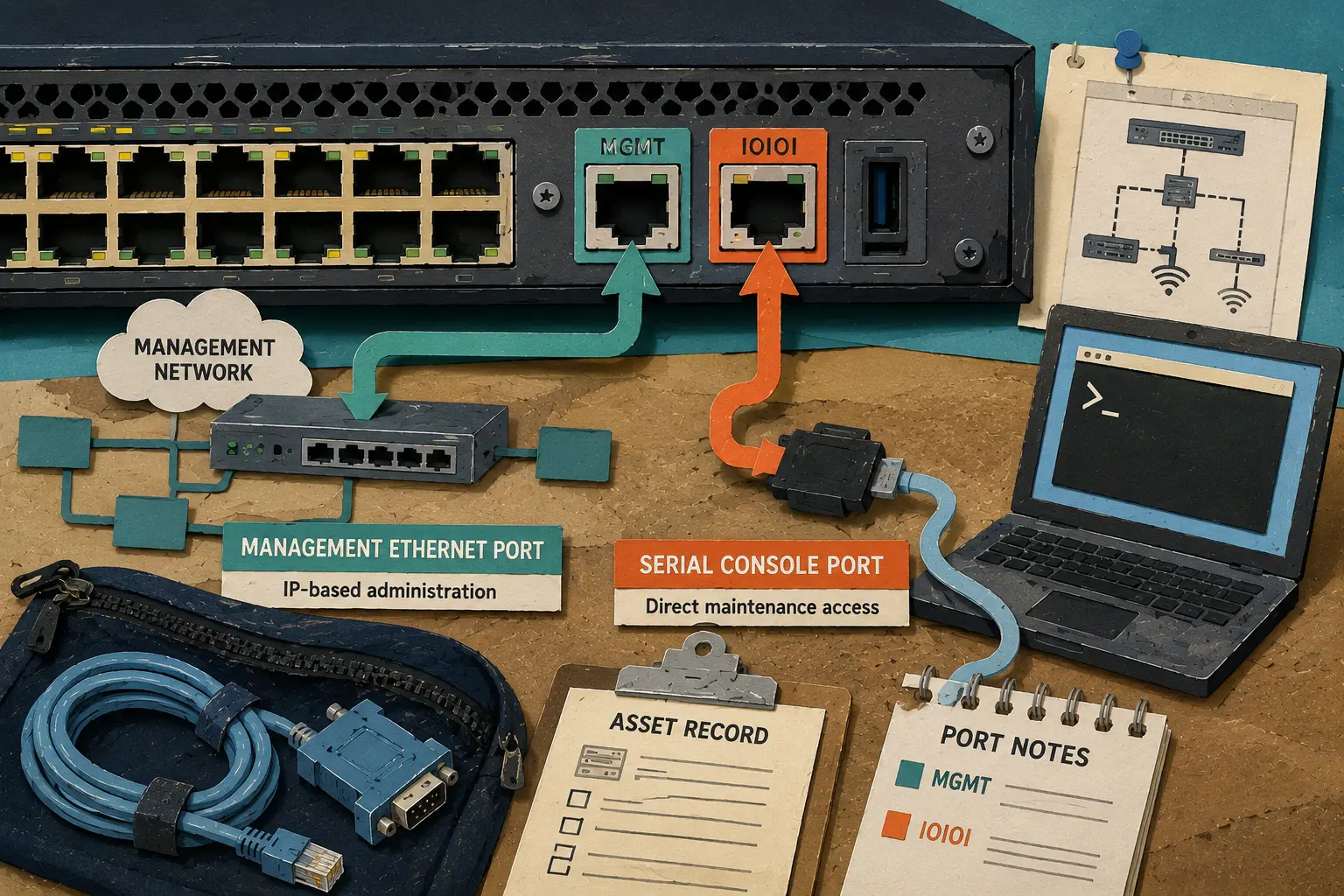
Rack-Side Port Comparison Map
- Two Similar-Looking Ports Can Solve Different Problems
- Quick Answer: Management Ethernet and Serial Console Are Not Interchangeable
- Understand the Two Maintenance Paths
- Identify the Correct Port Before Connecting Anything
- Avoid the Mistakes That Waste a Service Visit
- Build a Port Record Before the Network Fails
- Label Both Paths While the Rack Is Healthy
- Frequently Asked Questions
- Disclaimer
- References
Quick Answer: Management Ethernet and Serial Console Are Not Interchangeable
- Best for: Solo IT professionals, micro-MSPs, home-lab owners, network installers, and small-business teams maintaining switches, routers, firewalls, and servers.
- Main takeaway: A management Ethernet port provides IP-based administration, while a serial console port provides a direct maintenance connection that does not depend on the device’s ordinary network path.
- Time, cost, or effort: Spend 15 to 30 minutes documenting both interfaces on each important rack device.
- Best result to expect: The next authorized technician knows which port, cable, and recovery path to use before arriving onsite.
- When not to use this: Do not connect cables or make production changes without authorization, the correct model documentation, and an approved maintenance plan.
A serial console port is not automatically the only out-of-band option. A dedicated management Ethernet port can also support out-of-band administration when it connects to a separate management network. The important distinction is how the technician reaches the device.
Serial console access is direct. Management Ethernet access is network-based.
Understand the Two Maintenance Paths
A management Ethernet port behaves like a dedicated administrative network interface. The technician typically reaches it by IP address through an approved management network. Cisco documents management ports that use standard RJ-45 Ethernet connections and provide out-of-band management for supported switches.
A serial console port provides a direct terminal connection. Juniper documents console access as a path that does not rely on the network to which the device may or may not be connected. It can remain useful when the device has power but the normal management path is unavailable.
Plain-Language Definitions
- Management Ethernet port: A dedicated network interface used for IP-based administration.
- Serial console port: A direct maintenance interface used through a supported console cable.
- In-band management: Administration carried across the same network paths used for ordinary production traffic.
- Out-of-band management: Administration carried across a separate path designed for recovery or maintenance.
- Console server: A separate device that can provide authorized remote access to multiple serial-console connections.
HPE provides a useful visual example on supported storage switches. Its documentation lists an MGMT0 Ethernet management port and an IOIOI RS-232 serial console port as separate interfaces. Oracle also documents an RJ-45 SER MGT serial-management connector on supported servers and switches.
The interface labels vary by manufacturer. The purpose remains the better clue.
A Small Rack With Two RJ-45-Shaped Ports
A small law office has a firewall, one managed switch, two wireless access points, and a compact server. The switch has an ordinary data-port group, one port labeled for management, and one RJ-45-shaped serial-console port.
The office changes a network setting during an approved maintenance window. The switch remains powered on, but the technician can no longer reach the management IP address.
Trying another Ethernet cable in the management port will not fix a broken network path. The direct serial-console connection may provide the more appropriate maintenance route, provided the technician has authorization, the correct cable, and the official documentation for that model.
Identify the Correct Port Before Connecting Anything
The port shape is only the beginning. RJ-45 connectors appear on ordinary Ethernet ports, management Ethernet ports, and some serial-console ports. A cable may fit physically while still being wrong for the interface.
Cisco documents this distinction clearly on supported Catalyst switches. The Ethernet management port uses a standard RJ-45 Ethernet cable. The RJ-45 console port uses a supplied RJ-45-to-DB9 console cable. The nearby connectors may look similar, but the cable expectations are different.
Seven-Step Port-Identification SOP
- Record the exact manufacturer and model. Use the asset tag, chassis label, or official inventory record.
- Photograph the full port cluster. Include nearby labels, connector shapes, rack position, and cable routing.
- Open the official hardware guide. Find the front-panel or rear-panel diagram for the exact model.
- Locate the management Ethernet port. Look for labels such as
MGMT,MGMT0,MGMT ETH, or another vendor-specific designation. - Locate the serial-console port. Look for labels such as
IOIOI,CONSOLE, orSER MGT. - Verify the supported cable. Confirm whether the device expects standard Ethernet, RJ-45-to-DB9 console, USB console, USB-to-serial, or another documented cable.
- Label both paths. Store the port photo, manual link, cable note, and rack location in the asset record.
Quick Decision Guide
- If the device needs routine remote administration by IP address, use the documented management Ethernet path.
- If the management IP path is unreachable but the device still has power, review the documented serial-console path.
- If the rack contains several important devices, consider whether a properly managed console server is justified.
- If the port is marked
IOIOI, treat it as a serial-console clue and verify the exact manual. - Skip trial-and-error cable connections when the port label or model is unclear.
Avoid the Mistakes That Waste a Service Visit
Most failures at the rack are not caused by exotic hardware. They come from incomplete records, unlabeled cables, and assumptions made from connector shape alone.
A support technician should be able to answer four questions before traveling to the site: Which device is affected? Which maintenance paths exist? Which verified cable is required? Who can authorize the connection?
Common Port-Identification Mistakes
- Treating every RJ-45-shaped port as Ethernet: Some serial-console interfaces use RJ-45 connectors. Verify the label and hardware guide.
- Assuming management Ethernet works during every outage: It still depends on an IP configuration and a reachable management network.
- Assuming serial console solves every failure: It still requires device power, the right cable, authorization, and someone onsite or a properly managed console server.
- Calling every separate path “out-of-band” without documenting the design: A management Ethernet port on a separate management network and a direct serial-console connection are both useful, but they are not the same path.
- Packing one generic cable for every device: Connector shapes, pinouts, and supported accessories vary. Match the cable to the documented model.
- Leaving the cable unlabeled after the maintenance visit: The next technician repeats the same adapter search.
Management Ethernet and Serial Console Compared
| Interface | Connection type | Best for | Main advantage | Main limitation |
|---|---|---|---|---|
| Management Ethernet port | IP-based network connection | Routine remote administration and monitoring | Convenient remote access through a documented management network | Depends on a working management network, correct IP configuration, and reachable path |
| Serial console port | Direct terminal connection | Initial setup, rack-side recovery, and troubleshooting when network access is unavailable | Does not depend on the device’s ordinary network connection | Requires the correct cable, authorization, and local access or a console server |
| USB console port | Direct USB connection on supported equipment | Service laptops without native serial connectors | Can simplify direct maintenance on compatible hardware | Driver support and active-port behavior vary by model |
| Console server | Remote access to multiple serial-console ports | Branch offices, remote racks, and sites with several critical devices | Extends authorized direct-console access without a routine truck roll | Adds credentials, monitoring, updates, cost, and access-review responsibilities |
| Ordinary data Ethernet port | Production network connection | Normal traffic between devices | Carries everyday network workloads | Should not be confused with a dedicated management or console interface |
Build a Port Record Before the Network Fails
A port record is a one-page asset note that tells the next technician what the rack actually contains. It belongs in the asset system, ticketing platform, or site folder.
The record should be short enough to scan from a phone before a field visit. A long document nobody opens during an outage does not solve the problem.
One-Page Rack Port Record
| Field | What to record | Why it matters |
|---|---|---|
| Site and rack location | Building, room, closet, rack, and shelf position | Helps the technician find the correct equipment quickly |
| Device identity | Manufacturer, exact model, serial number, and asset tag | Prevents cable and manual mismatches |
| Management Ethernet port | Label, connector type, management-network note, and approved reachability path | Supports routine IP-based administration |
| Serial-console port | Label, connector type, supported cable, and official manual link | Supports direct authorized maintenance |
| Verified cable location | Pouch, cabinet, field case, or technician bag | Prevents an adapter hunt during an outage |
| Site access | Building hours, local contact, badge or key process, and after-hours escalation | Prevents travel delays from becoming outage delays |
| Authorization note | Person or role that approves production access | Keeps powerful maintenance paths controlled |
| Last review date | Date and reviewer | Reveals stale notes before a real incident |
A Fifteen-Minute Rack Audit
Start with the device that would create the biggest outage if it became unreachable. Photograph the port cluster, identify the management Ethernet label, identify the console label, save the official manual, and label the verified cable.
Repeat the process for the firewall, core switch, router, storage switch, and server-management interface. A small office may finish the first pass in under an hour. A larger branch rack may need a scheduled review.
Label Both Paths While the Rack Is Healthy
Management Ethernet and serial console are not competing features. They are different maintenance paths. The first supports routine network-based administration. The second becomes valuable when network-based access is unavailable or the device still needs its initial setup.
Document both paths while the rack is healthy. Save the model-specific manual, photograph the ports, verify the cable, and record who can authorize access.
Next Steps for a Serviceable Rack
Choose one switch, router, firewall, or server today and build its one-page port record. The process takes less time than a second trip to the site.
Rack-Side Checklist
- Photograph the complete port cluster.
- Record the exact device model.
- Identify the management Ethernet label.
- Identify the serial-console label.
- Verify the cable from the official manual.
- Label the cable pouch.
- Record site access and authorization notes.
- Review the record after every hardware replacement.
Frequently Asked Questions
Q1. Is a management Ethernet port the same as a serial console port?
No. A management Ethernet port provides IP-based administration through a network path. A serial console port provides a direct terminal connection through a supported console cable. Both can be useful, but they solve different problems.
Q2. Can a dedicated management Ethernet port be used for out-of-band management?
Yes. A dedicated management Ethernet interface can support out-of-band administration when it connects to a separate management network. That is different from a serial-console connection, which provides a direct maintenance path.
Q3. Why do some serial-console ports look like Ethernet ports?
Some serial-console interfaces use an RJ-45 connector. The physical shell may resemble Ethernet even though the interface and cable requirements differ. Check the label and the official manual for the exact model.
Q4. What does the IOIOI symbol mean beside a rack port?
On supported enterprise hardware, the IOIOI symbol commonly marks an RS-232 serial-console interface. Treat it as a clue, then confirm the exact model documentation before connecting a cable.
Q5. Does serial-console access work when the equipment is powered off?
No. A direct console path can remain useful when ordinary network access fails, but the equipment still needs power. The exact behavior depends on the device and its documented management architecture.
By: Marcus Irizarry
Why trust this: This post compares official Cisco, Juniper, HPE, and Oracle documentation and turns the interface differences into a practical rack-side support checklist.
Last updated: 2026-06-12
Disclosure: No paid placement influenced this post.
Disclaimer
This post is a general equipment-identification and maintenance-planning resource. Connect only to devices that you own or are authorized to service. Use the official documentation for the exact model and follow the organization’s approved access, change-control, and incident-response procedures.
References
- Juniper Networks — Console Port Overview
- Cisco — Catalyst 9200 Series Switches Hardware Installation Guide
- HPE — Storage Switch M-series SN3700M QuickSpecs
- Oracle — SER MGT Port




0 Comments