
That Tiny Symbol Is Not a Mystery Ethernet Port
A small IOIOI symbol beside a server or switch port can cause an expensive kind of confusion. The jack may resemble Ethernet, but the symbol commonly points to a serial console interface used for authorized maintenance and troubleshooting.
The practical answer is not to buy the first adapter that fits. Record the exact model, compare the port cluster with the official hardware guide, and verify the required cable before ordering anything.
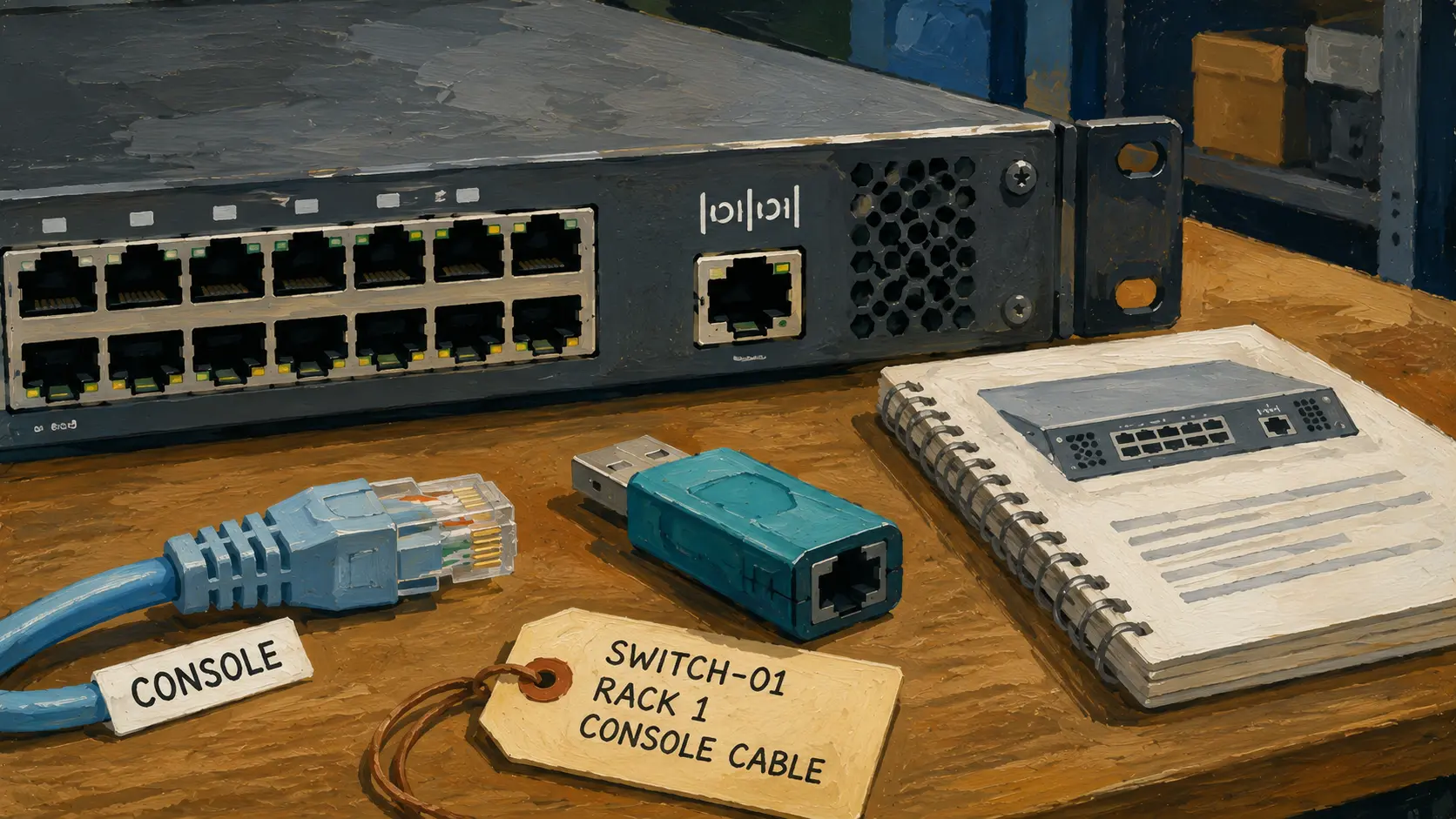
IOIOI Port Identification Map
- That Tiny Symbol Is Not a Mystery Ethernet Port
- Quick Answer: IOIOI Usually Marks a Serial Console Port
- Why an RJ-45 Shape Can Still Be a Serial Port
- Check the Device Before Ordering a Cable
- Avoid the Three Most Common IOIOI Port Mistakes
- Build a Small Authorized Console Kit
- Treat the Symbol as a Documentation Prompt
- Frequently Asked Questions
- Disclaimer
- References
Quick Answer: IOIOI Usually Marks a Serial Console Port
- Best for: Home-lab owners, repair technicians, small-business IT staff, and service representatives identifying unfamiliar server or network-equipment ports.
- Main takeaway: The
IOIOIsymbol commonly marks a serial console interface used for authorized maintenance, setup, or troubleshooting. - Time, cost, or effort: A careful identification check usually takes 10 to 20 minutes before any adapter is ordered.
- Best result to expect: You identify the interface family, confirm the device model, and avoid buying a cable based only on the jack shape.
- When not to use this: Do not connect to production equipment without authorization, a maintenance plan, and the model-specific documentation.
The IOIOI symbol is a useful clue, not a universal promise that every cable with the right-looking plug will work. Hewlett Packard Enterprise documentation labels an IOIOI interface as an RS-232 serial console port on certain storage switches. Lenovo documentation also refers to an IOIOI console port on an interconnect switch.
That does not mean every IOIOI port is identical. One model may use an RJ-45-style serial console jack. Another may expose a DB9 serial connector. A newer device may also provide USB console access or a separate Ethernet management port.
Why an RJ-45 Shape Can Still Be a Serial Port
The confusing part is physical appearance. An RJ-45-style console port can resemble an ordinary Ethernet jack closely enough that a buyer may reach for a spare network cable. The shell shape alone does not identify the electrical interface, pinout, or cable requirement.
Cisco documentation describes console ports that use an RJ-45 connector while operating as asynchronous serial interfaces. Oracle documentation describes an RJ-45 SER MGT connector that provides RS-232 access to management interfaces. Those examples show why the connector shape should never be treated as the whole answer.
Port Clues Worth Separating
- Ethernet network port: Usually connects the device to a local network for normal data traffic or management.
- Serial console port: Provides a direct maintenance path for authorized setup and troubleshooting.
- Dedicated management port: Provides network-based administrative access separate from ordinary traffic on supported equipment.
- USB console port: Provides a direct console path through USB on supported devices.
- DB9 serial port: A nine-pin connector used on some older or optional serial interfaces.
A Refurbished-Switch Scenario
A small office buys a refurbished rack switch for a lab bench. The rear panel has several Ethernet ports, one management port, and one RJ-45-shaped jack marked with the IOIOI symbol. The buyer assumes the marked jack is another Ethernet port and orders an ordinary patch cable.
The cable fits physically, but that does not make it the correct console cable. The office loses time, suspects the used switch is defective, and orders another adapter at random.
A better process takes less than 20 minutes: record the exact model number, photograph the port cluster, find the connector legend in the hardware guide, and order the cable only after confirming the interface type.
Check the Device Before Ordering a Cable
The cheapest wrong adapter is still a wrong adapter. A photo from an online listing is not enough because equipment families may use different console connectors, pinouts, or included accessories.
The safe approach is to identify the equipment before shopping. That means checking the manufacturer, model, hardware revision when available, and the exact position of the port.
Six-Step Port-Identification SOP
- Record the manufacturer and exact model. Use the front label, rear label, service tag, or official inventory record.
- Photograph the full port cluster. Capture the
IOIOImark, nearby labels, connector shape, and surrounding ports. - Open the official hardware guide. Find the rear-panel or front-panel connector diagram for the exact model.
- Name the interface family. Determine whether the port is RS-232 serial console, USB console, Ethernet management, or another documented interface.
- Check the documented cable requirement. Confirm whether the device expects a model-specific console cable, an RJ-45-to-DB9 cable, a USB-to-serial adapter, or another supported accessory.
- Label the cable after verification. Store it with the device name or rack location so the next service visit does not restart the same investigation.
Lenovo’s documentation for one interconnect switch illustrates the point clearly: it calls the connector an IOIOI console port and describes a DB9-to-RJ45 console cable or a USB-to-serial RJ45 adapter cable. That is a model-specific example, not a reason to assume every switch uses the same wiring.
Quick Decision Guide
- If the jack has an
IOIOIsymbol, start by treating it as a serial-console clue and verify the manual. - If the jack looks like RJ-45 Ethernet, do not assume an ordinary network cable is correct.
- If the device has both management Ethernet and console ports, document both because they serve different roles.
- If the equipment is used or missing accessories, verify the model-specific cable before purchasing a replacement.
- Skip trial-and-error connections on production equipment when the documentation is unclear.
Avoid the Three Most Common IOIOI Port Mistakes
Most confusion comes from mixing up physical shape, interface purpose, and cable compatibility. Keeping those questions separate prevents avoidable purchases and failed service visits.
Common Mistakes
- Buying by connector shape alone: An RJ-45-style opening does not automatically mean Ethernet. Check the hardware guide before ordering.
- Assuming every console cable is interchangeable: Similar-looking console cables can have different requirements. Match the accessory to the documented model.
- Confusing console access with ordinary network management: A serial console is a direct maintenance path. A management Ethernet port is network-based. They may coexist on the same device.
- Treating one vendor example as a universal rule: An HPE storage switch, a Lenovo interconnect switch, a Cisco switch, and an Oracle platform may use different connectors or defaults.
- Leaving the cable unlabeled after the repair: The next visit repeats the same search. Mark the cable with the device or rack location.
Console and Management Interfaces Compared
| Interface | What it may look like | Best for | Main limitation |
|---|---|---|---|
| RJ-45-style serial console | Similar to an Ethernet jack, often marked with a console clue such as IOIOI |
Authorized direct maintenance when the model documentation specifies it | The correct cable and pinout cannot be guessed from shape alone |
| DB9 serial console | Nine-pin connector with screw posts | Older equipment or devices with an installed serial option | Many modern laptops need an appropriate adapter |
| USB console | USB connector on supported devices | Direct access from a service laptop when the vendor supports it | Driver and operating-system support may matter |
| Ethernet management port | RJ-45 network jack, often labeled for management | Routine network-based administration on supported equipment | It depends on network reachability and proper configuration |
| Ordinary data Ethernet port | RJ-45 or higher-speed network connector | Normal device traffic | It is not automatically a console or out-of-band path |
Build a Small Authorized Console Kit
A serviceable device is easier to support when the required accessories and documentation are already attached to the inventory record. The goal is not to create a bag full of random adapters. The goal is to keep a short, verified kit for the equipment you actually maintain.
A Practical Console-Kit Checklist
- Record the manufacturer, model, rack location, and asset tag.
- Save the official hardware-guide link in the service notes.
- Store the verified console cable in a labeled bag.
- Keep one supported USB-to-serial adapter when the service laptop requires it.
- Record whether the equipment also has a dedicated management Ethernet port.
- Store authorization notes and the maintenance-window procedure with the ticketing or asset system.
- Review the kit when equipment is replaced, donated, or moved to another site.
For a one-person IT business or micro-MSP, this small step can save a billable visit. The cable should be treated like any other site-specific spare: verified, labeled, and easy to locate before an outage or maintenance window.
Treat the Symbol as a Documentation Prompt
The IOIOI symbol is not a reason to guess. It is a reason to stop, identify the model, and open the official hardware guide. That approach separates a harmless-looking jack from the wrong cable purchase, a failed site visit, or an unnecessary return of working equipment.
Take one photo, record the model, and verify the connector diagram before ordering anything. A 10-minute check is usually cheaper than a drawer full of adapters that almost fit.
Frequently Asked Questions
Q1. Is an IOIOI port the same as an Ethernet port?
Usually not. The IOIOI mark commonly identifies a serial console interface on servers, switches, and related equipment. Some console ports use an RJ-45-style connector, so the jack may resemble Ethernet. Confirm the exact model before connecting a cable.
Q2. Can I use an ordinary Ethernet patch cable in an RJ-45-shaped console port?
Do not assume that you can. A cable may fit physically while still being wrong for the documented interface or pinout. Check the equipment manual and use the supported console cable or adapter for that model.
Q3. Is a serial console port the same as a management Ethernet port?
No. A serial console is a direct maintenance path. A management Ethernet port is a network-based administrative interface. Some devices provide both, and each should be documented separately.
Q4. Why should a small business label its console cable?
Labeling the verified cable prevents repeated guesswork during a service visit or outage. Store it with the asset record, rack location, and official manual link so the next authorized technician can identify it quickly.
By: Marcus Irizarry
Why trust this: This post compares official HPE, Lenovo, Cisco, and Oracle hardware documentation and focuses on model verification before purchasing cables or adapters.
Last updated: 2026-06-12
Disclosure: No paid placement influenced this post.
Disclaimer
This post is a general equipment-identification and maintenance-planning resource. Connect only to devices that you own or are authorized to service. Use the official documentation for the exact model before connecting cables, purchasing adapters, or making changes to production equipment.



0 Comments