
Why AI Readiness Is Easier to Sell Than AI Magic
Small-business owners are hearing the same AI pitch from every direction: write faster, automate everything, replace busywork, save hours, do more with less. That sounds exciting until someone asks where the company files live, who can see them, whether old folders are over-shared, and what staff should never paste into an AI tool.
That is the opening for an AI readiness audit. The strongest offer is not “we will make you an AI company.” The stronger offer is: “We will check whether your accounts, files, workflows, permissions, and staff rules are ready for a safe AI pilot.”
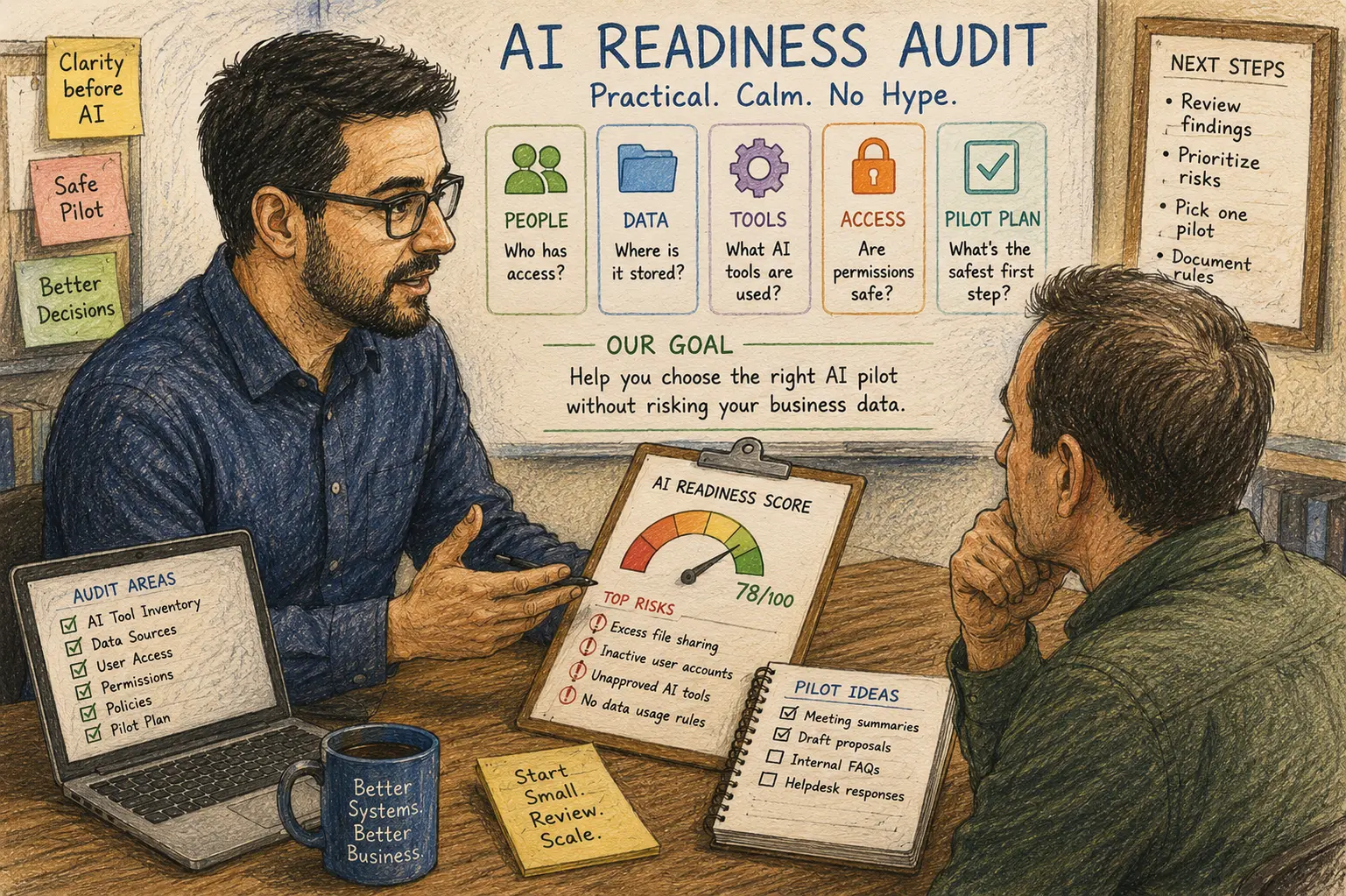
AI Readiness Audit Sales Map
- Why AI Readiness Is Easier to Sell Than AI Magic
- AI Readiness Audit at a Glance
- What the Client Is Actually Buying
- Package the Audit Around Business Readiness
- Risks, Limits, and When to Slow the Sale Down
- How to Present the Offer Without Sounding Like a Vendor Deck
- Next Step: Build the One-Page Audit Menu
- FAQs
- References
AI Readiness Audit at a Glance
- Best for: Solo IT consultants, micro-MSPs, and small-business tech providers helping clients evaluate AI tools without rushing into broad access.
- What this covers: A practical service offer for reviewing data, accounts, workflows, permissions, tools, risks, and pilot options before AI rollout.
- What this does not cover: Legal advice, compliance certification, AI model testing, incident response, or guaranteed productivity gains.
- Main caution: Do not sell AI readiness as a guaranteed time-saver. Sell it as a decision-making audit with safer next steps.
- When to get professional help: Escalate when the client handles regulated records, legal files, sensitive employee data, healthcare data, financial records, government data, or active security concerns.
What the Client Is Actually Buying
A client does not need a lecture about large language models. They need help deciding whether AI belongs in their workflow today, later, or not at all.
That means the real product is clarity. The audit should answer questions like these:
- Which AI tools are already being used by staff?
- Which business data could those tools touch?
- Which users need AI first, and which users do not?
- Which folders, apps, mailboxes, or chats are too messy for AI access?
- Which workflows are good candidates for a small pilot?
- Which risks require a policy, cleanup, or professional review first?
An AI readiness audit should feel like a pre-flight inspection. The client may still take off, but not before checking the obvious problems.
Scope and key terms
- AI readiness audit: A structured review of whether a business is prepared to test or adopt AI tools safely.
- AI pilot: A limited test with one tool, one team, or one workflow before wider rollout.
- Use case: A specific job the AI tool might support, such as summarizing meeting notes or drafting first-pass proposals.
- Data exposure: The risk that sensitive business information is accessed, pasted, summarized, stored, or shared in the wrong place.
- Governance starter: A short set of rules for approved tools, approved data, user behavior, and review timing.
The audit is not about proving AI is good or bad. It is about deciding what the client can reasonably try without turning their file structure, inboxes, or customer notes into a guessing game.
Mini scenario: the owner who wants AI by Friday
A 9-person service company owner asks an IT consultant to “turn on AI for everyone” by Friday. The owner wants proposal drafts, meeting summaries, and faster email replies.
The consultant asks for one hour of discovery first. That discovery finds three issues: staff already use two different AI tools without guidance, the shared drive has old customer contracts mixed with general templates, and two former employees still appear in a project app.
A hype-driven seller says, “Great, let’s enable AI.”
A better consultant says, “You have useful AI use cases, but we should clean the access issues first. Let’s do a readiness audit, pick one safe pilot, and write the basic rules before we expand.”
That answer is less flashy. It is also easier to defend later.
Package the Audit Around Business Readiness
The easiest way to sell this service is to avoid vague AI language. Break the audit into visible parts the owner can understand.
Practical steps for the audit
- Find the AI tools already in use. Ask staff which tools they use for writing, summaries, screenshots, customer replies, coding, spreadsheets, research, or image work.
- Map the data sources. List email, cloud storage, chat, meetings, CRM, helpdesk, accounting, project tools, browser extensions, and local files.
- Review identity and access. Check active users, admin roles, shared accounts, MFA, former employee access, and broad permissions.
- Pick low-risk use cases. Start with tasks that use approved templates or internal notes, not sensitive client records.
- Write the first rule set. Define approved tools, blocked data, review steps, and who approves expansion.
- Deliver a readiness score and pilot plan. Give the client a short report with next actions, risks, and the safest first workflow.
What to include in the deliverable
| Deliverable | What it should answer | Why it helps the sale |
|---|---|---|
| AI tool inventory | What tools are staff already using? | Shows hidden adoption without blaming users |
| Data source map | What systems could AI touch? | Makes risk visible in plain language |
| Access review notes | Which accounts, folders, or apps need cleanup? | Turns vague privacy concern into action |
| Use-case shortlist | Which AI tasks are worth testing first? | Keeps the client from trying everything |
| Risk register | What could go wrong and how serious is it? | Makes the audit feel concrete |
| Pilot recommendation | What should the client do next? | Creates a natural follow-up service |
Quick decision guide
- If the client has no AI policy and staff already use AI, sell a readiness snapshot first.
- If the client has messy files or shared mailboxes, sell a permissions cleanup before AI rollout.
- If the client has one obvious workflow, sell a narrow pilot instead of a company-wide launch.
- If the client has regulated or sensitive data, slow down and include legal, compliance, or qualified security review.
- Skip the AI pitch if the client cannot explain where important files live or who owns admin access.
Risks, Limits, and When to Slow the Sale Down
The fastest way to sound like an AI hype person is to promise savings before you understand the workflow. “AI will save you 10 hours a week” may sound good in a sales call, but it can backfire when the client’s data is messy, staff need training, or the tool creates review work instead of removing it.
A readiness audit should protect the client from that mistake. It should also protect the consultant.
What not to assume
- Do not assume AI use starts after approval. Staff may already be using free tools, browser assistants, phone apps, or built-in app features.
- Do not assume the owner knows where sensitive files are. Small businesses often grow through shortcuts, shared folders, and old permissions.
- Do not assume productivity gains are immediate. Drafting faster can still require review, editing, fact-checking, and approval.
- Do not assume one AI tool fits every role. Sales, operations, bookkeeping, support, and ownership have different data exposure risks.
- Do not assume a vendor privacy page replaces client policy. The client still needs rules for staff behavior, approved data, and review.
Red flags before selling an AI rollout
- Former employee accounts remain active.
- Multiple users share one login.
- Sensitive files sit in general shared folders.
- Staff paste customer data into unapproved tools.
- The owner wants AI connected to email, files, chat, CRM, and accounting all at once.
- No one knows who approves AI tools.
- The client expects AI output to go directly to customers without human review.
Safer offer paths
| Offer | Best for | Pros | Cons |
|---|---|---|---|
| AI Readiness Snapshot | Small client asking where to start | Fast, affordable, easy to explain | Limited depth |
| AI Permission Cleanup | Client with messy folders or shared access | Reduces exposure before AI rollout | May feel less exciting than AI setup |
| AI Pilot Design | One team or workflow | Practical and measurable | Needs clear success criteria |
| AI Staff Rules Starter | Client with shadow AI use | Gives staff boundaries quickly | Does not fix technical access problems alone |
| Full AI Rollout Plan | Cleaner environment with leadership buy-in | Better long-term adoption path | Requires more time, training, and review |
How to Present the Offer Without Sounding Like a Vendor Deck
The best language is plain and slightly boring. That is a feature.
Avoid this:
“We help you unlock AI-powered transformation across your organization.”
Say this instead:
“We check your accounts, files, tools, and workflows so you can choose one safe AI pilot instead of turning everything on at once.”
The second version sounds less glamorous, but a small-business owner can understand it in five seconds. It also avoids promising results you do not control.
Simple sales script
Use wording like this:
“Before we recommend an AI tool, we run a short readiness audit. We look at what your team already uses, where your files and customer data live, who has access, and which workflow is safest to test first. At the end, you get a short report, a risk list, and a practical pilot recommendation.”
That script sells judgment. It does not sell fear.
Suggested package tiers
| Package | Time estimate | Good fit | Deliverable |
|---|---|---|---|
| AI Readiness Snapshot | 60 to 90 minutes | 1 to 10 users | Short findings summary and next-step recommendation |
| AI Readiness Audit | 3 to 6 hours | 5 to 25 users | Tool inventory, access notes, risk list, pilot recommendation |
| AI Pilot Prep | 4 to 8 hours | One workflow or department | Use-case scope, approved data list, staff rules, review plan |
| AI Governance Starter | 1 to 2 weeks | Growing team with several tools | Role-based rules, review schedule, basic governance document |
Pricing depends on the market, risk, travel, remote access, documentation depth, and how many systems the client uses. A solo consultant might price a small snapshot as a fixed entry-level service and reserve hourly or project pricing for deeper audits.
The point is to avoid selling “AI consulting” as a foggy bucket. Sell a named audit with a beginning, an end, and a deliverable.
Next Step: Build the One-Page Audit Menu
Create a one-page offer before your next AI conversation. Keep it simple enough to send after a phone call.
The page should include:
- Who the audit is for
- What systems you review
- What the audit does not include
- What the client receives
- What decisions the audit helps them make
- When the client should pause and get legal, compliance, or security help
AI readiness audit checklist for consultants
- Ask which AI tools staff already use.
- List email, files, chat, meetings, CRM, helpdesk, accounting, and project apps.
- Check active users, former users, admin roles, and shared logins.
- Review whether MFA is enabled for key accounts.
- Identify sensitive data sources that should not be used in AI prompts.
- Pick one low-risk workflow for a pilot.
- Define what human review is required before output goes to clients.
- Write a short “do not paste” rule.
- Deliver a readiness score, risk notes, and next-step recommendation.
- Schedule a review date because AI features and settings change.
Sell the Audit as Calm Judgment
Small businesses do not need another AI promise they cannot verify. They need a practical way to decide what to test, what to clean up, and what to leave alone for now.
That is why the AI readiness audit works. It helps the consultant sell caution without sounding negative, and it helps the client move forward without pretending every workflow is ready. The best AI service offer may not start with the tool. It starts with the question: “Are we ready to give this tool access?”
FAQs
Q1. What is an AI readiness audit?
A1. An AI readiness audit is a structured review of whether a business is prepared to test or adopt AI tools. It usually covers current AI use, data sources, permissions, user access, possible use cases, risk areas, and a recommended pilot plan.
Q2. How is an AI readiness audit different from an AI permission audit?
A2. An AI permission audit focuses heavily on what the assistant or connected tool can access. An AI readiness audit is broader. It looks at business goals, staff behavior, tool inventory, data sources, permissions, policies, and whether a specific AI pilot makes sense.
Q3. Should an IT consultant promise productivity savings from AI?
A3. It is safer to avoid guaranteed savings. AI may reduce drafting time or help summarize information, but it can also add review, editing, training, and risk-management work. Promise a structured evaluation and pilot recommendation, not a guaranteed number of saved hours.
Q4. What should be excluded from a basic AI readiness audit?
A4. Exclude legal advice, compliance certification, incident response, forensic review, custom AI model testing, and guaranteed security outcomes. Those require separate scope and, in some cases, specialized professionals.
Q5. What is the easiest first AI pilot for a small business?
A5. The easiest pilot is usually a low-risk workflow using approved internal material, such as drafting a first-pass internal procedure, summarizing non-sensitive meeting notes, or improving a template. Avoid starting with payroll, legal files, medical records, private customer data, or direct customer-facing output without review.
By: Rex Iriarte
About the author: Written for solo IT consultants and micro-MSPs who need practical service packaging, client handoff structure, and safer AI adoption workflows.
Reviewed by: Editorial review only. No credentialed legal, compliance, or cybersecurity certification review is claimed.
Last updated: 2026-06-23
Disclosure: No paid placement influenced this post.
Disclaimer
This article provides general educational guidance for IT service packaging and AI readiness reviews. It is not legal, compliance, forensic, or individualized cybersecurity advice. Before enabling AI tools for sensitive or regulated workflows, confirm authorization, data-retention needs, privacy obligations, and any industry-specific requirements that may apply.
References
- Microsoft Learn — “Microsoft 365 Copilot Data and Compliance Readiness.” https://learn.microsoft.com/en-us/microsoft-365/copilot/microsoft-365-copilot-minimum-requirements-data-compliance
- Google Workspace — “Generative AI in Google Workspace Privacy Hub.” https://knowledge.workspace.google.com/admin/gemini/generative-ai-in-google-workspace-privacy-hub
- NIST — “Artificial Intelligence Risk Management Framework: Generative Artificial Intelligence Profile.” https://www.nist.gov/publications/artificial-intelligence-risk-management-framework-generative-artificial-intelligence
- Federal Trade Commission — “Protecting Personal Information: A Guide for Business.” https://www.ftc.gov/business-guidance/resources/protecting-personal-information-guide-business
- Federal Trade Commission — “Cybersecurity for Small Business.” https://www.ftc.gov/business-guidance/small-businesses/cybersecurity



0 Comments