
Why the Sony BDP-S2100 Needs a Modern Reality Check
The Sony BDP-S2100 was sold as a Wi-Fi Blu-ray Disc and DVD player with Full HD 1080p playback and internet video features. At the time, that sounded like a clean living-room solution: one small box for discs, Netflix-style apps, YouTube-style viewing, and DVD upscaling.
In 2026, the useful question is different. This is not a fresh “buy this for 100+ apps” recommendation. It is an older Wi-Fi Blu-ray player that may still be useful for discs, but its streaming features need careful testing before anyone depends on them.
That makes the source usable, but weak. The stronger article is a practical checklist for keeping, buying, testing, or retiring an older Sony Wi-Fi Blu-ray player.
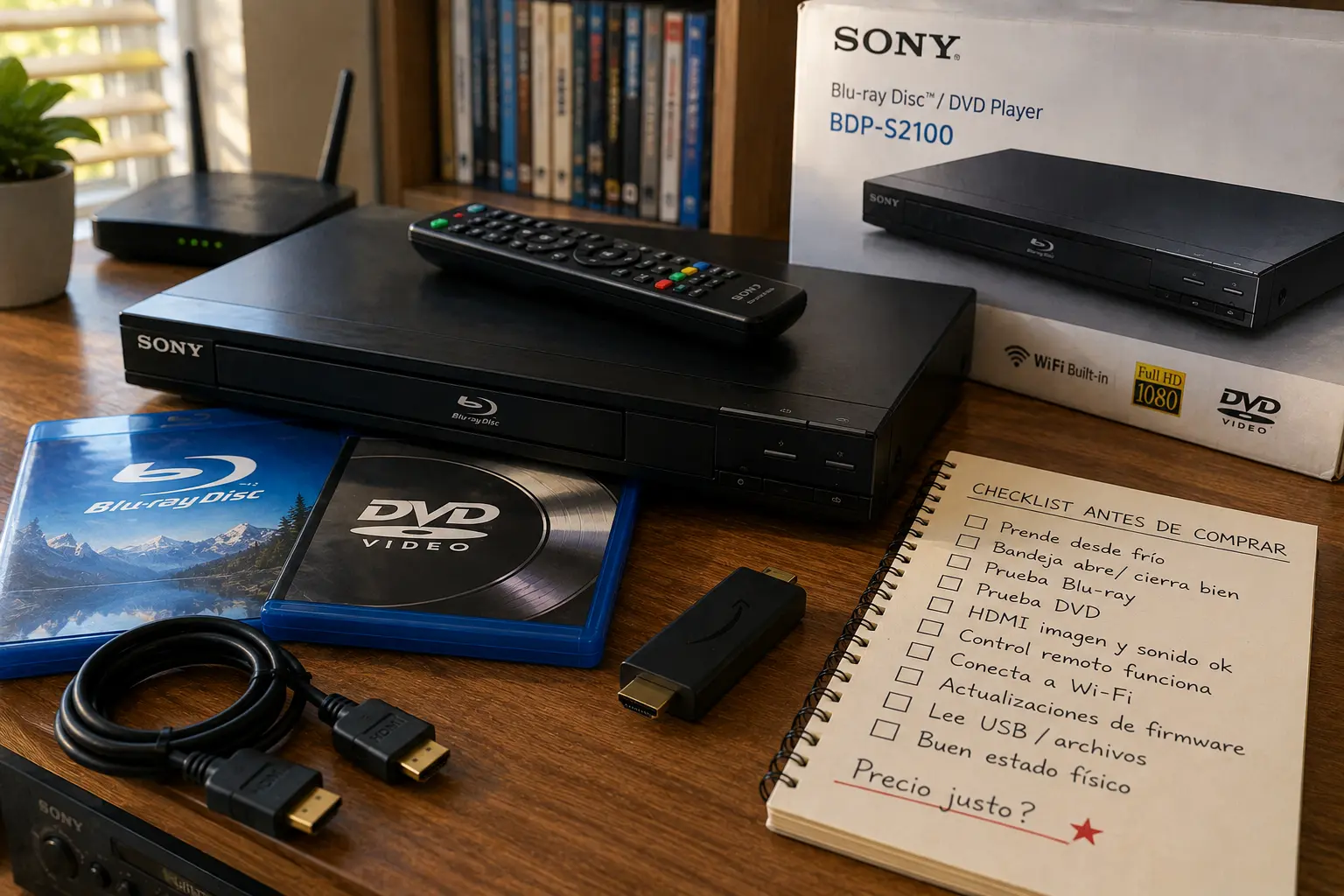
Sony BDP-S2100 Decision Map
- Why the Sony BDP-S2100 Needs a Modern Reality Check
- The 60-Second Sony BDP-S2100 Decision
- What This Wi-Fi Blu-ray Player Still Does Well
- How to Test One Before You Keep It or Buy It
- Streaming Apps, Wi-Fi, and Firmware Limits
- What to Do Instead if Apps Are the Main Goal
- Sony BDP-S2100 Questions People Ask
- References
The 60-Second Sony BDP-S2100 Decision
- Best for: People who still use Blu-ray discs, DVDs, CDs, guest-room TVs, older HDTVs, or a simple disc-based media shelf.
- Main takeaway: Keep or buy it for disc playback first. Treat built-in streaming apps as uncertain extras, not the main reason to own it.
- Time, cost, or effort: Expect 15 to 30 minutes for a real test: Blu-ray disc, DVD, Wi-Fi connection, remote, firmware menu, and app launch.
- Best result to expect: A compact 1080p disc player that works well over HDMI and may still handle some network features.
- When not to use this: Skip it if your main goal is reliable Netflix, YouTube, Hulu, or other current streaming apps. A modern streaming stick is usually the better tool.
What This Wi-Fi Blu-ray Player Still Does Well
The supplied listing describes the Sony BDP-S2100 as a Blu-ray Disc and DVD player with built-in wireless LAN, Full HD 1080p playback, DVD upscaling, and internet video features. Those are useful features, but they age differently.
Disc playback ages slowly. A Blu-ray disc does not depend on a streaming company supporting an old app interface. Wi-Fi apps age faster because services change login methods, security requirements, app standards, and device support lists.
That is why an older Sony Blu-ray player should be judged in two separate lanes: disc use and streaming use. Disc use may still be practical. Streaming use needs a warning label.
Key terms worth knowing
- Full HD 1080p: A video output resolution of 1920 x 1080 for compatible TVs.
- DVD upscaling: The player enlarges DVD video to better fit an HDTV, but it does not turn DVDs into true Blu-ray quality.
- Built-in Wi-Fi: The player can connect to a wireless network without an Ethernet cable, if the network settings still cooperate.
- Firmware: Internal player software that may affect disc playback, menus, and app behavior.
- Streaming app support: App availability controlled by service providers, device age, software limits, and Sony support changes.
A realistic living-room scenario
Picture someone finding a Sony BDP-S2100 in a closet with the remote, power cord, and HDMI cable still nearby. They want to put it in a guest room so visitors can watch DVDs and maybe use Netflix.
That can work if the disc drive is healthy and the TV has HDMI. The problem is the “maybe use Netflix” part. If the app fails, freezes, disappears, or refuses to log in, that does not mean the whole player is useless. It means the streaming half of the promise aged faster than the disc half.
How to Test One Before You Keep It or Buy It
Do not judge an older Blu-ray player by the front logo or the old product listing. Test it like a small used computer connected to your TV.
Start with HDMI and discs. Then test Wi-Fi and apps last. If the tray is weak, the remote is missing, or the player cannot load a Blu-ray, the app menu does not matter.
Practical test steps
- Connect the player directly to the TV with HDMI.
- Test one Blu-ray disc and one DVD, not just one format.
- Confirm that audio plays through the TV or sound system.
- Check that the remote works, because many settings depend on it.
- Open the network settings and connect to Wi-Fi.
- Look for a firmware or software update option in the settings menu.
- Try the streaming app you care about, but do not treat a successful launch as a long-term guarantee.
Quick decision guide
- If you have a working disc collection, keep the player if Blu-rays and DVDs load cleanly.
- If you have no discs and only want apps, use a modern streaming device instead.
- If the remote is missing, price a replacement before buying or keeping it.
- If the Wi-Fi setup fails, try Ethernet only if the model and your room setup support it.
- Skip the unit if the disc tray sticks, the fan is noisy, HDMI cuts out, or the seller will not test it.
Streaming Apps, Wi-Fi, and Firmware Limits
The old listing’s “100+ streaming apps” claim is the part most likely to mislead a modern buyer. App availability on older Blu-ray players can change without the hardware breaking.
Sony has posted multiple support notices over the years about streaming services ending on older Blu-ray Disc players and home theater systems. Hulu ended service on certain U.S. Sony Blu-ray player models beginning in August 2019. Sony also posted notices for Netflix ending on certain older Blu-ray players, including 2015 models in June 2025. These notices do not prove every app on every BDP-S2100 unit is gone, but they do show the pattern: built-in streaming on old players should be treated as temporary.
Wi-Fi is another practical problem. Older players may struggle with modern router settings, crowded apartments, weak signal, changed passwords, or app login screens that assume newer hardware. Even when Wi-Fi connects, the app may still fail.
Common mistakes
- Buying because of the app list: The printed or copied app list may be from the original sales era.
- Testing only the home screen: A menu icon does not prove the app can log in and stream.
- Forgetting firmware: Old firmware can affect playback and app behavior, but updates may be limited or no longer enough.
- Ignoring the remote: Without the original remote, network setup and app navigation can become frustrating.
- Using it as the main streaming box: A dedicated streaming stick is usually faster, cheaper, and better supported.
Older media player comparison table
| Option | Best for | Pros | Cons |
|---|---|---|---|
| Sony BDP-S2100 | Blu-ray and DVD playback on an HDTV | Compact, HDMI, disc support, Wi-Fi menu | Old apps may fail or lose support |
| New basic Blu-ray player | Simple disc playback with easier returns | Newer hardware, cleaner purchase path | May still have limited app usefulness |
| 4K Ultra HD Blu-ray player | Serious movie collection and 4K discs | Better format support, better long-term home theater value | Higher cost |
| Streaming stick | Netflix, YouTube, Hulu, and current apps | Cheap, current apps, easy replacement | Does not play discs |
| Game console with disc drive | Games plus movies | One device for gaming and discs | Larger, more expensive, uses more power |
What to Do Instead if Apps Are the Main Goal
If the Sony BDP-S2100 plays discs well, it can still earn a place under the TV. Just stop asking it to be the app platform for the room.
For streaming, use the TV’s current apps or a modern streaming stick. That separates the jobs cleanly: the Sony player handles discs, and the newer streaming device handles internet services. It also makes troubleshooting easier. If Netflix fails on the streaming stick, you troubleshoot the stick. If a DVD fails, you troubleshoot the disc player.
The Bottom Line on the Sony BDP-S2100
The Sony BDP-S2100 can still be useful as a compact 1080p Blu-ray and DVD player if the tray, HDMI output, remote, and disc drive work. The weak part of the old listing is the streaming promise.
Do not buy or keep it because it once advertised “100+ apps.” Keep it because it plays the discs you actually own. For modern streaming, use a modern streaming device and let the old Blu-ray player do the job it is still best at.
Run This Quick Test Before You Decide
Before selling, donating, recycling, or buying one, run a 20-minute test. Use one Blu-ray, one DVD, one HDMI cable, the original remote if available, and your actual TV. Then try Wi-Fi and app login last.
Final checklist
- Test Blu-ray playback and DVD playback separately.
- Confirm HDMI video and audio work.
- Check whether the remote can access settings.
- Try a firmware update only through the player’s normal settings.
- Treat old streaming app claims as uncertain.
- Use a current streaming device if apps matter most.
- Keep the player only if it solves a real disc-playback need.
Sony BDP-S2100 Questions People Ask
Q1. Is the Sony BDP-S2100 still worth using?
A1. Yes, if it still plays Blu-ray discs and DVDs reliably. It is much less convincing as a streaming device because older built-in apps can lose support or stop working properly.
Q2. Should I buy a Sony BDP-S2100 for Netflix or YouTube?
A2. No, not as the main reason. Buy or keep it for discs first. For Netflix, YouTube, Hulu, and other current apps, a modern streaming stick or current smart TV app is usually the safer choice.
Q3. What should I test before buying a used BDP-S2100?
A3. Test the tray, HDMI output, remote, Blu-ray playback, DVD playback, audio, Wi-Fi connection, and settings menu. App testing should come last because app support is the least dependable part of an older player.
Q4. Does DVD upscaling make DVDs look like Blu-ray?
A4. No. Upscaling helps a DVD fill an HDTV screen more cleanly, but it cannot add the detail that was not on the DVD in the first place.
Q5. What if the streaming apps no longer work?
A5. Keep the player for discs if it still works well. Add a current streaming device for apps instead of trying to force an old Blu-ray player to behave like a modern app box.
By: Marcus Irizarry
Why trust this: This guide turns a thin product listing into a practical device checklist using the supplied source details, Sony support materials, streaming-app support notices, and older-device setup guidance.
Last updated: 2026-06-17
Disclosure: The source HTML included an affiliate-style Amazon reference, but no paid placement influenced this rewrite.
References
- Sony — “Manuals for BDP-S2100.” https://www.sony.com/electronics/support/product/bdp-s2100/manuals
- Sony — “Questions and Answers about BDP-S2100.” https://www.sony.com/electronics/support/home-video-blu-ray-disc-players-recorders/bdp-s2100/faqs
- Sony — “Hulu Service to end on Blu-ray Disc Players beginning August 2019.” https://www.sony.com/electronics/support/articles/00228486
- Sony — “Netflix streaming service no longer available on some 2015 Blu-ray Disc Players.” https://www.sony.com/electronics/support/home-video-blu-ray-disc-players-recorders/bdp-s3500/articles/00351196
- Netflix Help Center — “Netflix is no longer available on this device.” https://help.netflix.com/en/node/112425



0 Comments