
Why Small TVs Are Easy to Buy Wrong
A small TV looks like a simple purchase until you bring it home and discover the antenna signal is weak, the HDMI port is in the worst possible spot, the USB drive will not play your files, or the built-in speakers sound like they are apologizing.
The old Naxa NTD-2252-style product listing is useful for one reason: it reminds buyers how many small-TV features get squeezed into a short description. A 22-inch screen, DVD player, digital tuner, USB or SD inputs, and AC/DC power all sound helpful, but each one needs a quick reality check before it matters.
This small TV buying checklist is for bedrooms, kitchens, garages, dorms, waiting areas, RVs, guest rooms, and backup entertainment setups where a huge screen would be silly.
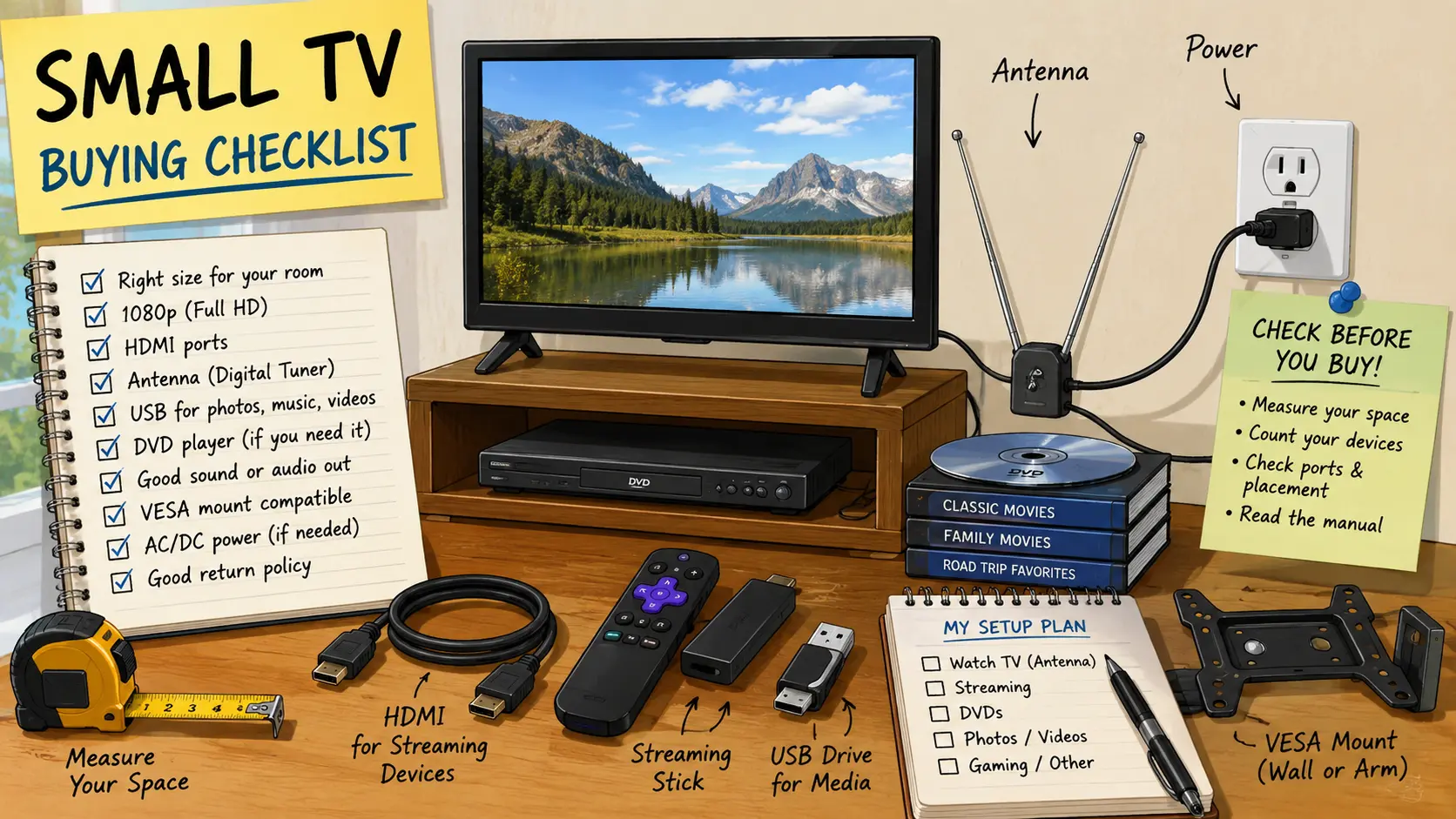
Small TV Buying Map
- Why Small TVs Are Easy to Buy Wrong
- The 60-Second Small TV Decision
- Start With the Room, Not the Brand Name
- Ports Matter More Than the Spec Sheet
- Power, Mounting, and Everyday Annoyances
- What to Check Before You Pay
- Small TV Questions People Ask
- References
The 60-Second Small TV Decision
- Best for: Small rooms, guest spaces, kitchens, RVs, garages, and simple secondary screens.
- Main takeaway: Buy for your actual signal, ports, mounting plan, and power setup, not just screen size.
- Time, cost, or effort: Expect 15 to 30 minutes of checking before purchase, especially if antenna TV or wall mounting matters.
- Best result to expect: A small TV that works with your devices on day one without adapters, bad placement, or surprise returns.
- When not to use this: Do not buy a small TV as a cheap substitute for a proper monitor, outdoor-rated display, or business signage screen unless the specs truly match that job.
Start With the Room, Not the Brand Name
Small TVs are usually bought for convenience. That is also why people skip the checks that matter. A 22-inch or 24-inch TV may fit on a counter, shelf, or rolling cart, but the screen size alone does not tell you whether it will be readable from across the room.
For a kitchen counter, a 19-inch to 24-inch screen can be fine if the viewer is nearby. For a garage wall, waiting room corner, or bed across the room, the same screen may feel too small, even at 1080p. Resolution matters, but distance matters more.
Key terms worth checking
- 1080p: A Full HD resolution of 1920 x 1080, useful on small screens when text or menus matter.
- Digital tuner: The internal TV hardware that receives over-the-air broadcast channels through an antenna.
- HDMI: The main cable connection for streaming boxes, game consoles, laptops, and many cable boxes.
- USB playback: A feature that may play photos, music, or videos from a USB drive, depending on supported formats.
- VESA mount: A standardized screw pattern used to attach the TV to many wall mounts or monitor arms.
A realistic small-room scenario
Picture a small guest room with a 22-inch TV on top of a dresser. The buyer wants local channels, one streaming stick, occasional DVD use, and simple volume control. That setup needs at least one HDMI port, a working antenna input, a reachable USB port only if media playback matters, and a remote that is not impossible to replace later.
Now change the room to a garage. Suddenly the viewing distance is longer, glare is worse, sound is harder to hear, and the power outlet may be across the wall. The same TV can be a good buy in one room and a bad fit in another.
Ports Matter More Than the Spec Sheet
The worst small-TV mistake is counting features without checking how they are arranged. A product page may say HDMI, USB, antenna, DVD, AV, or VGA, but that does not mean the ports are easy to reach after mounting.
If the TV will sit on a shelf, rear-facing ports may be fine. If it will go on a wall, side-facing or downward-facing ports are easier to use. A single HDMI port can work for one streaming stick, but it becomes annoying if you also need a cable box, game console, or laptop.
Practical steps before buying
- Count your devices: streaming stick, cable box, DVD player, game console, laptop, or antenna.
- Check the number of HDMI ports and where they physically sit.
- Confirm whether the TV has an antenna input if you want free over-the-air channels.
- Look for a headphone jack or audio output if the built-in speakers may be too weak.
- Check whether the remote has a direct input button, because tiny TVs often hide useful settings inside awkward menus.
Quick decision guide
- If you only use a streaming stick, choose a small TV with at least one easy-to-reach HDMI port and nearby USB power if the stick supports it.
- If you want local channels, check the FCC DTV map first, then plan for the right indoor or outdoor antenna.
- If you still use DVDs, a built-in DVD player can reduce cable clutter, but it also adds one more part that can fail.
- If you want to use the TV as a computer display, check for 1080p resolution, HDMI input, readable text, and a setting that reduces overscan.
- Skip the cheapest option if the return policy is poor and the port layout is hidden from the listing photos.
Power, Mounting, and Everyday Annoyances
Power details matter more on small TVs because people often put them in odd places. A bedroom dresser, RV cabinet, garage shelf, or kitchen corner may not have a convenient outlet. Some small TVs advertise AC/DC power, which can be helpful for RV or vehicle-style use, but buyers should check the exact adapter, voltage, wattage, and included cables.
Do not assume that “DC power” means universal battery compatibility. Use only the adapter and power accessories specified by the manufacturer. If the TV will be connected through an extension cord or power strip, keep the setup temporary, uncluttered, and within the rating of the cord or strip.
Common mistakes
- Buying for DVD only: A built-in DVD player sounds convenient, but HDMI streaming may be used more often. Make sure the TV is not weak in the features you will use daily.
- Ignoring antenna reality: A digital tuner does not guarantee clear channels. Signal strength depends on your location, building materials, antenna type, and station distance.
- Forgetting the wall mount: A small TV may support VESA mounting, but the screw pattern and port direction still need to fit your bracket and cable path.
- Trusting USB too much: USB ports on TVs are not the same as a full media player. Some files may not play, even if the drive is detected.
- Skipping sound checks: Thin small TVs often have small speakers. For noisy rooms, plan for headphones, a compact speaker, or another audio option.
Small TV comparison table
| Option | Best for | Pros | Cons |
|---|---|---|---|
| Basic small TV | Guest room, kitchen, simple streaming | Cheap, light, easy to move | May have weak speakers and few ports |
| Small TV/DVD combo | DVDs, kids’ movies, older media collections | Less cable clutter, simple playback | DVD mechanism can fail, fewer modern smart features |
| Small smart TV | Streaming apps without extra box | Fewer devices, familiar apps | App support may age, setup can be slower |
| Small monitor plus streaming device | Desk, office, computer-first setup | Better text clarity in many cases | Usually lacks tuner, remote, and TV speakers |
| 12V or AC/DC small TV | RV, camper, backup-style setup | Flexible power options when properly matched | Must verify adapters, wattage, and safe use |
What to Check Before You Pay
A good small TV purchase starts with boring questions. That is not a bad thing. Boring questions prevent returns.
Check the product photos for the side and rear panels. Look for the ports, not just the front image. Read the manual when available, especially if you care about power input, mounting, supported USB formats, or the digital tuner. For antenna use, check available local signals before blaming the TV.
Quick buying checklist
- Confirm the screen size fits your viewing distance, not just the shelf.
- Choose 1080p if menus, text, or computer input matter.
- Count HDMI devices before accepting a one-port TV.
- Check for an antenna input if you want over-the-air channels.
- Look at port direction before buying a wall mount.
- Confirm VESA mount size and screw requirements.
- Check whether the stand fits your furniture width.
- Read the manual for power input and included adapters.
- Treat USB playback as a bonus, not a guaranteed media solution.
- Confirm the return policy before buying a closeout or older model.
The Bottom Line for Small TV Buyers
A small TV is not automatically simple. The right one depends on the room, signal source, power setup, mounting plan, and the devices you actually use. A 22-inch 1080p TV/DVD combo can still make sense for a guest room, RV-style setup, or DVD-heavy household, but it should not be bought just because the spec line looks long.
Use the checklist first. Then choose the TV that fits your real setup instead of the listing that shouts the most features.
Make the Purchase Easier
Before buying, take one photo of the place where the TV will go and write down three things: viewing distance, available outlets, and devices you need to connect. That tiny prep step can save a return trip and a surprising amount of cable frustration.
Final pre-purchase checklist
- Measure the viewing distance and furniture space.
- Count every device that needs HDMI, antenna, USB, or audio.
- Check the manual for power and mounting details.
- Look up local antenna signal availability if broadcast TV matters.
- Save the receipt and packaging until the TV is tested in the actual room.
Small TV Questions People Ask
Q1. Is 1080p worth it on a small TV?
A1. Yes, especially around 22 to 32 inches if you read menus, connect a laptop, or sit close. For basic background TV across a kitchen, the difference may matter less. If prices are close, 1080p is usually the safer pick.
Q2. Do I need a smart TV if I already have a streaming stick?
A2. Not always. A non-smart TV with a good HDMI port can work well with a streaming stick. The bigger concern is whether the TV has enough HDMI ports, decent sound, and a remote that makes input switching easy.
Q3. Will any indoor antenna work with a small TV?
A3. No. The TV needs an antenna input and digital tuner, but reception depends on your location and signal conditions. Check an official reception map first, then choose an antenna based on distance and placement.
Q4. Is a TV/DVD combo still worth buying?
A4. It can be worth it for guest rooms, kids’ movies, older DVD collections, RVs, or simple setups where one device is easier than extra cables. It is less attractive if most viewing happens through streaming apps.
Q5. Can I use a small TV during power outages?
A5. Only with the right power source and safe setup. Some small TVs support DC power, but you must match the manufacturer’s adapter and rating. Do not improvise with random plugs, overloaded cords, or unverified power accessories.
By: Marcus Irizarry
Why trust this: This checklist is based on practical small-TV feature review, the supplied product-source material, and consumer guidance from FCC, FTC, CPSC, and manufacturer documentation.
Last updated: 2026-06-17
Disclosure: The source HTML included an affiliate-style product reference, but no paid placement influenced this rewrite.
References
- Federal Communications Commission — “DTV Reception Maps.” https://www.fcc.gov/media/engineering/dtvmaps
- Federal Communications Commission — “Antennas and Digital Television.” https://www.fcc.gov/consumers/guides/antennas-and-digital-television
- Federal Trade Commission — “EnergyGuide Labels.” https://www.ftc.gov/news-events/topics/tools-consumers/energyguide-labels
- U.S. Consumer Product Safety Commission — “Extension Cords Business Guidance.” https://www.cpsc.gov/Business--Manufacturing/Business-Education/Business-Guidance/Household-Electrical-Products/Extension-Cords
- Naxa — “NTD-2252 English Manual.” https://naxa.com/wp-content/uploads/manuals/NTD-2252%20English%20Manual.pdf



0 Comments