
The Worst Time to Write an Outage Message Is During the Outage
The office internet fails at 10:14 a.m. The client calls twice. Three employees send separate messages. The ISP places the technician on hold. Nobody knows whether the next update should go out in five minutes or an hour.
The technical work matters. Communication matters too.
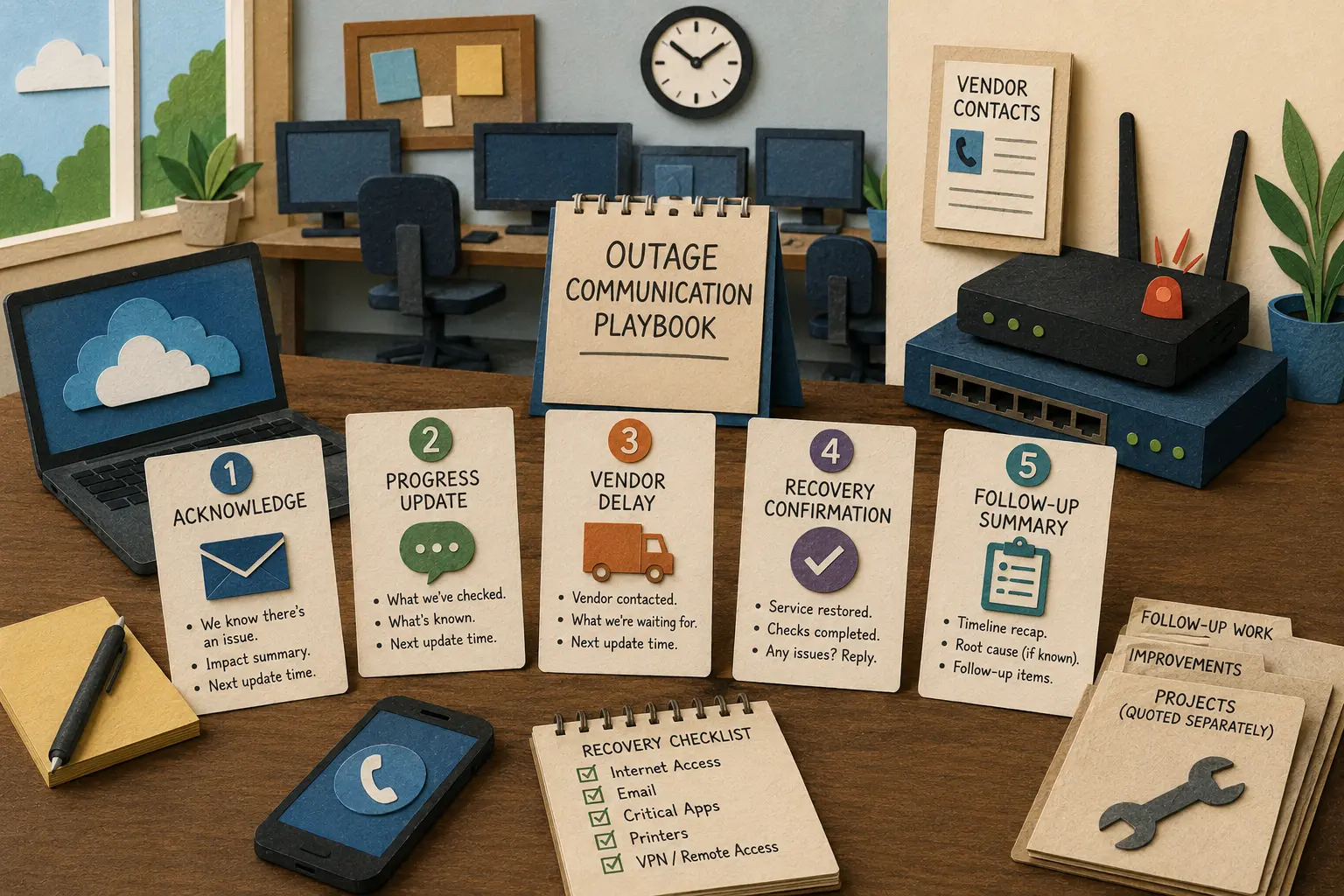
A short outage communication template prevents the support provider from composing every message under pressure. It gives the client a clear acknowledgment, a realistic update time, a vendor-delay explanation when needed, and a clean recovery notice after service returns.
Your Outage-Update Playbook
- The Worst Time to Write an Outage Message Is During the Outage
- Outage Communication at a Glance
- Use Five Messages From First Alert to Final Follow-Up
- Set an Update Cadence Without Making Promises You Cannot Keep
- Build the Templates in 45 Minutes
- Store the Messages Where Support Work Actually Happens
- Calm Communication Protects the Client Relationship
- Suggested Follow-Up Articles
- Frequently Asked Questions
- References
Outage Communication at a Glance
- Best for: Solo IT consultants, freelance sysadmins, network installers, and micro-MSPs supporting small-business clients.
- Main takeaway: Prepare five short outage messages before the next disruption: acknowledgment, progress update, vendor-delay notice, recovery confirmation, and follow-up summary.
- Time, cost, or effort: Build the first template set in about 30 to 60 minutes. Test it during the next continuity review.
- Best result to expect: Fewer duplicate calls, less confusion, clearer client expectations, and more time for focused troubleshooting.
- When not to use this: A basic communication template is not a cybersecurity incident-response plan, a formal service guarantee, or a substitute for specialist guidance during a suspected compromise.
The client does not need a stream of technical guesses. The client needs useful answers:
- What is affected?
- Is the issue being investigated?
- Is there a workaround?
- When will the next update arrive?
- Has a vendor been contacted?
- Is the service confirmed as restored?
- What happens after the immediate disruption?
Atlassian’s Statuspage guidance recommends communicating early, briefly summarizing the known impact, and providing further updates at an appropriate cadence. The exact timing depends on the situation. For a small-business outage, a short and accurate message is better than a detailed message that arrives too late.
Use Five Messages From First Alert to Final Follow-Up
The template set should match the actual stages of an outage.
Do not try to write one giant message that covers every possibility. Use short messages that answer the question the client has at that moment.
Message 1: acknowledge the disruption
Send the first message after the issue has been confirmed enough to communicate responsibly.
The goal is not to explain the cause. The goal is to tell the client that the issue is known, state the visible impact, and give a time for the next update.
Subject: Service interruption acknowledged
We are reviewing an interruption affecting [location, service, or users]. The known impact is [brief business impact].
Troubleshooting is in progress. The next update will be sent by [time], even if the issue is still being investigated.
For now, please send new details through [ticket path or designated contact] so the information stays in one place.
Keep the language calm. Do not promise a repair time before the cause is understood.
Message 2: send a progress update
Use the progress message when the issue remains active.
Subject: Service interruption update
The interruption affecting [location, service, or users] is still being investigated.
Current status: [what has been checked, what is known, and whether a workaround exists].
The next update will be sent by [time]. Please continue using [workaround] when practical.
This message should answer one useful question: what changed since the last update?
Avoid repeating the same paragraph every 30 minutes with no added information. When the investigation is still underway, say that plainly and restate the next update time.
Message 3: explain a vendor delay
An ISP, software provider, cloud vendor, or equipment manufacturer may control the next step.
Subject: Service interruption update: vendor escalation in progress
The interruption affecting [location or service] has been escalated to [vendor or provider type].
We are waiting for [remote testing, dispatch confirmation, replacement timing, or vendor response]. The current estimate remains uncertain until the provider confirms the next step.
The next update will be sent by [time], or sooner if the vendor provides a confirmed change.
This wording avoids two mistakes:
- Pretending the technician controls the vendor’s timeline.
- Sending the client to chase the vendor separately without coordination.
Message 4: confirm service recovery
Do not announce recovery after one successful refresh or one working laptop. Confirm the agreed test path.
Subject: Service restored: confirmation requested
Service has been restored for [location or system] as of [time].
We confirmed [brief list of checks, such as internet access, email delivery, shared application access, or failover status].
Please reply if any users still see an issue. We will monitor the service through [time or review window] and record any remaining follow-up work separately.
The message should distinguish restoration from perfection. One recovered service may still leave smaller cleanup tasks behind.
Message 5: close with a short follow-up summary
Send a brief follow-up after the outage has stabilized.
Subject: Service interruption follow-up
The interruption affecting [service or location] began at [time] and service was restored at [time].
Summary: [plain-language description of the confirmed cause or known limitation].
Follow-up items: [monitoring change, vendor request, backup-internet review, hardware replacement quote, documentation update, or no further action].
Any additional project work will be scoped separately before it begins.
That final line matters. An outage often reveals a useful improvement project. It does not automatically place that project inside the original support ticket.
Copy-ready outage-message tracker
| Message Stage | Send When | Main Purpose | Avoid |
|---|---|---|---|
| Acknowledgment | The disruption is confirmed enough to communicate | Tell the client the issue is known and state the next update time | Guessing the cause |
| Progress update | Troubleshooting continues | Explain what changed and whether a workaround exists | Repeating empty status messages |
| Vendor-delay notice | A provider controls the next step | State the dependency and the next communication time | Promising a vendor repair deadline |
| Recovery confirmation | Service passes the agreed checks | Confirm restoration and ask for remaining reports | Declaring victory after one quick test |
| Follow-up summary | The service is stable | Record timeline, confirmed cause, and separate improvement work | Turning the summary into a technical essay |
Set an Update Cadence Without Making Promises You Cannot Keep
The client should know when the next message will arrive.
The provider should choose an update interval that is realistic during the outage. Atlassian’s guidance uses 30 minutes as an example while noting that the cadence should fit the situation.
For a solo IT operator, the cadence may vary:
| Outage Situation | Practical Starting Cadence | Reason |
|---|---|---|
| Office-wide outage during working hours | Every 30 to 60 minutes | Several people may be blocked and need a predictable update |
| Vendor dispatch or line repair | Every 60 to 120 minutes, unless the vendor confirms a change sooner | Frequent messages may not add useful information |
| Short service interruption with a workaround | One acknowledgment and one recovery notice | Avoid creating noise for a minor event |
| Planned maintenance | Notice before the work, start confirmation, completion notice | The timeline is known in advance |
| Suspected cybersecurity incident | Use the approved security-escalation plan | Routine outage messaging may expose information or delay specialist involvement |
Do not treat the table as a contract. Adjust the timing to the client plan, the business impact, and the available information.
Mini scenario: the ISP outage that generates 11 messages
A 12-person office loses internet at 9:18 a.m. The first three employees send messages separately. The office manager calls. Two people ask whether they should restart the router.
The IT provider confirms that the modem shows a provider-side connectivity issue and sends one acknowledgment at 9:28 a.m.:
- The office internet is unavailable.
- The ISP escalation is in progress.
- The next update will arrive by 10:00 a.m.
- New details should go through the office manager.
At 9:54 a.m., the ISP confirms a local service problem but does not provide a repair time. The technician sends the vendor-delay template and schedules the next update for 11:00 a.m.
The client still has an outage. The difference is that the office knows what is happening, when to expect the next message, and where to send useful information.
Use one update owner
When several people communicate independently, the client receives mixed messages.
Assign one update owner for the incident. In a solo IT business, that may be the technician. When a vendor or subcontractor joins the work, the technician should still decide who sends the client-facing update.
The update owner should maintain:
- Incident start time
- Affected location or system
- Current business impact
- Workaround status
- Vendor-escalation status
- Next update time
- Recovery checks
- Follow-up items
Keep the record short enough to use during a real outage.
Build the Templates in 45 Minutes
The first template set does not need custom software.
Start with five saved messages and one small incident tracker.
Minutes 0 to 10: choose the communication channel
Decide where the client should receive outage updates.
Possible channels include:
- Helpdesk ticket thread
- Designated support email
- Client contact group
- Status page
- Approved text-alert process for narrow emergency use
- Client portal
Use one primary channel whenever possible. A client should not need to check email, text messages, voicemail, and several group chats for the same update.
Minutes 10 to 20: write the five messages
Create:
- Acknowledgment
- Progress update
- Vendor-delay notice
- Recovery confirmation
- Follow-up summary
Keep each one short enough to send during a busy interruption.
Minutes 20 to 30: define the update rule
Record:
- Who sends updates
- Which client contact receives updates
- Normal outage-update cadence
- Emergency escalation rule
- Vendor-escalation contact
- When to move from routine outage handling to specialist support
- Which tests confirm restoration
Minutes 30 to 38: build a one-page tracker
Use these fields:
| Tracker Field | What to Record |
|---|---|
| Client and location | Which business and office are affected |
| Incident start time | When the interruption began or was first reported |
| Known impact | Users, systems, or business process affected |
| Workaround | Available, partial, unavailable, or unconfirmed |
| Vendor status | Not needed, contacted, escalated, dispatch scheduled, or waiting |
| Last update time | When the client received the latest message |
| Next update time | The promised communication point |
| Recovery checks | What must work before service is called restored |
| Follow-up items | Project quote, vendor request, documentation change, or review |
Minutes 38 to 45: run a tabletop test
Use one realistic outage:
The main office loses internet at 10:00 a.m. The backup hotspot works for two laptops, but not for the full office. The ISP has not confirmed a repair estimate.
Ask:
- Which message goes out first?
- Who receives it?
- When is the next update promised?
- Which workaround is safe to recommend?
- When does the vendor-delay template apply?
- What tests confirm recovery?
- Which follow-up work becomes a separate project?
A five-minute test will expose vague wording before a real outage does.
Quick communication-readiness checklist
- Save five client-facing outage templates.
- State the known business impact.
- Give a next-update time in every active-outage message.
- Avoid guessing at a repair deadline.
- Use one update owner.
- Keep vendor dependencies visible.
- Define the recovery checks.
- Separate follow-up projects from the outage ticket.
- Store the message set in the support workflow.
- Review the templates after the next real interruption.
Store the Messages Where Support Work Actually Happens
The template set should be easy to reach while the technician is troubleshooting.
Atlassian Statuspage supports incident templates for recurring communication needs. Odoo supports canned responses that use a shortcut and a saved substitution. ERPNext issue records can collect related client emails in the same issue thread.
Odoo, ERPNext, Zoho Desk, Jira Service Management, Statuspage, or any other ERP or helpdesk platform can support the process after the message set is defined.
Store three levels of information separately
| Information Type | Best Location | Reason |
|---|---|---|
| Client-facing update | Ticket thread, support email, portal, or status page | Keeps the client informed |
| Internal troubleshooting notes | Private ticket notes or technical record | Prevents sensitive details from entering public updates |
| Follow-up improvement work | Separate quote, project, or change request | Stops the outage ticket from becoming an unlimited project |
Client updates should explain the situation without exposing internal details that do not help the reader.
Keep technical guesses out of the client message
Avoid writing:
The router firmware probably crashed after a provider-side DHCP issue.
Prefer:
The office internet connection remains unavailable. The ISP escalation is active, and we are checking the local network while waiting for the provider response.
The second version stays accurate even if the cause changes.
Common outage-message mistakes
- Waiting too long to acknowledge the issue: The client sends duplicate requests because nobody knows the ticket is active.
- Promising a repair time too early: A vendor delay makes the message look unreliable.
- Sending updates without a next-update time: The client does not know when to check again.
- Writing a technical essay: The message becomes harder to scan during a busy day.
- Using several communication channels without one source of truth: Different employees receive different versions of the incident.
- Declaring recovery after one quick test: Smaller failures remain hidden.
- Adding improvement work automatically: A failover project, router replacement, or monitoring change needs a separate approval path.
Calm Communication Protects the Client Relationship
An outage communication template does not repair a failed connection. It protects the space needed to troubleshoot responsibly.
Prepare five messages: acknowledgment, progress update, vendor delay, recovery confirmation, and follow-up summary. State the impact, avoid guesses, give the next update time, and separate improvement projects from the immediate outage.
When the office goes offline, the client should not have to wonder whether anyone is working on the problem.
Frequently Asked Questions
Q1. How quickly should an IT provider send the first outage message?
A1. Send an acknowledgment after the disruption is confirmed enough to communicate responsibly. The first message should state the known impact, explain that troubleshooting is underway, and give a specific time for the next update. Avoid guessing at the cause or repair deadline.
Q2. How often should clients receive outage updates?
A2. Use a cadence that fits the business impact and the available information. A major office-wide outage may justify an update every 30 to 60 minutes. A vendor dispatch with no new information may justify a longer interval, as long as the next update time remains clear.
Q3. Should the client receive technical troubleshooting notes?
A3. Usually not. Client-facing updates should explain the affected service, known impact, workaround, vendor dependency, and next communication point. Keep detailed technical notes in the internal ticket or documentation record.
Q4. Does a recovered connection always close the outage ticket?
A4. Confirm the agreed recovery checks first. Internet access, email delivery, shared applications, printers, or failover status may need separate verification depending on the incident. Record remaining cleanup or improvement work as follow-up items.
Q5. Can outage templates be stored in an ERP or helpdesk platform?
A5. Yes. Odoo supports canned responses. ERPNext supports issue records and related email threads. Statuspage, Jira Service Management, Zoho Desk, or any other ERP or helpdesk platform with saved replies and ticket records can support the workflow.
By: Marcus Irizarry
Why trust this: This post is written for solo IT operators and micro-MSPs, using a practical outage-communication workflow and current official documentation for incident templates, helpdesk responses, and support records.
Last updated: 2026-06-11
Disclosure: No paid placement influenced this post.
References
- Atlassian Statuspage: Incident Communication Tips — Recommends communicating early, stating the known impact, and providing updates at an appropriate cadence.
- Atlassian Statuspage: Incident Template Library — Explains how saved templates can quickly acknowledge issues and reduce redundant support requests.
- Odoo Documentation: Canned Responses — Documents reusable shortcuts and substitutions for saved response text.
- ERPNext Documentation: Issue — Documents issue records, support-ticket numbers, email threads, comments, and ticket statuses.




0 Comments