
Why “Done” Needs a Test, Not a Feeling
A small IT project can look finished from the consultant’s side and still feel unfinished to the client. The printer was replaced, but nobody tested Friday invoices. The shared folder was reorganized, but one staff member cannot find current jobs. The new workstation works, but the scanner profile is missing.
Acceptance tests fix that gap. They define what “done” means before the work starts, so the client and consultant are not arguing from memory after the project is delivered.
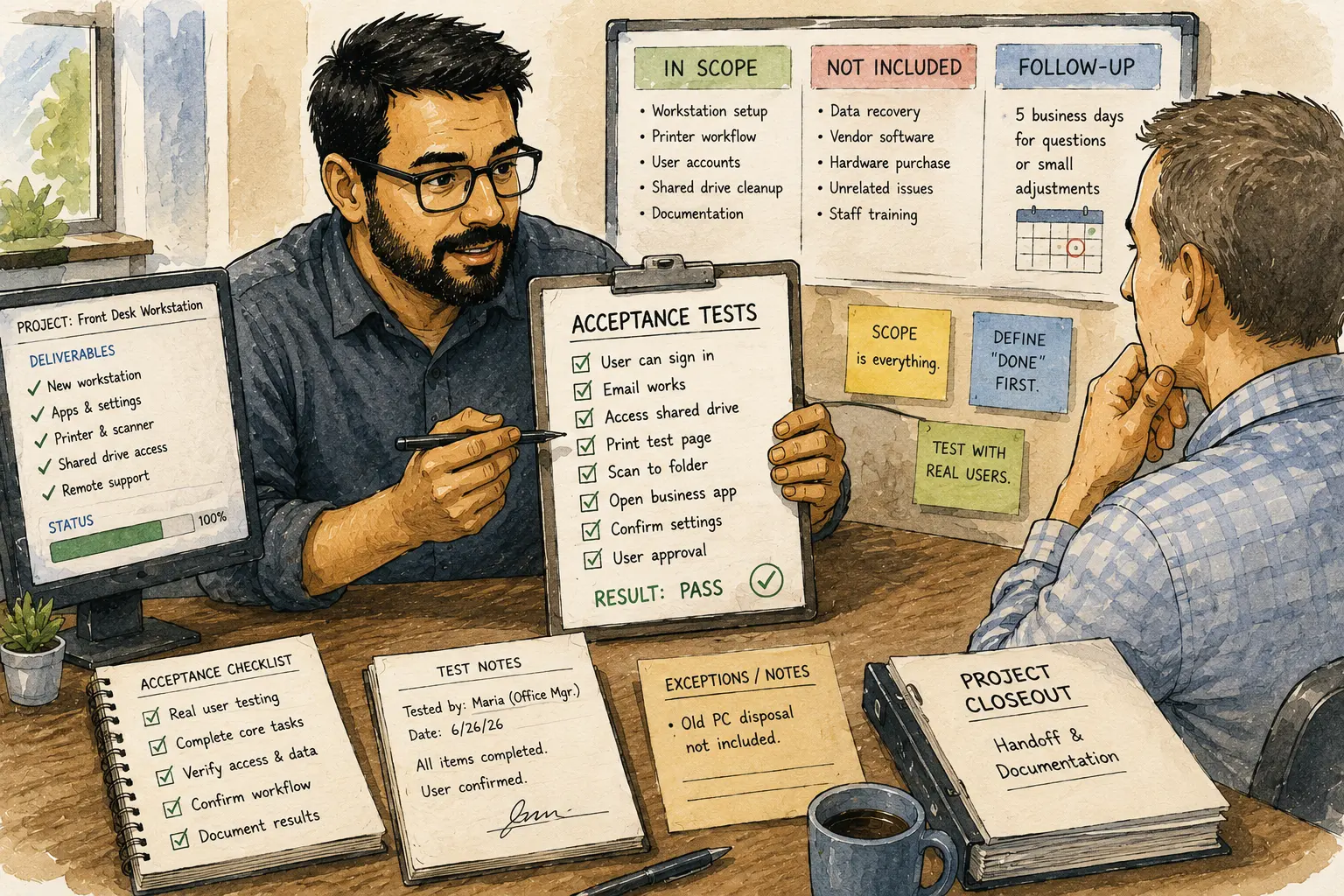
Small IT Project Acceptance Map
- Why “Done” Needs a Test, Not a Feeling
- Acceptance Tests at a Glance
- What an Acceptance Test Does in IT Work
- Build the Test Before the Project Starts
- Where Acceptance Testing Gets Risky
- Use Acceptance Tests to Close the Job Cleanly
- FAQs
- References
Acceptance Tests at a Glance
- Best for: Solo IT consultants, freelance sysadmins, micro-MSPs, and small-business IT providers closing cleanup, migration, access, workflow, and replacement projects.
- What this covers: Practical acceptance test structure, examples, scope boundaries, client signoff, and safer closeout notes.
- What this does not cover: Legal advice, accounting advice, cybersecurity certification, compliance review, or guaranteed project outcomes.
- Main caution: Do not wait until delivery day to define success. The test belongs in the quote or scope note.
- When to get professional help: Ask a qualified attorney, accountant, cybersecurity professional, or compliance adviser when signoff language affects contracts, regulated data, payment systems, employee disputes, legal records, or suspected compromise.
What an Acceptance Test Does in IT Work
An acceptance test is a plain-language check that proves the agreed work is complete enough to close. It does not need to be complicated. It needs to be observable.
For small IT projects, that usually means a user can complete a real task on the real system. “The printer is installed” is not enough. A better acceptance test is: “The front desk can print one invoice and one receipt from both supported workstations.”
That kind of wording protects both sides. The client gets a practical result. The consultant gets a finish line.
Scope and key terms
- Acceptance test: A specific check that proves a deliverable meets the agreed result.
- Acceptance criteria: The conditions the work must satisfy before it is considered complete.
- Deliverable: The thing being delivered, such as a configured device, cleaned folder, documented workflow, or migrated mailbox.
- Signoff: The client’s written confirmation that the agreed test passed.
- Exception note: A short record of what did not pass, what is excluded, or what needs a separate quote.
Mini scenario: the workstation swap that almost stayed open forever
A consultant replaces one aging workstation for a 6-person office. The quote says “set up new office PC.” That sounds clear until the user says the scanner is missing, the owner asks about the old desktop files, and the bookkeeper wants a special PDF printer restored.
Without an acceptance test, the project keeps expanding.
A better scope says:
“Acceptance test: user can sign in, open email, access the shared drive, print a test page, scan one document to the approved folder, open the billing portal, and confirm old desktop files were copied to the named archive folder.”
That test does not cover every possible future issue. It covers the agreed result.
Build the Test Before the Project Starts
Acceptance testing works best when it is written before the project begins. If it is added at the end, it can feel like a debate. If it is written at the beginning, it becomes part of the decision.
Start with the business task, not the tool. A small-business owner does not care that a driver installed correctly if the invoice still cannot print. A dispatcher does not care that a mailbox migrated if search is unusable for recent messages.
Practical steps for writing acceptance tests
- Name the project outcome. Use one sentence, such as “front desk can process invoices from two workstations.”
- List the deliverables. Name the device, folder, app, permission group, mailbox, workflow, or documentation being delivered.
- Use real tasks. Test printing, scanning, opening files, sending email, exporting a report, creating a ticket, or approving a quote.
- Choose the tester. Name who confirms the test: owner, office manager, front-desk user, bookkeeper, or technical contact.
- Define what is excluded. Do not let unrelated cleanup, vendor bugs, hardware purchases, or training silently enter the test.
- Record exceptions. If something fails because of a vendor, old device, or missing approval, document it before closing or re-quoting.
- Add a follow-up window. Include a short period for project-related questions, then treat new issues as new work.
Quick decision guide
- If the project is device setup, test login, apps, printer, scanner, files, and remote support.
- If the project is shared folder cleanup, test access with two real users and confirm one archived path.
- If the project is permission cleanup, test who can open, edit, share, and no longer access the approved folder.
- If the project is workflow cleanup, test the full task from start to finish, not only the first screen.
- Skip fixed-scope closeout if the client cannot name who is allowed to accept the work.
Acceptance test examples
| Project type | Weak “done” statement | Better acceptance test |
|---|---|---|
| Workstation replacement | New PC is ready | User can sign in, open email, print, scan, access files, and use the main business app |
| Shared folder cleanup | Files are organized | Two approved users can find active folders, archived folders are labeled, and former user access is removed |
| Printer workflow cleanup | Printer works | Front desk can print one invoice and one receipt from two supported workstations |
| Email migration | Mailbox moved | User can send, receive, search recent mail, open calendar, and confirm key folders appear |
| Helpdesk setup | Tickets configured | Client can submit one test ticket, consultant can assign it, and time can be recorded for billing |
Where Acceptance Testing Gets Risky
Acceptance tests are useful, but they should not become fake guarantees. A small IT project can pass its acceptance test and still have future issues. A vendor may change a portal. A printer may fail later. A user may request a workflow that was never included. A cloud service may have an outage outside the consultant’s control.
The test should prove the agreed result at delivery, not promise that nothing will ever break.
What not to assume
- Do not assume the owner knows the daily workflow: The office manager or front-desk user may be the better tester.
- Do not assume a login test is enough: The real test is whether the user can finish the business task.
- Do not assume one device proves every device: A printer may work from one workstation and fail from another.
- Do not assume acceptance includes future support: Define the follow-up window and what becomes new work.
- Do not assume sensitive systems are safe to test casually: Payroll, payment data, legal records, customer files, and employee data need extra care.
Red flags or when to seek help
- The acceptance test touches payroll, taxes, legal files, healthcare data, payment systems, or regulated customer records.
- The client wants you to delete files, wipe devices, or remove access without written approval.
- The project involves an employee dispute, former staff account, legal hold, or suspected account compromise.
- The test depends on a vendor-controlled system that cannot be verified on your timeline.
- The client asks for a guarantee that goes beyond the agreed test and follow-up window.
Common acceptance test mistakes
- Testing the technical setup but not the work: Opening the app is not the same as completing the invoice, scan, upload, or ticket.
- Letting the wrong person approve: A user may say it works, but the owner may later object to missing files or access.
- Skipping exclusions: If exclusions are not written, the client may treat related issues as included.
- Using vague language: “Everything works” is not a test. “Print one invoice from both workstations” is a test.
- Not closing with a note: Without a closeout note, future tickets lose the history.
Use Acceptance Tests to Close the Job Cleanly
Acceptance testing should be part of the client handoff, not a separate ceremony. Keep it short. Use a checklist. Save the result in the ticket, project record, or quote system.
A strong closeout note can look like this:
“Acceptance test completed on 2026-06-26 with the office manager. User confirmed email, shared drive, invoice portal, printer, scanner, and remote support access on the new workstation. Old desktop files were copied to the approved archive folder. Not included: old PC disposal, advanced printer training, vendor portal changes, or unrelated workstation cleanup. Follow-up for project-related questions is included for 5 business days.”
That note makes the project feel finished. It also tells the client what is not part of the finished work.
Safer next steps
- Add one acceptance test to every small project quote. Keep it short enough to understand before approval.
- Use the client’s real task. Test the invoice, ticket, scan, email, file, quote, or report that matters.
- Name the acceptance person. Do not leave signoff to whoever happens to be available.
- Document exceptions. If something fails because it was excluded, unsupported, or vendor-controlled, write that down.
- Close with a handoff note. Include what passed, what stayed out of scope, and how long follow-up lasts.
Acceptance test checklist
- Write the project outcome in one sentence.
- Define the deliverables.
- Pick a real business task to test.
- Name who will approve the test.
- Confirm backup, access, and data risk before changes.
- List exclusions in plain English.
- Test from the user’s seat, not only the admin panel.
- Save screenshots or notes without exposing sensitive data.
- Record pass, fail, and exception items.
- Close with a dated handoff note.
A Project Is Done When the Test Passes
Small IT projects do not need heavy project-management theater. They need a clear finish line.
An acceptance test gives the client a fair way to confirm the result and gives the consultant a fair way to close the job. Write it before the work starts, test the real task, document the result, and separate future requests from the finished scope.
FAQs
Q1. What is an acceptance test for a small IT project?
A1. An acceptance test is a practical check that proves the agreed IT work is complete enough to close. For example, a workstation replacement may pass only after the user can sign in, open email, access files, print, scan, and use the main business app.
Q2. Are acceptance tests only for software projects?
A2. No. Acceptance tests are useful for small IT projects such as device setup, printer workflow cleanup, shared folder cleanup, permission changes, email migration, helpdesk setup, and network handoff work. The key is testing the business task, not only the technical setting.
Q3. Who should approve an acceptance test?
A3. The best approver is the person authorized to accept the work and confirm the daily workflow. That may be the owner, office manager, bookkeeper, front-desk user, or technical contact. For sensitive systems, approval should come from the correct decision-maker, not just the available user.
Q4. What if the client finds a problem after the project closes?
A4. Use the closeout note and follow-up window. If the issue is tied to the agreed project and appears inside the follow-up period, handle it under that scope. If it is new, unrelated, vendor-controlled, or excluded, quote it as new work or a separate support ticket.
By: Rex Iriarte
About the author: Written for solo IT consultants and micro-MSPs who need practical service packaging, client handoff structure, and clearer support-scope workflows.
Reviewed by: Editorial review only. No credentialed legal, accounting, or cybersecurity review is claimed.
Last updated: 2026-06-26
Disclosure: No paid placement influenced this post.
Disclaimer
This article provides general educational guidance for IT service packaging, project closeout, and scope communication. It is not legal advice, accounting advice, cybersecurity incident-response advice, compliance advice, or individualized business advice. Have a qualified professional review your agreements, approval process, data-handling practices, regulated workflows, and liability language where needed.
References
- U.S. Chamber of Commerce — “Independent Contractor Agreements: What to Include.” https://www.uschamber.com/co/start/strategy/what-to-include-in-independent-contractor-agreements
- Atlassian — “What Is Acceptance Criteria?” https://www.atlassian.com/work-management/project-management/acceptance-criteria
- Project Management Institute — “Mastering Project Requirements.” https://www.pmi.org/learning/library/mastering-project-requirements-assessing-good-5942
- NIST — “The NIST Cybersecurity Framework (CSF) 2.0.” https://nvlpubs.nist.gov/nistpubs/CSWP/NIST.CSWP.29.pdf



0 Comments