
If Your Inbox Became an AI Memory Palace, It Would Misremember You First
An inbox is already a haunted warehouse. Receipts from 2017. Password reset emails. Shipping updates for things you no longer own. A dentist reminder from a place you left three apartments ago. Now imagine an AI assistant walking through that warehouse with a clipboard and saying, “Great news, I understand you.”
Do you, though?
AI memory and personalization promise a smoother digital life. Your assistant can remember preferences, find old details, summarize threads, draft replies, and connect clues across apps. Helpful. Also slightly unsettling when the clues include a decade of panic emails, abandoned hobbies, and one newsletter phase where you were apparently becoming a sourdough cyclist. No juicio, but still.
The useful question is not “Is AI memory good or bad?” The better question is: when should your inbox remember you, and when should it stop treating 2021 you like the legal owner of your personality?
What This AI Memory Palace Meltdown Covers
- If Your Inbox Became an AI Memory Palace, It Would Misremember You First
- Your Inbox Is Becoming a Personality Museum
- The Assistant May Remember a Version of You That Moved Out
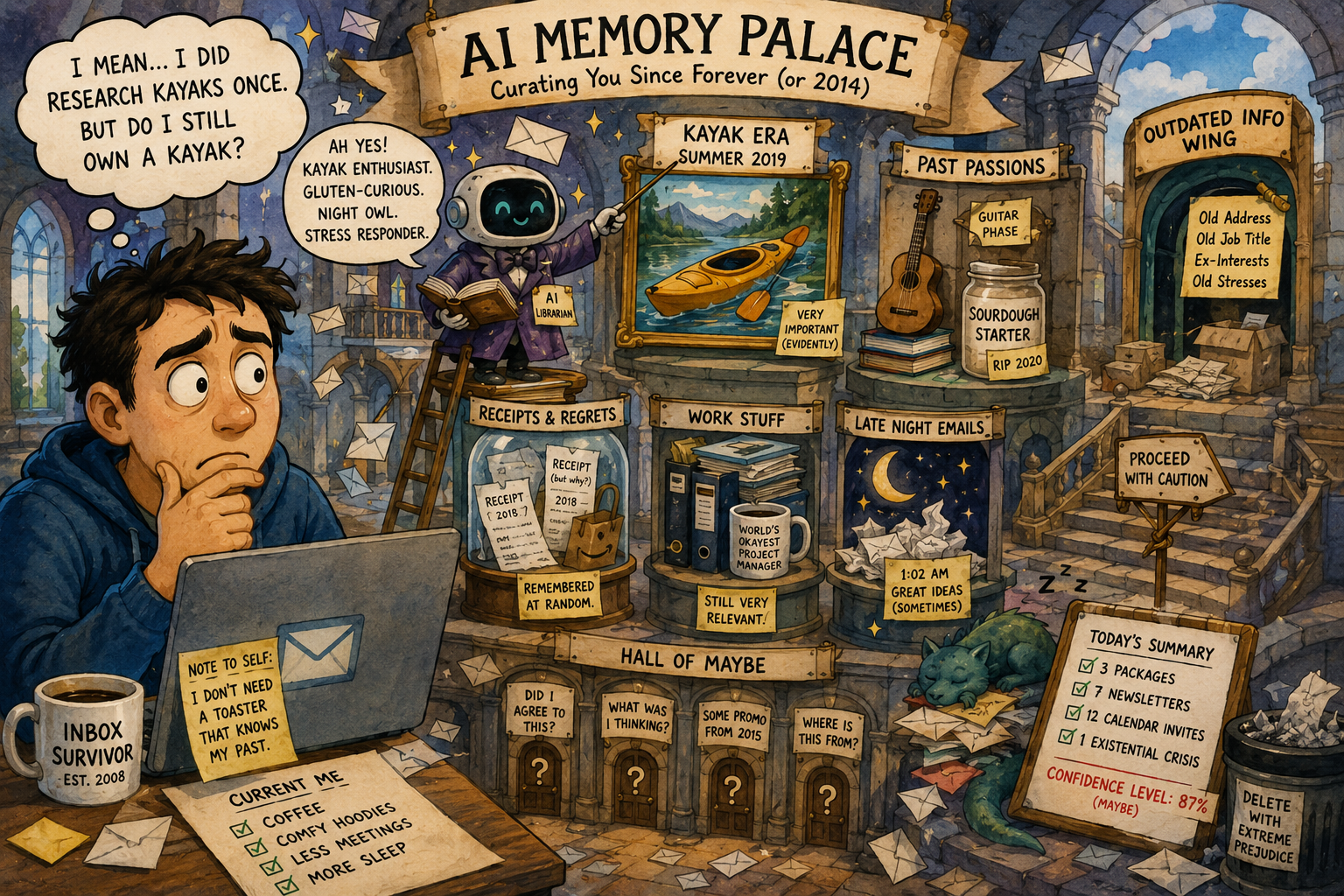
- Mini Case: The Inbox That Thought You Still Loved Kayaks
- The Five-Minute AI Memory Audit
- The Bottom Line: Memory Is Useful Until It Gets Weirdly Confident
- FAQ: AI Memory, Email, and Personalization
- References
Your Inbox Is Becoming a Personality Museum
For years, email search was basically digital archaeology. You typed “hotel receipt,” waited, found 400 results, and clicked the wrong one first. Now AI tools are being built to understand context, answer questions, and retrieve the thing you meant instead of the exact phrase you typed.
That is genuinely useful. Ask about a flight confirmation, a meeting thread, or the warranty email for a laptop charger, and a good assistant can save time. It can also draft replies that sound closer to your tone, pull details from related messages, and reduce the classic inbox ritual of opening twelve tabs while whispering, “where is the attachment, demon?”
But an inbox is not a clean biography. It is a dump truck full of partial evidence. It contains plans you canceled, jobs you left, people you no longer talk to, interests you tried twice, and automated messages written by systems that believe “important update” means “we changed button colors.”
Personalization Has a Memory Problem
AI personalization works best when the remembered context is current, accurate, and actually relevant. That is the catch. People change faster than inboxes.
Your inbox may know you once searched for baby strollers, tax software, keto recipes, Spanish lessons, guitar strings, office chairs, and a ceramic frog lamp. It does not necessarily know which of those were serious, temporary, ironic, required by work, bought as a gift, or caused by a 1:00 a.m. decision made under snack pressure.
When AI memory treats old clues like current truth, it can become confidently wrong. Not malicious. Just deeply office-manager wrong. The kind of wrong that schedules a meeting about your “ongoing kayak journey” because one cousin sent you a kayaking coupon in 2019.
The Assistant May Remember a Version of You That Moved Out
The major 2026 shift is that memory is becoming more explicit and more connected. Chat systems can remember preferences. Workplace assistants can personalize based on prior conversations. Google’s Personal Intelligence can use connected apps for more tailored answers. Email tools can answer questions buried in threads.
This is the new bargain: less repetition in exchange for more context.
That bargain can be worth it. Nobody wants to re-explain their writing style, project names, family travel preferences, dietary restrictions, or favorite formatting every single time. A helpful assistant remembering “keep replies short” is delightful. A helpful assistant remembering “you hate unnecessary meetings” is practically spiritual care.
The problem begins when memory becomes vibes with a database.
What AI May Get Wrong
| What the AI Remembers | What It May Miss |
|---|---|
| You booked trips to Chicago twice | Those were work trips, not your dream vacation |
| You emailed a landlord about repairs | You moved out two years ago |
| You bought running shoes | You hated running and now use them for errands |
| You wrote formal emails at work | You do not want every personal message sounding like a compliance memo |
| You once asked about budgeting | You do not want every purchase judged like a congressional hearing |
This is why AI memory needs hygiene. Not panic. Hygiene.
Mini Case: The Inbox That Thought You Still Loved Kayaks
Imagine a normal user named Dana. Dana’s inbox has ten years of messages: work, shopping, family, travel, newsletters, school forms, medical reminders, delivery receipts, and one intense summer when Dana researched kayaks after watching two outdoor videos.
In 2026, Dana connects an AI assistant to email. The assistant becomes extremely helpful. It finds receipts, summarizes long threads, and drafts cleaner replies. Then Dana asks, “What should I do this weekend?”
The assistant responds with kayak rentals, waterproof bags, and a scenic lake two hours away.
Technically, the AI found evidence. Emotionally, it discovered an extinct version of Dana wearing water shoes.
This is the danger of personalization without freshness. Old data can become digital folklore. Your inbox says, “Dana is outdoorsy.” Dana says, “Dana has lower back pain and a Costco return to make.”
The Practical Lesson
AI memory is not a diary. It is a suggestion engine with receipts.
Treat it like a helpful assistant who needs correction. If it remembers something outdated, delete or edit the memory when the platform allows it. If it keeps using old inbox context, narrow the connected sources or ask it to ignore certain topics.
“No, gracias, I am not a kayak person anymore” should be a valid privacy setting.
The Five-Minute AI Memory Audit
You do not need to become a privacy monk. You need a quick routine that keeps memory useful and prevents your inbox from building a shrine to outdated you.
AI Memory Audit Checklist
- Open the AI tool’s personalization or memory settings.
- Review saved memories, preferences, or profile details.
- Delete anything outdated, too personal, or oddly specific.
- Check which apps are connected, especially email, calendar, files, photos, and browser history.
- Turn off connections you do not use.
- Look for temporary chat, incognito mode, or “do not save” options for sensitive questions.
- Ask the assistant what it remembers about your preferences, then correct the weird parts.
- Recheck every month, or after major life changes like a new job, move, breakup, health change, or new school/work routine.
The Three-Bucket Decision Framework
Use this when deciding what AI memory should keep.
| Memory Type | Keep It? | Example |
|---|---|---|
| Stable preferences | Usually yes | “Use short replies,” “prefer plain English,” “avoid morning meetings” |
| Temporary projects | Maybe, with cleanup | “Planning a June trip,” “working on a laptop purchase” |
| Sensitive or outdated context | Usually no | health details, relationship issues, old addresses, financial stress, private family problems |
The best memories are durable and low-drama. The worst memories are intimate, stale, or based on a weird email you received once from a brand that thought you were a dentist.
The Tradeoff: Better Help Needs Better Boundaries
The annoying truth is that AI memory can be very useful. Turning everything off may make assistants less helpful. They may forget your preferred tone, fail to connect useful dots, or force you to repeat details like you are explaining your life to a sleepy kiosk.
But leaving everything on forever is not wisdom either. It is digital hoarding with a nicer interface.
The tradeoff is simple: personalization improves convenience, but context increases the blast radius of mistakes. If an assistant has access to old emails, files, chats, and preferences, it can be more useful. It can also be more confidently wrong about your identity, priorities, and plans.
When Not to Use AI Memory
Do not rely on memory for anything that needs current truth without checking. Travel plans, medical information, school deadlines, taxes, billing, legal documents, and workplace decisions deserve verification from the original source.
Also avoid using persistent memory for private one-off conversations. If a question is sensitive, temporary, or emotionally loaded, use temporary chat or turn memory off if your tool supports it. The assistant does not need to remember every crisis, every worry, or every “please help me word this text” moment.
Your future self deserves privacy from your past self’s search history.
The Bottom Line: Memory Is Useful Until It Gets Weirdly Confident
An AI memory palace built from your inbox sounds elegant until you remember what inboxes actually contain. They are not clean timelines. They are junk drawers with search bars.
AI assistants can help everyday users find information faster, write better replies, and stop repeating themselves. That is good. But memory should be editable, limited, and occasionally challenged. If an assistant misremembers you, correct it quickly before it starts acting like the official historian of your snack habits, travel preferences, and abandoned hobbies.
Let AI remember the useful stuff. Make it forget the expired versions of you. Your inbox has enough drama without appointing itself your biographer.
FAQ: AI Memory, Email, and Personalization
Q1. Should I turn AI memory off completely?
A1. Not always. If memory saves useful preferences like tone, format, or recurring projects, it can help. Turn off or delete memories that are outdated, sensitive, or too personal.
Q2. Is it safe to connect AI tools to email?
A2. It depends on the tool, the settings, and your comfort level. Email contains sensitive details, so review what is connected, what is saved, and whether you can delete or control memories.
Q3. What should AI memory remember?
A3. Stable, low-risk preferences are best. Examples include reply length, formatting style, favorite units, or recurring work preferences. Avoid saving sensitive health, financial, relationship, or legal details unless there is a clear reason.
Q4. How often should I review AI memory settings?
A4. Once a month is enough for most users. Also review after major changes like moving, starting a new job, changing schools, ending a project, or switching email accounts.
By: Rex Iriarte
Why trust this: Consumer-tech commentary based on current AI memory, email personalization, and privacy-control trends from major consumer and workplace platforms.
Last updated: 2026-05-13
Disclosure: No paid placement influenced this post.
References
- OpenAI Help Center, “ChatGPT release notes,” May 5, 2026
- Google Blog, “Gemini introduces Personal Intelligence,” January 14, 2026
- Google Blog, “Bringing the power of Personal Intelligence to more people,” March 17, 2026
- Microsoft Support, “Personalize what Microsoft 365 Copilot remembers,” updated February 2026
- Google Workspace, “Gemini in Gmail,” accessed May 13, 2026




0 Comments