
Why Ticket Scope Needs to Be Said Before the Fix
A client opens a ticket for “printer not working.” Twenty minutes later, the issue is really an old desktop, a vendor portal, a missing login, a browser profile, and a billing deadline. The original ticket was small. The real work is not.
Ticket scope language helps solo IT consultants slow that moment down without sounding difficult. It gives the client a clear explanation of what is included, what is outside the ticket, when work becomes billable discovery, and when a recurring problem should become a project instead of another rushed support call.
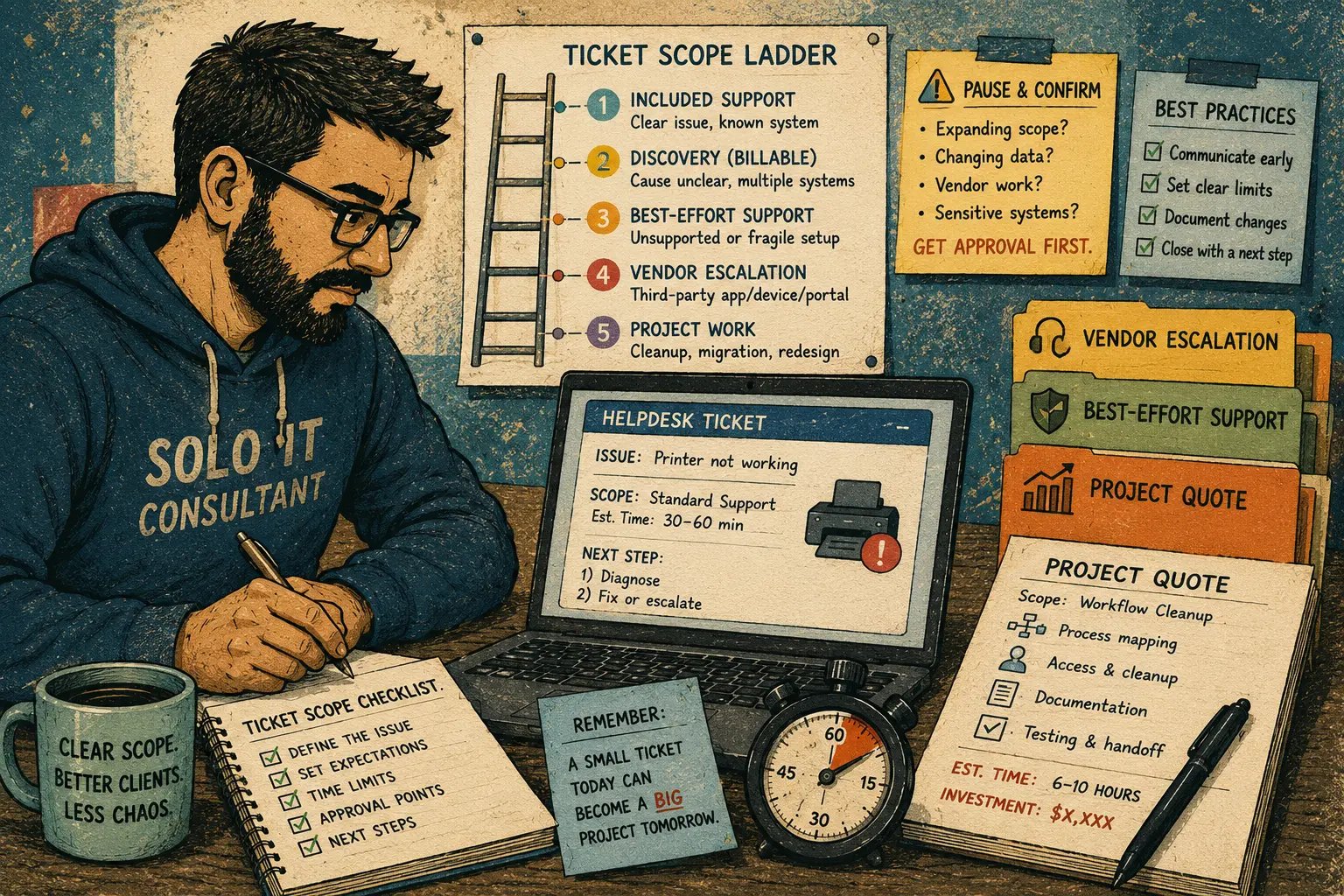
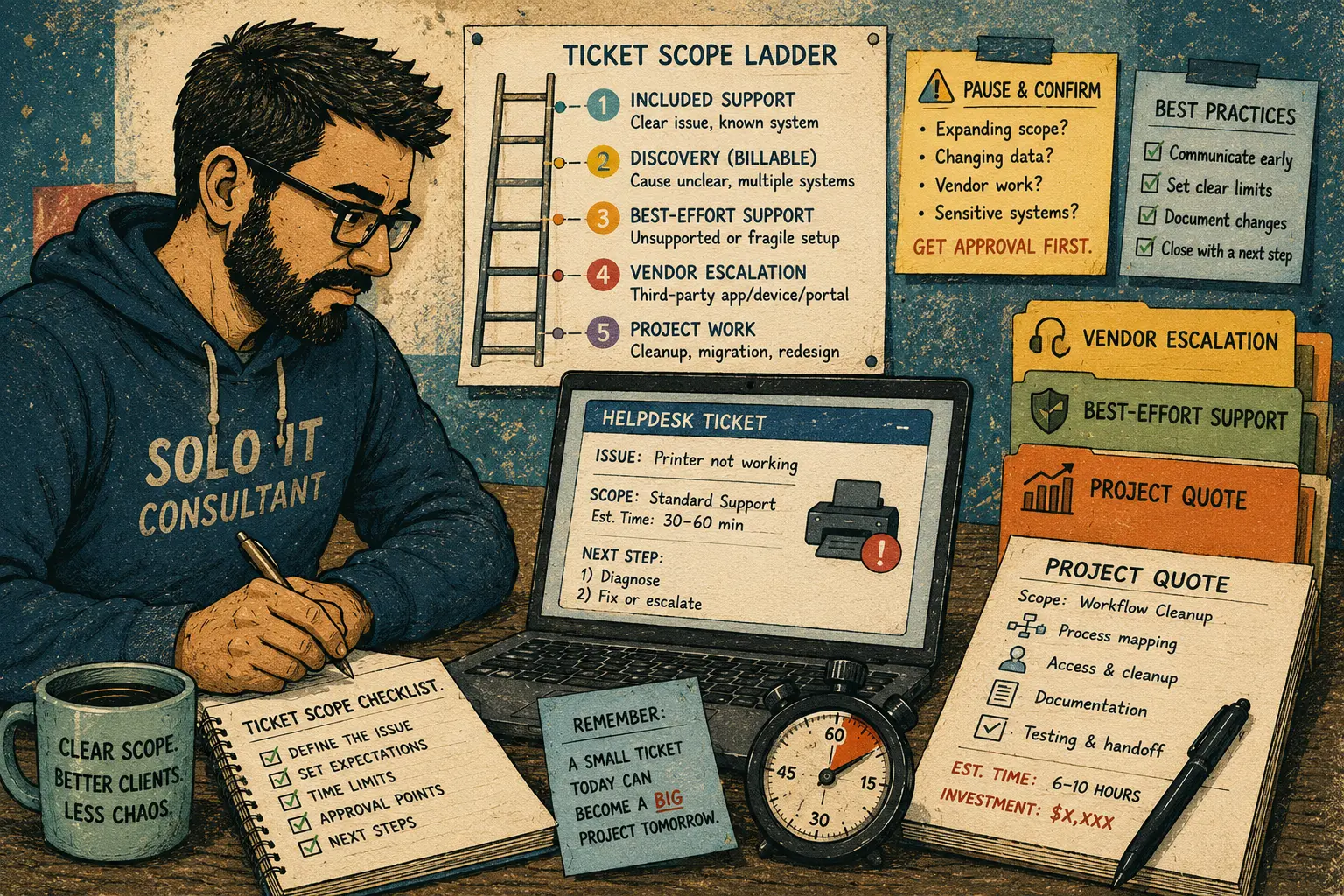
Ticket Scope Language Map
- Why Ticket Scope Needs to Be Said Before the Fix
- Ticket Scope Language at a Glance
- What Ticket Scope Language Actually Does
- Use Short Scripts Before the Ticket Expands
- Where Ticket Scope Gets Risky
- Build a Simple Scope Ladder
- The Ticket Should End With a Clear Next Step
- FAQs
- References
Ticket Scope Language at a Glance
- Best for: Solo IT consultants, freelance sysadmins, micro-MSPs, and small-business IT providers who handle break/fix tickets, retainers, and small managed-service clients.
- What this covers: Practical wording for ticket limits, billable discovery, best-effort support, vendor issues, repeated failures, and project handoff.
- What this does not cover: Legal drafting, contract review, liability advice, insurance advice, or state-specific service agreement language.
- Main caution: Do not wait until the client is upset to introduce scope limits. Say the boundary before extra work begins.
- When to get professional help: Ask a qualified attorney to review your service agreement if your scope language affects liability, warranties, payment terms, data handling, client disputes, or termination rights.
What Ticket Scope Language Actually Does
Ticket scope language is the short wording you use before a support request grows beyond its original purpose. It is not a full contract. It is the working language that helps a client understand the difference between a normal ticket, discovery, best-effort support, vendor escalation, cleanup work, and a separate project.
The best scope language does four things:
- It names the issue in plain English.
- It explains what is included right now.
- It states what is not included.
- It gives the next paid or approved path.
That matters because small-business support is messy. A ticket may uncover a deeper problem, but the consultant should not silently absorb that extra work. Silent extra work trains the client to treat discovery, documentation, vendor chasing, and cleanup as free side effects of support.
Key terms for ticket scope
- Standard ticket: A support request with a clear issue, reasonable time limit, and known system.
- Discovery: Paid investigation when the cause, system owner, access path, or risk is unclear.
- Best-effort support: A limited attempt without a guarantee of repair or long-term stability.
- Vendor escalation: A handoff or support request to the company that owns the app, portal, device, or service.
- Project work: Larger scoped work with deliverables, timeline, approval, and separate pricing.
Mini scenario: the ticket that turns into a billing workflow
A 10-person service company opens a ticket: “PDF printer stopped working.” The consultant logs in and discovers that the PDF printer is only one piece of a Friday billing workflow. The office manager exports a CSV, edits a spreadsheet, prints to PDF, uploads invoices to a portal, and emails copies to clients.
The first 15 minutes are support. The next hour is workflow discovery. Rebuilding the process on a second computer is project work.
Good ticket scope language would sound like this:
“I can troubleshoot the PDF printer as part of this ticket. If the issue depends on the full billing workflow, export process, browser portal, or spreadsheet template, that moves into workflow discovery. I’ll pause before that work and confirm approval.”
That sentence protects the consultant and gives the client a fair choice.
Use Short Scripts Before the Ticket Expands
Ticket scope language should be short enough to use in a helpdesk note, email, text, or phone call. Long legal wording belongs in the service agreement. Ticket wording belongs where decisions happen.
Practical scripts for common situations
When the ticket is still normal support:
“I’ll treat this as a standard support ticket for now: confirm the symptom, test the expected fix, and document the result. If I find a larger issue, I’ll flag it before expanding the work.”
When the cause is unclear:
“This needs discovery before I can give a reliable fix. I can spend up to 60 minutes identifying the cause, affected systems, and next options. After that, I’ll recommend either a ticket fix, vendor escalation, or a separate project.”
When the issue is best-effort only:
“This looks like best-effort support because the setup depends on an older device, unsupported app behavior, or a non-standard workflow. I can attempt a limited fix, but I can’t guarantee long-term stability.”
When the client asks for vendor chasing:
“I can prepare the vendor escalation notes and submit the request if you approve that time. Vendor response time, vendor decisions, and vendor-side fixes are outside my control.”
When the ticket should become a project:
“This has moved beyond a single support issue. The better path is a small project with a scope, backup plan, test steps, and handoff notes instead of continuing as open-ended troubleshooting.”
Quick decision guide
- If the issue is one device, one known app, and one clear symptom, keep it as a standard ticket.
- If the issue has unclear cause, missing access, or several systems involved, move it into discovery.
- If the issue depends on old hardware, unsupported software, or a fragile workaround, label it best-effort.
- If the issue involves another company’s app, portal, device, or account, use vendor escalation language.
- If the issue repeats three times in 30 to 60 days, propose a cleanup or replacement project.
Where Ticket Scope Gets Risky
The risky part is not only money. Ticket scope can affect data access, privacy, system changes, and client trust. A consultant may start with a simple ticket and end up touching payroll exports, customer records, legal files, payment information, employee folders, or sensitive email.
That is why scope language should include pause points. A pause point is a clear moment where the consultant stops and asks for approval before continuing.
What not to assume
- Do not assume the client knows the ticket expanded: Explain when the work changes from repair to discovery, cleanup, or project work.
- Do not assume access means permission: Having a login does not automatically mean the consultant should inspect sensitive files or messages.
- Do not assume all time is covered by a retainer: Retainers should still define what counts as included support and what becomes billable work.
- Do not assume vendor problems are yours: You can help coordinate, but you do not control vendor bugs, outages, policies, or response time.
- Do not assume repeated tickets are normal: Recurring failures often mean the client needs cleanup, replacement, documentation, or training.
Red flags that should trigger a pause
- The ticket touches payroll, HR, legal files, healthcare data, payment data, tax records, or regulated customer information.
- A former employee’s account, device, or mailbox is involved.
- The fix requires deleting files, wiping devices, changing permissions, or moving business data.
- The issue depends on unsupported software, abandoned hardware, or one user’s saved password.
- The client asks for a guarantee on a fragile or vendor-controlled workflow.
- The ticket has already exceeded the expected time and no clear fix is visible.
Ticket scope options
| Support path | Best for | Pros | Cons |
|---|---|---|---|
| Standard ticket | Clear symptom on supported systems | Fast, easy to document | Not enough for messy root causes |
| Paid discovery | Unknown cause or multiple systems | Prevents guessing and silent free work | Client may resist paying before the fix |
| Best-effort block | Unsupported or fragile setup | Helps without overpromising | May still end with replacement advice |
| Vendor escalation | Third-party app, portal, or device issue | Puts responsibility closer to the owner | Slow if vendor support is weak |
| Project quote | Repeated or structural problem | Cleaner fix and better handoff | Needs approval, planning, and budget |
Build a Simple Scope Ladder
A scope ladder gives the consultant a repeatable path. Instead of deciding from scratch every time, you move the ticket into the right lane.
Start with five lanes:
- Included support: Normal issue, known system, low risk, clear fix.
- Billable discovery: Cause unclear, multiple systems involved, or access missing.
- Best-effort support: Unsupported, old, fragile, or non-standard setup.
- Vendor escalation: Vendor-owned app, platform, portal, license, or hardware.
- Project work: Repeated problem, cleanup, migration, documentation, replacement, or redesign.
This is useful because clients often hear “support” as one bucket. Your business cannot survive that way. A one-person IT provider needs ticket boundaries because billable hours, cash flow, uptime, and reputation all suffer when small tickets become unpaid projects.
Sample ticket response format
Use a short format like this:
Issue: Printer fails when generating invoices.
Current lane: Standard support, first 30 minutes.
Possible scope change: Workflow discovery if the issue depends on the invoice export, browser portal, spreadsheet, or PDF process.
Approval needed: Required before changing templates, moving files, replacing the printer workflow, or contacting vendor support.
Next step: Test the printer path, then pause if the billing workflow is involved.
That format is simple enough for a client to understand and structured enough for the consultant to reuse.
The Ticket Should End With a Clear Next Step
Every ticket should close with one of five outcomes:
- Fixed and documented.
- Not fixed, but cause identified.
- Needs vendor escalation.
- Needs cleanup or replacement.
- Needs a project quote.
Avoid closing vague tickets with “let me know if it happens again” when you already know it will. That phrase turns repeat problems into a slow leak of unpaid time.
A better close is:
“This is working now, but the root cause appears to be the old browser profile and unsupported printer path. If it happens again, the next step should not be another emergency ticket. I recommend a workflow cleanup quote so the process can run from more than one device.”
That is firm without being rude. It also moves the client toward a business decision.
Ticket scope checklist
- Name the current ticket lane before extra work begins.
- Set a time cap for unclear issues.
- Pause before touching sensitive data or changing permissions.
- Separate repair, discovery, vendor escalation, and project work.
- Use best-effort wording for unsupported systems.
- Document what changed and what did not change.
- Close the ticket with a clear next step.
- Convert repeated failures into a cleanup or replacement quote.
- Keep sample wording inside your helpdesk or notes app.
- Have formal scope language reviewed by a qualified attorney.
Scope Language Is Client Service, Not Friction
Good ticket scope language does not make you less helpful. It makes your help easier to trust.
Clients deserve to know when a small request has become something bigger. Consultants deserve to be paid for discovery, documentation, vendor coordination, cleanup, and project planning. The ticket is not just a box to close. It is a decision point, and clear wording keeps that decision from becoming free labor.
FAQs
Q1. What is ticket scope language?
A1. Ticket scope language is the short wording an IT consultant uses to define what is included in a support request, what is outside the ticket, and when work becomes discovery, best-effort support, vendor escalation, or a separate project.
Q2. Should ticket scope language be part of a contract?
A2. The formal version should be reviewed as part of a service agreement by a qualified attorney. The shorter version can appear in tickets, estimates, and handoff notes so clients understand the boundary before extra work begins.
Q3. How do you stop a ticket from becoming unpaid work?
A3. Set a time cap, name the support lane, pause before expanding the task, and explain the next paid path. For example, a printer ticket may become workflow discovery if it involves billing exports, templates, portals, and file storage.
Q4. What should a consultant say when a client asks for “one quick thing”?
A4. Use calm language: “I can check that, but if it touches a different system or requires changes outside the current ticket, I’ll pause and confirm approval first.” That keeps the tone helpful while protecting scope.
By: Rex Iriarte
About the author: Written for solo IT consultants and micro-MSPs who need practical service packaging, client handoff structure, and clearer support-scope workflows.
Reviewed by: Editorial review only. No credentialed legal review is claimed.
Last updated: 2026-06-25
Disclosure: No paid placement influenced this post.
Disclaimer
This article provides general educational guidance for IT service packaging and support-scope communication. It is not legal advice, contract drafting advice, insurance advice, or individualized business advice. Have a qualified attorney review your service agreement, especially if your wording affects liability, warranties, payment terms, data handling, disputes, or termination rights.
References
- U.S. Chamber of Commerce, “Independent Contractor Agreements: What to Include.” https://www.uschamber.com/co/start/strategy/what-to-include-in-independent-contractor-agreements https://www.uschamber.com/co/start/strategy/what-to-include-in-independent-contractor-agreements
- Federal Trade Commission, “Protecting Personal Information: A Guide for Business.” https://www.ftc.gov/business-guidance/resources/protecting-personal-information-guide-business https://www.ftc.gov/business-guidance/resources/protecting-personal-information-guide-business
- NIST, “The NIST Cybersecurity Framework (CSF) 2.0.” https://nvlpubs.nist.gov/nistpubs/CSWP/NIST.CSWP.29.pdf https://nvlpubs.nist.gov/nistpubs/CSWP/NIST.CSWP.29.pdf



0 Comments