
A Full Inbox Is Not a Priority System
A client sends three messages because one printer stopped working. Another client quietly reports that the entire office has lost internet access. The loudest request appears urgent. The business impact says otherwise.
A ticket-priority matrix gives a solo IT operator a consistent way to decide what gets attention first. The client describes the interruption. The technician assigns the priority using impact and urgency. That small separation protects the schedule, reduces emotional triage, and makes response promises easier to explain.
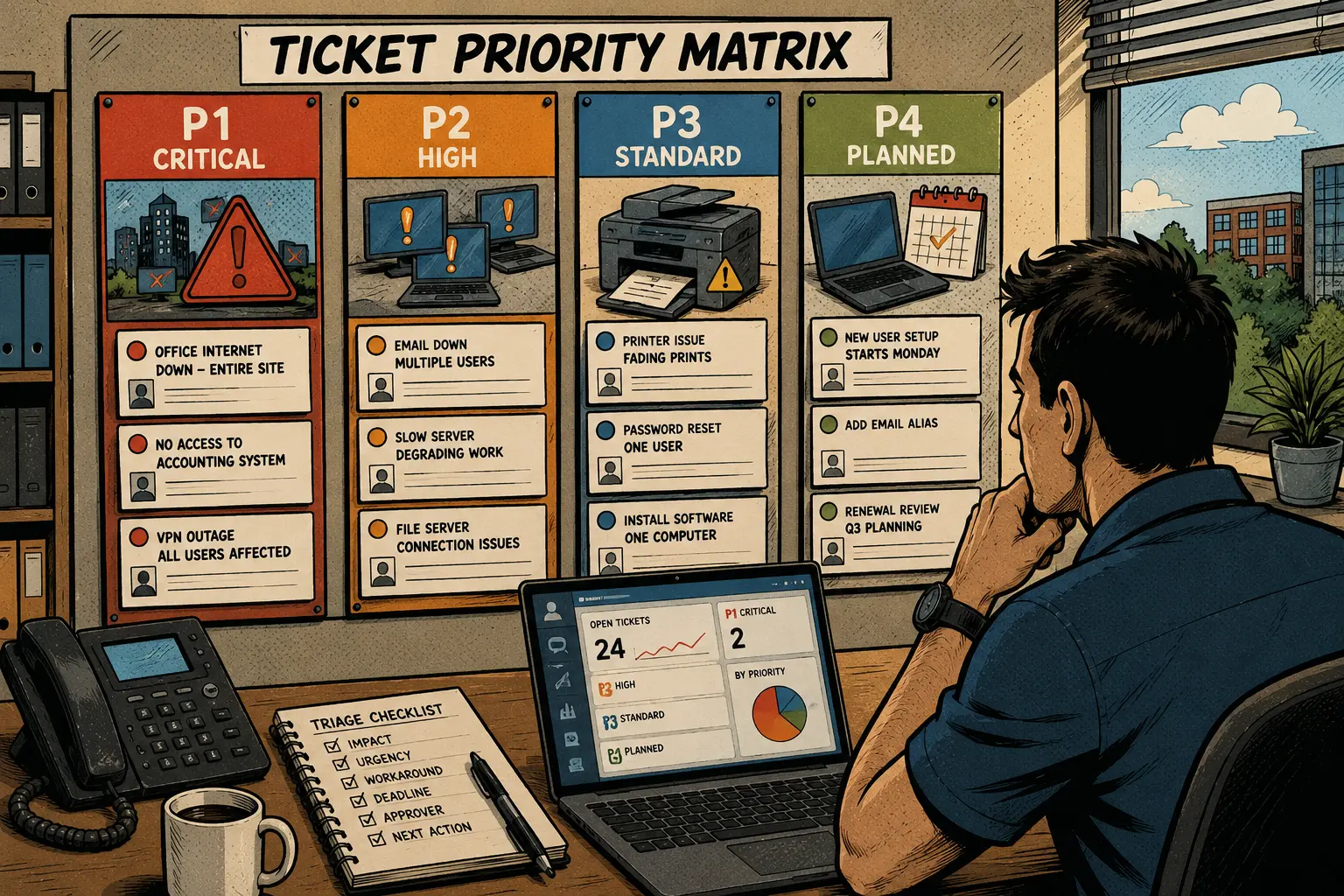
Your Ticket-Triage Map
- A Full Inbox Is Not a Priority System
- Ticket-Priority Matrix at a Glance
- Use Impact and Urgency Instead of Client Volume
- Build a Four-Level Matrix a Solo Operator Can Maintain
- Put the Matrix Into Service in 45 Minutes
- Connect the Matrix to the Helpdesk Without Overbuilding It
- A Small Matrix Protects the Workday
- Suggested Follow-Up Articles
- Frequently Asked Questions
- References
Ticket-Priority Matrix at a Glance
- Best for: Solo IT consultants, freelance sysadmins, network installers, and micro-MSPs handling support requests from several small-business clients.
- Main takeaway: Assign ticket priority using business impact and urgency, not the number of emails, the client’s tone, or the order in which requests arrive.
- Time, cost, or effort: Build the first matrix in about 30 to 60 minutes. Review it after the next 10 to 20 tickets.
- Best result to expect: More consistent triage, clearer response targets, fewer unnecessary interruptions, and a cleaner explanation when one request must wait.
- When not to use this: A basic matrix is not a substitute for a formal incident-response plan, regulated service obligations, or a staffed 24/7 support operation.
A solo IT operator does not need 12 severity codes. Four levels are usually enough:
- P1: critical interruption
- P2: high business impact
- P3: standard support issue
- P4: planned or low-impact request
The names can change. The decision logic matters more than the label.
Use Impact and Urgency Instead of Client Volume
Ticket priority should answer two questions:
- How much of the client’s operation is affected?
- How quickly does the interruption become serious?
That is the difference between impact and urgency.
Define the two decision inputs
- Impact: The number of users, locations, services, or business processes affected.
- Urgency: How quickly the issue causes meaningful operational harm if it is not addressed.
A request can have high impact but low urgency. A quarterly renewal error affecting every user may matter, but it may not need immediate action when the deadline is six weeks away.
A request can also have low impact but high urgency. One employee may be locked out of the computer used to submit a time-sensitive payroll file. The user count is small. The deadline changes the priority.
Ask the client for business facts
Clients should not need to diagnose technical causes or memorize priority codes. Ask a short set of questions:
- How many people are affected?
- Which office, device, or service is affected?
- Is work stopped, slowed down, or still possible through a workaround?
- Is there a deadline, scheduled event, or client-facing interruption?
- Did the issue begin suddenly?
- Is there any reason to suspect a security incident?
- Is the office currently operating?
- Can the issue wait until the next normal support window?
Those questions produce better triage than “How urgent is this?”
Mini scenario: three tickets arrive within six minutes
At 10:02 a.m., a client reports that one printer is producing faded pages. Another printer is available nearby.
At 10:05 a.m., a second client reports that 11 employees have lost access to the shared accounting system while invoices are being prepared.
At 10:08 a.m., a third client requests a new email account for an employee starting next Monday.
The order of arrival is not the work order.
- The faded printer belongs in P3 because a workaround exists.
- The accounting outage belongs in P2 because several employees and a time-sensitive workflow are affected.
- The new email account belongs in P4 because it is planned work with a future deadline.
The matrix turns three unrelated messages into a defensible queue.
Build a Four-Level Matrix a Solo Operator Can Maintain
Start with four levels. Add detail only when the real ticket history shows a need.
The four-level support matrix
| Priority | Business Impact | Typical Examples | Example Starting Response Target | Next Action |
|---|---|---|---|---|
| P1: Critical | Major outage, immediate operational risk, active security concern, or approved critical event | Entire office offline during operations, business-critical service unavailable with no workaround, suspected active compromise | Acknowledge within 30 to 90 minutes for covered clients | Begin triage, confirm approval path, escalate or refer when required |
| P2: High | Several users affected, core workflow blocked, or serious degradation with a near-term deadline | Shared accounting system unavailable, intermittent internet affecting the office, email failure across several users | Acknowledge within 1 to 3 business hours | Review promptly, identify workaround, schedule focused troubleshooting |
| P3: Standard | One user, one device, or limited interruption with a workaround | Printer issue, single-user login problem, slow laptop, shared-folder permission question | Acknowledge within one business day | Add to normal queue and schedule support |
| P4: Planned | Low-impact request, maintenance task, documentation update, or future setup | New-user onboarding, software install next week, equipment quote, renewal review | Acknowledge within one business day | Confirm requirements and schedule the work |
These are editable starting points, not universal promises. A provider should choose targets that fit the agreement, service hours, client plan, and actual calendar.
Separate acknowledgment from resolution
The response target should describe what happens first.
- Acknowledgment: Confirm the request was received.
- Triage: Review impact, urgency, coverage, and the next action.
- Work start: Begin troubleshooting or schedule the task.
- Resolution estimate: Give a case-specific estimate after the cause and dependencies are clearer.
Do not promise that every P1 issue will be fixed within 60 minutes. An ISP outage, hardware failure, vendor delay, or active security incident may require a different path.
Add an impact-and-urgency grid
Use a small internal worksheet:
| Impact | Low Urgency | Medium Urgency | High Urgency |
|---|---|---|---|
| One user or device | P4 or P3 | P3 | P2 when a deadline or critical role changes the impact |
| Several users or one important workflow | P3 | P2 | P2 or P1 |
| Entire office, location, or critical service | P2 | P1 or P2 | P1 |
This grid is a decision aid, not a machine. The technician still reviews the context.
Know what belongs outside the normal matrix
Some requests need a separate path:
- Suspected compromise or active cybersecurity incident
- Safety issue
- Electrical problem
- Regulated-system concern
- Data-loss event
- Major outage requiring a specialist
- Work outside the provider’s competence or agreement
Do not force a serious event into an ordinary printer-ticket workflow.
Put the Matrix Into Service in 45 Minutes
A first version should be usable today.
Minutes 0 to 10: list your common tickets
Review the last 10 to 20 support requests.
Group them into categories:
- Internet outage
- Email problem
- Password or access issue
- Printer or scanner issue
- Slow computer
- New-user request
- Software install
- Vendor escalation
- Backup concern
- Security concern
- Quote or project request
Do not create a category for every ticket. Look for repeat patterns.
Minutes 10 to 20: assign the four levels
For each category, write the most common priority and the condition that changes it.
Example:
| Ticket Type | Normal Priority | Raise the Priority When |
|---|---|---|
| Printer issue | P3 | No alternative printer exists and a shipping or billing deadline is blocked |
| Internet outage | P1 or P2 | Entire office is offline during operations, failover is unavailable, or a critical event is active |
| Password reset | P3 | A time-sensitive payroll, billing, or client-facing task is blocked |
| New-user account | P4 | The start date is today because onboarding was missed |
| Email issue | P3 | Several users or the entire domain are affected |
| Backup alert | P3 | A recovery event is active or the last usable backup is uncertain |
The condition matters more than the category.
Minutes 20 to 30: write the intake questions
Use a short ticket form or support script:
- Which location is affected?
- How many users are affected?
- Which service, device, or task is interrupted?
- Is there a workaround?
- Is there a deadline?
- Is the office operating now?
- Is there any reason to suspect a security incident?
- Who is the best contact for updates?
Keep the form readable. A client reporting an outage should not complete a 30-field questionnaire before asking for help.
Minutes 30 to 38: set response targets
Choose targets your business can maintain.
Example:
| Priority | Support-Hours Target | After-Hours Path |
|---|---|---|
| P1 | 30 to 90 minutes for covered clients | Use agreed emergency escalation |
| P2 | 1 to 3 business hours | Review under the client’s support plan |
| P3 | One business day | Add to normal queue |
| P4 | One business day | Schedule through the normal workflow |
Do not publish 24/7 promises when the business cannot deliver them.
Minutes 38 to 45: test five realistic tickets
Test the matrix:
- One printer fails, but another printer works.
- The office internet connection fails during operating hours.
- One employee requests software installation for next week.
- Several employees cannot send email.
- A client reports an unexpected administrator login alert.
Ask whether each ticket has a clear next action.
The last example should trigger a separate security-escalation path rather than routine troubleshooting.
Connect the Matrix to the Helpdesk Without Overbuilding It
After the policy is clear, configure the stable version in Odoo, ERPNext, Jira Service Management, Zoho Desk, or any other ERP or helpdesk platform that fits the business.
Odoo Helpdesk can apply SLA policies according to ticket priority, tags, customers, and other criteria. ERPNext supports issue priorities such as Low, Medium, High, and Critical for SLA workflows. Other platforms may use different names.
The software should store the triage decision. It should not make every ticket feel like a corporate incident report.
Use six helpdesk fields
| Helpdesk Field | What It Records | Why It Helps |
|---|---|---|
| Priority | P1, P2, P3, or P4 | Shows work order |
| Impact | Users, locations, or critical workflow affected | Explains why the priority was assigned |
| Urgency | Deadline or time until serious disruption | Prevents loud requests from outranking important ones |
| Workaround | Available, partial, or unavailable | Helps set the next action |
| Coverage | Normal support, after-hours coverage, or out-of-scope request | Clarifies the service path |
| Update contact | Person receiving status messages | Reduces repeated calls from several people |
A solo operator can add more fields later. Start with the fields that improve decisions.
Use a simple triage workflow
- Receive the ticket.
- Record the business impact.
- Record the urgency and workaround.
- Assign the priority.
- Check coverage and approval.
- Acknowledge the client.
- Begin triage or schedule the work.
- Record the outcome and any follow-up.
A matrix is useful when it reduces mental load. It has failed when the technician spends more time classifying the ticket than solving the issue.
Review the matrix after 10 to 20 tickets
Ask:
- Did P1 remain rare?
- Did several P3 tickets deserve P2 treatment?
- Did clients misunderstand the emergency path?
- Did one category repeatedly interrupt the schedule?
- Did the response targets fit the actual workday?
- Did after-hours requests reveal a need for a recurring support plan?
- Did repeated outages reveal a continuity project?
Use real ticket history to adjust the policy.
Common triage mistakes
- Allowing clients to assign the final priority: The client reports impact. The technician applies the matrix.
- Treating the first ticket as the first task: Arrival order is not always business priority.
- Making P1 too broad: When everything is critical, nothing is.
- Promising resolution instead of response: Vendor delays and technical findings can change the repair timeline.
- Ignoring workarounds: One working printer can reduce the urgency of another printer issue.
- Hiding the after-hours rule: The client should know the escalation and billing path before an emergency occurs.
- Overbuilding the form: Intake should capture the facts needed for a decision, not every technical detail.
A Small Matrix Protects the Workday
A one-person IT business needs a triage method that is simple enough to use during a busy morning.
Start with four priorities. Measure impact and urgency. Ask whether a workaround exists. Separate acknowledgment from resolution. Keep P1 narrow enough that it means something.
The matrix will not remove interruptions. It will make the interruptions easier to compare, explain, schedule, and invoice.
Frequently Asked Questions
Q1. How many ticket-priority levels should a one-person IT business use?
A1. Start with four: critical, high, standard, and planned. That is usually enough to separate major outages from routine support and scheduled work. Add more levels only when real ticket history shows a clear need.
Q2. Should clients choose the priority when submitting a ticket?
A2. Clients should describe business impact, urgency, deadlines, and available workarounds. The technician should assign the final priority using the documented matrix. This prevents every inconvenient issue from becoming an emergency.
Q3. Is ticket priority the same as an SLA?
A3. No. Priority helps determine the order and urgency of work. An SLA or support agreement defines service expectations such as response targets, covered hours, responsibilities, and measurement rules.
Q4. Should a P1 ticket guarantee a fast resolution?
A4. A P1 ticket should receive fast acknowledgment and triage according to the agreement. Resolution can depend on the cause, vendor availability, hardware replacement, access, approvals, or specialist support. Avoid promising a repair time before those dependencies are known.
Q5. Can ticket priorities be configured in an ERP or helpdesk platform?
A5. Yes. Odoo Helpdesk supports priority-based SLA criteria. ERPNext supports customizable issue priorities for SLA workflows. Jira Service Management, Zoho Desk, or any other ERP or helpdesk platform with priority fields can also support the process.
By: Marcus Irizarry
Why trust this: This post is written for solo IT operators and micro-MSPs, using a practical helpdesk framework and current official documentation for ticket priorities and SLA workflows.
Last updated: 2026-06-11
Disclosure: No paid placement influenced this post.
References
- Odoo Documentation: Service Level Agreements — Documents SLA policies and ticket-priority criteria in Odoo Helpdesk.
- ERPNext Documentation: Issue Type and Priority — Documents customizable issue priorities such as Low, Medium, High, and Critical for SLA workflows.
- Atlassian Support: What Are Priority Levels in Jira Service Management? — Explains priority levels and the use of impact and urgency when assigning priority.
- Atlassian: What Is an SLA? — Explains response and resolution expectations, service scope, roles, and performance measurement.




0 Comments