
If Your Browser Could Book a Purchase, It Would Also Judge the Cart
The 2026 browser no longer wants to sit quietly at the top of the screen like a normal rectangle. It wants to summarize the page, warn you about scams, remember your logins, manage passkeys, compare products, and maybe help book the thing you were only supposed to “look at for five minutes.”
That sounds useful. It also sounds like giving a clipboard to a raccoon.
AI browser shopping is the obvious next step in tech’s current mood: every app wants to become an assistant, every assistant wants to become an agent, and every agent wants permission to click buttons while you sit there wondering why your smart speaker is emotionally invested in patio furniture.
What This Cart-Judging Browser Rant Covers
- If Your Browser Could Book a Purchase, It Would Also Judge the Cart
- The Browser Is Becoming a Tiny Mall Cop With a Credit Card
- A Realistic Cart Disaster, Now With Helpful Judgment
- The Tradeoff: Helpful Assistant or Nosy Checkout Goblin?
- What to Do Before Letting an AI Browser Near Your Cart
- The Bottom Line: Your Browser Can Help, Not Parent You
- FAQ: AI Browsers, Shopping Agents, and Cart Shame
- References
The Browser Is Becoming a Tiny Mall Cop With a Credit Card
For years, the browser had one job: open websites without turning your laptop fan into a leaf blower. Now the browser is becoming a command center. OpenAI introduced ChatGPT Atlas in 2025 as a browser with ChatGPT built in, while Perplexity’s Comet and similar tools pushed the idea that browsing can include an assistant that reads, summarizes, compares, and acts across pages.
This is the cultural shift: browsing is no longer just “go to site, click thing, regret thing.” The new pitch is “tell the browser what you want, and it will help.” That may mean summarizing reviews, comparing two keyboards, spotting suspicious pages, filling forms, or handling the boring parts of a purchase.
The absurd part is not that this exists. The absurd part is that the same browser expected to protect you from phishing may also be asked to help you buy a $74 smart mug that needs firmware updates, an app account, Bluetooth permission, a privacy policy longer than a submarine, and emotional support.
What the 2026 Pattern Suggests
Passkeys are becoming more mainstream, scam protection is getting more automated, and old software is dragging its haunted office chair behind it. Microsoft’s Windows 10 support ended on October 14, 2025, but many users are still living in the Windows 10 afterlife because their PC technically works and, emotionally, they are not ready to meet Windows 11 at a second location.
Meanwhile, passkeys are moving from “what is this magic login button?” to ordinary account security. The FIDO Alliance reported in May 2026 that passkeys had reached large-scale consumer and workforce adoption. That matters because shopping agents, password managers, and browsers are all colliding around the same checkout moment.
Then add scam detection. Google said in May 2026 that it uses on-device AI in some products to help detect scam patterns. Helpful? Yes. Slightly weird when the same tech ecosystem is also asking for more permissions, more prompts, and more trust? Also yes. “Confía en mí, bro” is not a security model.
A Realistic Cart Disaster, Now With Helpful Judgment
Picture a normal Tuesday night. You search for a replacement phone charger. You open one tab. Then a review page. Then a Reddit thread. Then a marketplace listing. Then a video where a man in a hoodie says the charger “changed everything,” which is suspicious because it is a charger, not a family inheritance.
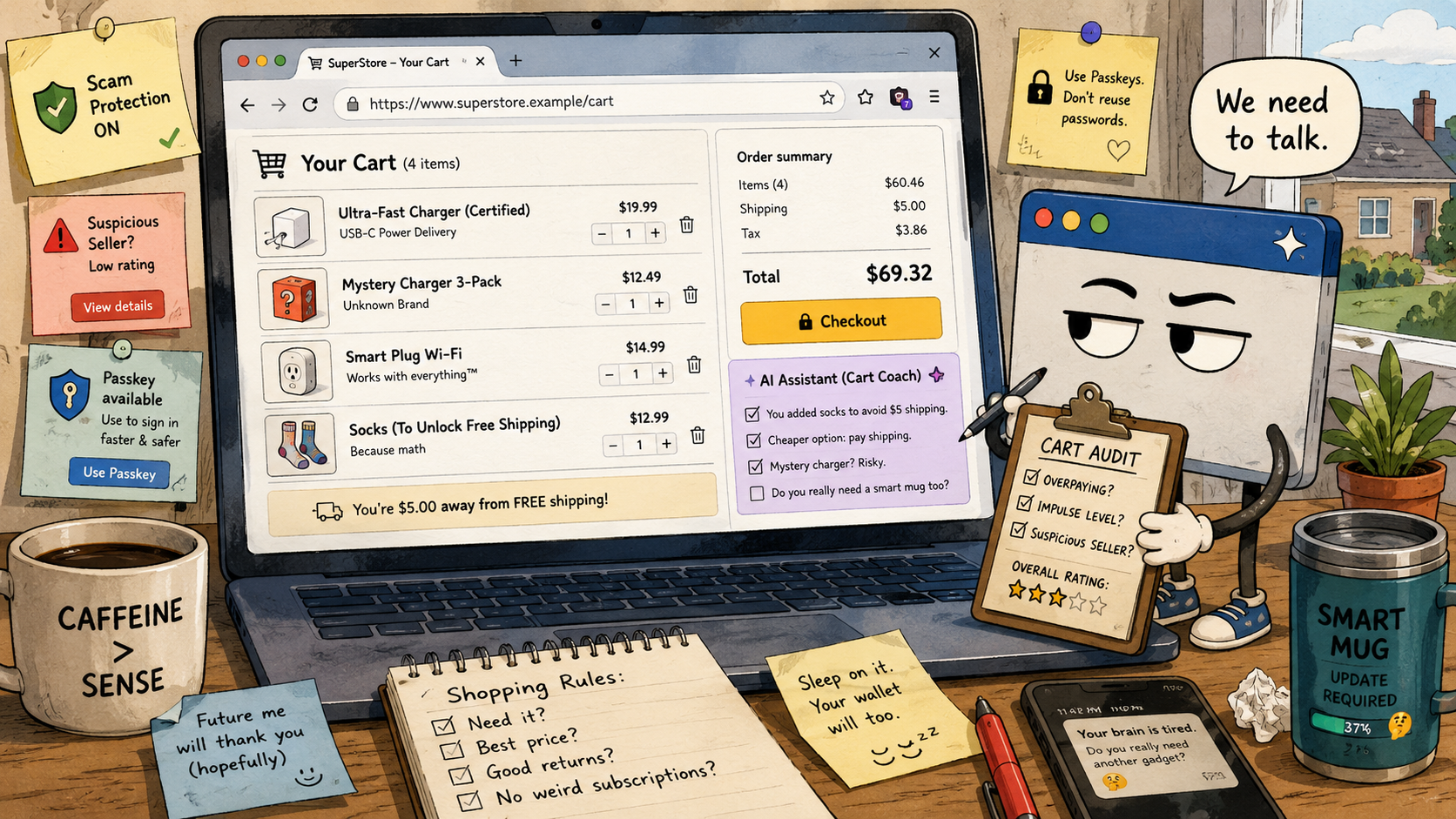
By 11:42 p.m., your cart contains a certified charger for $19.99, a mystery charger bundle for $12.49, a smart plug because the site suggested it, a screen cleaner you already own, and free shipping unlocked by adding socks, somehow.
An AI browser could be useful here. It could compare return policies, flag the weird seller, summarize recent reviews, and point out that you added socks to avoid $5 shipping while spending $13 on socks. That is not judgment. That is math wearing a tiny robe.
Mini Case: The $5 Shipping Trap
The browser’s best shopping role is not “buy this for me.” It is “slow me down before I do something dumb with confidence.”
A good assistant might say: “Your cart total is $48.32. You added a $13 item to avoid $5 shipping. The cheaper move is to pay shipping unless you actually need the item.” A bad assistant might say: “Great news, I optimized your cart by joining the retailer’s rewards program, accepting three prompts, and subscribing you to thermal socks.” No gracias.
The Tradeoff: Helpful Assistant or Nosy Checkout Goblin?
The useful version of the AI browser is boring in the best way. It checks, compares, warns, and explains. The annoying version tries to “complete the journey,” which is tech-speak for doing too much while wearing a lanyard.
The key difference is whether the browser is advising or acting. Advice is lower risk. Action is where the gremlins start lifting weights.
Where the Simple Take Fails
- “AI shopping agents will save time”: Sometimes. They can also create chores if you must verify every click, permission, coupon, and seller.
- “Scam protection means I can relax”: No. Scam protection is a seat belt, not a teleportation device.
- “Passkeys solve login pain”: They help, but account recovery and shared-device habits still matter.
- “Old devices are fine if they turn on”: Maybe for offline typing. Not ideal for shopping or banking after security support ends.
Quick Comparison: Browser Roles at Checkout
| Browser Role | Best For | Helpful Part | Annoying Part |
|---|---|---|---|
| Regular browser | People who want control | You make every decision | You also do every boring comparison |
| AI-assisted browser | Research-heavy shopping | Summaries, warnings, review checks | May ask for permissions or miss context |
| Shopping agent | Repetitive purchases | Can handle routine steps | Higher risk if it clicks, fills, or buys too freely |
What Not to Do
Do not hand a browser agent an open-ended command like “buy the best one” unless you enjoy mystery boxes with tracking numbers. “Best” can mean cheapest, fastest, most reviewed, most profitable to promote, or the one with a product photo that looks like it was rendered inside a dentist’s office.
Use narrow instructions. Tell it your budget, deal breakers, shipping deadline, and whether it may only suggest items or actually take action. When money, accounts, addresses, or saved cards are involved, vague commands become tiny chaos invitations.
What to Do Before Letting an AI Browser Near Your Cart
Use the browser as a skeptical intern, not a legal guardian. Let it gather information, compare options, and point out obvious traps. Keep the final click human.
That boundary matters because software overload keeps getting worse. Smart devices ask for accounts. Browsers ask to sync. Sites ask for cookies, notifications, location, and your firstborn’s favorite dinosaur. The modern checkout flow is a parade of pop-ups wearing tiny suits.
Quick Reality-Check List
- Compare total cost, including shipping, taxes, return fees, and subscriptions.
- Check the seller, not just the product.
- Keep agent permissions limited. Suggesting is safer than clicking, filling, or purchasing.
- Use passkeys where they make sense, with account recovery already set up.
- Avoid shopping from unsupported or poorly updated devices.
- Pause if countdown timers, fake scarcity, or urgent “security” pop-ups appear.
The Bottom Line: Your Browser Can Help, Not Parent You
The funniest possible future is not that browsers become smart. It is that browsers become smart enough to know your cart is ridiculous and polite enough not to say it out loud.
AI browsers can help everyday users shop better, avoid obvious scams, and survive the software jungle with fewer tabs open. The limitation is trust. A browser that can read, compare, warn, and act is useful only when you decide where its authority ends.
Let the browser judge the cart a little. Let it question the socks. Let it flag the mystery charger. But keep the final checkout click for yourself, because no agent should be the sole adult in a room where a smart mug requires three permissions and a firmware update before coffee.
FAQ: AI Browsers, Shopping Agents, and Cart Shame
Q1. Should I let an AI browser buy products for me?
A1. Use it for research first. Let it compare prices, return policies, reviews, and seller reputation. For purchases involving saved cards, subscriptions, or personal information, keep the final approval manual.
Q2. Are passkeys safer than passwords for shopping accounts?
A2. Passkeys can reduce phishing risk and password reuse, but they are not magic. Set up account recovery and know how your passkeys sync.
Q3. Is scam protection enough to trust any checkout page?
A3. No. Scam protection can help, but you should still check the URL, seller identity, payment method, return policy, and whether the deal looks strangely urgent or unrealistic.
By: Marcus Irizarry
Why trust this: Technology commentary based on current browser, authentication, scam-protection, and consumer software trends, written for everyday users without vendor hype.
Last updated: 2026-05-13
Disclosure: No paid placement influenced this post.
References
- OpenAI, “Introducing ChatGPT Atlas,” October 21, 2025
- FIDO Alliance, “The State of Passkeys 2026,” May 7, 2026
- Microsoft Support, “Windows 10 support has ended,” accessed May 13, 2026
- Google, “Our fight against fraud: 5 ways we’re keeping you safer,” May 13, 2026




0 Comments