
When Your Website Tries to Sell Everything at Once
Many solo IT providers do more than one thing. One week it is a website repair. The next week it is business email setup, domain cleanup, a firewall issue, an Odoo or any other ERP question, and a client asking whether their contact form still works.
The problem is not having many skills. The problem is making one website page carry all of them with no structure.
A one-page website map gives your services a simple place to live before you redesign, rewrite, or buy more tools. It helps you decide what belongs on the homepage, what needs its own service page, and what should wait until the business has a clearer offer.
Website Map Planner
- When Your Website Tries to Sell Everything at Once
- One-Page Website Map Snapshot
- What a One-Page Website Map Does
- Decide What Belongs on the Homepage
- Move the Right Services Into Their Own Pages
- Build Your First Website Map in 45 Minutes
- One-Page Website Map FAQs
One-Page Website Map Snapshot
- Best for: Solo IT providers, micro-MSPs, freelance sysadmins, web developers, email consultants, and ERP setup providers.
- Main takeaway: Your website should organize services by buyer intent, not by every tool you know.
- Time, cost, or effort: A first website map can be drafted in 45 minutes.
- Best result to expect: A clearer homepage, better service-page priorities, and fewer confusing “do you do this?” inquiries.
- When not to use this: Do not map the site yet if you have not decided which services you want to sell more often.
What a One-Page Website Map Does
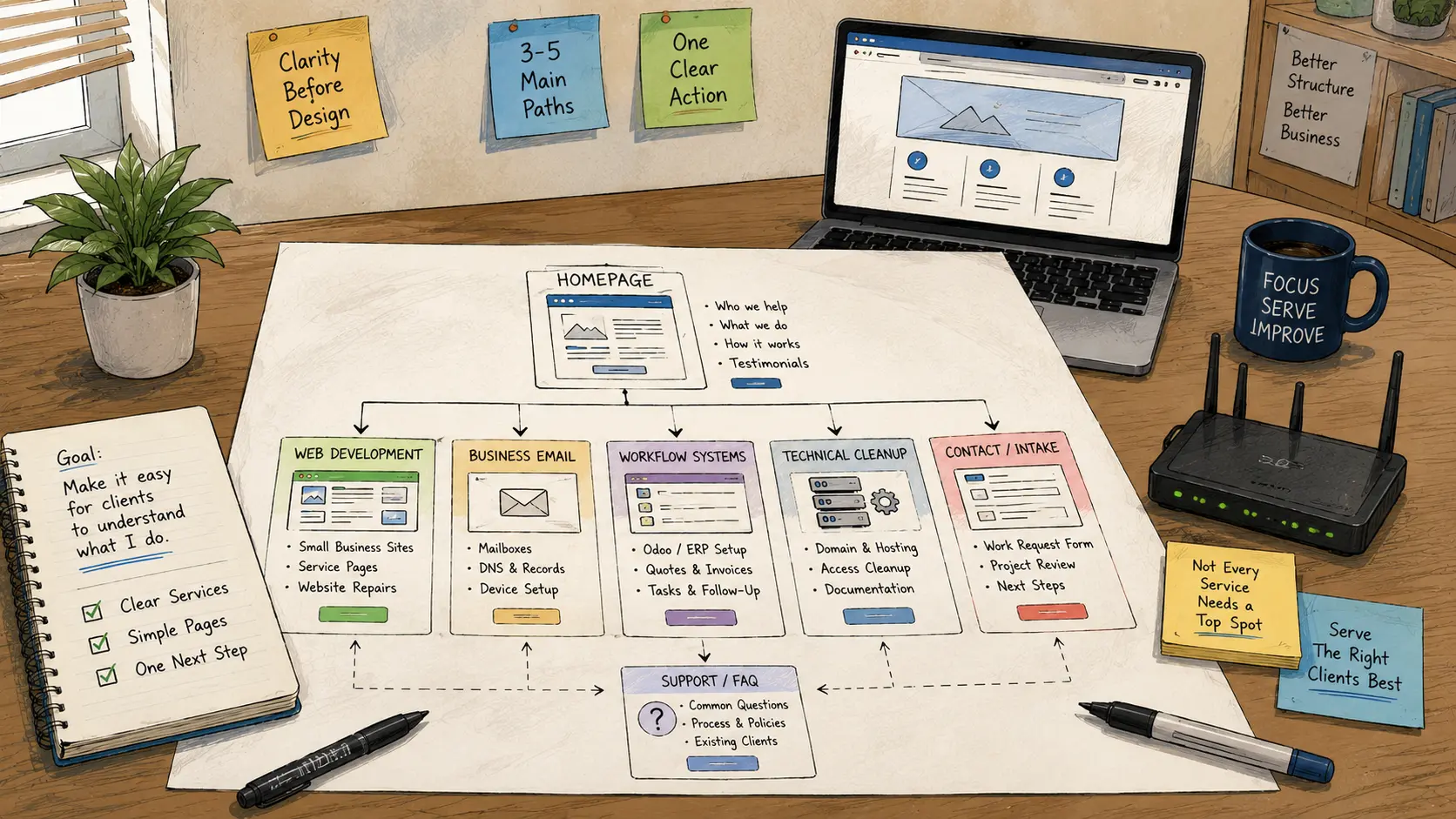
A one-page website map is a plain planning sheet. It is not a design mockup. It shows what each main page should do, which service it supports, and what action the visitor should take.
For a solo IT provider, this matters because your website can easily become a junk drawer. A page may mention web development, email support, domain registration, DNS, hosting, backups, Odoo, ecommerce, remote support, onsite work, and automation, all before the visitor understands what to click.
The map forces a decision: which services are public offers, which are supporting details, and which are better handled after the first conversation.
Key terms for the map
- Homepage: The front door that explains who you help and what services matter most.
- Service page: A focused page for one offer, one buyer, and one next step.
- Support page: A page that helps existing or warm leads understand process, pricing, or intake.
- Hidden offer: A service you can still perform, but do not need to promote heavily.
A realistic solo-provider scenario
Imagine a one-person IT business that does small websites, business email setup, domain cleanup, Odoo support, printer troubleshooting, and occasional network work.
If all of that sits on the homepage with equal weight, the visitor sees noise. If the website map groups the public offers into three paths, such as “Websites,” “Business Email,” and “Workflow Systems,” the visitor can choose faster. The smaller services can appear under support or intake instead of fighting for homepage space.
Decide What Belongs on the Homepage
The homepage should not be a full catalog. It should help the right visitor understand the business in under a minute.
For most solo IT providers, the homepage needs three to five service paths. More than that usually turns into a menu nobody reads. Your job is to choose the categories that match how buyers think, not how technicians sort tools.
The homepage sorting test
Ask these questions before placing a service on the homepage:
- Does this service bring in the type of work you want more often?
- Can a client understand it without a technical explanation?
- Does it lead to a clear next action?
- Is it profitable enough to deserve public attention?
- Can you deliver it repeatably without reinventing the process every time?
If the answer is no, the service may still belong somewhere else. It may fit on an intake form, FAQ, support page, or proposal conversation.
What the homepage should show
- A plain headline that says what kind of IT work you do.
- Three to five service categories.
- A short “good fit” section.
- A simple process from request to handoff.
- One primary call to action.
- A secondary path for readers who are not ready to book.
Example homepage service paths
| Service path | What it can include | Why it works |
|---|---|---|
| Web Development | Small business websites, service pages, contact forms, updates | Easy for clients to recognize |
| Business Email Systems | Mailboxes, aliases, DNS records, delivery checks, device setup | Connects technical work to daily operations |
| Workflow and ERP Setup | Odoo or any other ERP, quotes, invoices, tasks, helpdesk, follow-up | Frames ERP as business workflow, not software trivia |
| Technical Cleanup | Domain ownership, hosting, access, documentation, handoff notes | Useful for messy inherited setups |
Move the Right Services Into Their Own Pages
A service deserves its own page when the buyer has a clear problem, the project has repeatable steps, and the page can help qualify the lead.
Do not create a separate page just because you know how to do something. Create one when the page can carry a useful sales conversation.
For example, “DNS support” may not need a top-level page unless DNS cleanup is a productized service. But “Business Email Setup” can have its own page because the client understands the problem: emails fail, accounts are scattered, devices are inconsistent, or old providers still control important settings.
Use this decision guide
- If a service has a clear buyer and repeatable process, give it a service page.
- If a service is useful but occasional, place it under a broader service page.
- If a service is technical but hard to explain, turn it into a problem-based page.
- If a service is not profitable or not strategic, keep it off the main navigation.
Page priority examples
| Service | Best placement | Reason |
|---|---|---|
| Website rebuild | Own service page | Clear buyer, clear project, strong public offer |
| Business email setup | Own service page | Repeatable and easy to explain |
| Odoo quote-to-invoice setup | Own service page or workflow page | Strong if it matches your offer strategy |
| Random printer issue | Support or intake page | Usually not a homepage-level offer |
| DNS record repair | Under email, website, or domain cleanup | Better framed through the problem it solves |
| Emergency support | Intake page with limits | Needs boundaries before it becomes chaos |
Build Your First Website Map in 45 Minutes
You can make the first version with a notebook, spreadsheet, whiteboard, or simple text document. Do not start in the website builder. Planning inside the builder usually turns into design fiddling before the structure is clear.
Set a timer for 45 minutes. The goal is not perfection. The goal is to stop treating every service as equally important.
Step 1: List every service you actually want to sell
Write the services you would gladly repeat. Leave out the one-off work you only accept for old clients or emergencies.
A useful first list might include:
- Small business website setup
- Website repair and cleanup
- Business email setup
- Email DNS review
- Odoo or any other ERP starter setup
- Domain and hosting ownership cleanup
- Monthly website and email care
- Technical documentation and handoff notes
Step 2: Group services by buyer problem
Now group the list into client-facing categories. “Email DNS review” may become part of “Business Email Systems.” “Domain ownership cleanup” may fit under “Technical Cleanup.”
The visitor does not need your internal skill chart. They need a path.
Step 3: Assign each group a page type
Use three choices: homepage feature, dedicated service page, or supporting page.
Homepage features are the main doors. Dedicated service pages explain repeatable offers. Supporting pages handle process, intake, FAQ, pricing, documentation, and fit.
Step 4: Pick one call to action for each page
Every page needs a job. Do not make every page say the same vague “contact us.” A website page can ask the reader to request a project review, send current setup details, book a fit call, or download a checklist.
45-minute website map worksheet
| Page or section | Purpose | Main services shown | Primary action |
|---|---|---|---|
| Homepage | Explain the business and route visitors | Web, email, workflow systems | Request a project review |
| Web Development page | Explain website projects | Service pages, small sites, repairs | Send current website URL |
| Business Email page | Explain email setup and cleanup | Mailboxes, aliases, DNS, devices | Send domain and email provider |
| Workflow Systems page | Explain Odoo or any other ERP setup | Quotes, invoices, tasks, follow-up | Book a fit call |
| Technical Cleanup page | Organize messy inherited setups | Domains, hosting, documentation | Request a cleanup checklist |
Clean Structure Beats a Bigger Website
A small IT provider does not need a giant website to look serious. A clear five-page site can outperform a messy twenty-page site because visitors can understand it faster.
The tradeoff is discipline. Some services must move down the page, into supporting pages, or out of the public menu. That can feel uncomfortable when you know you can do the work. But a website is not an inventory of every skill. It is a guide for the right work.
Map Before You Rebuild
Before you redesign, write, or buy a new theme, map the pages first. Choose the homepage service paths, the first three service pages, and the contact action for each one.
The fastest improvement may be simple: rename services in client language, remove scattered tool lists, and give each important offer a place to live.
Final DIY checklist
- List only services you want to sell again.
- Group services by client problem, not by tool.
- Choose three to five homepage service paths.
- Give repeatable offers their own service pages.
- Move occasional services into support, intake, or FAQ.
- Give every important page one clear next action.
One-Page Website Map FAQs
Q1. How many services should a solo IT provider show on the homepage?
A1. Three to five service paths are usually enough. The homepage should route visitors to the most important offers, not list every technical skill you have.
Q2. Should web development, email systems, and ERP work be on separate pages?
A2. Yes, if each service has a different buyer problem, process, and next step. Separate pages make the site easier to understand and easier to improve later.
Q3. What should I do with services I still offer but do not want to promote?
A3. Move them into supporting pages, FAQs, intake forms, or proposal conversations. Not every service needs a public navigation item.
Q4. Can a one-page website map help before a redesign?
A4. Yes. A website map should come before design because it decides what the site is supposed to say and where each offer belongs.
By: Rex Iriarte
Why trust this: Raxan.net publishes practical small-business technology guidance focused on web systems, email workflows, service delivery, and client-facing operations.
Last updated: 2026-06-17
Disclosure: RaxanExpress.com is a related service provider. This post is written as DIY guidance and does not require buying services.



0 Comments