
The Door Should Not Need Your Life Story
You are visiting a friend, picking up keys, attending a 45-minute appointment, or meeting a contractor at an apartment building. The lobby instructions say to download an app. The setup screen asks for your name, phone number, email address, a profile photo, and location access.
A building may have a legitimate reason to control entry. That does not make every data request necessary. Building-access app privacy starts with a smaller question: what information is proportionate to this visit?
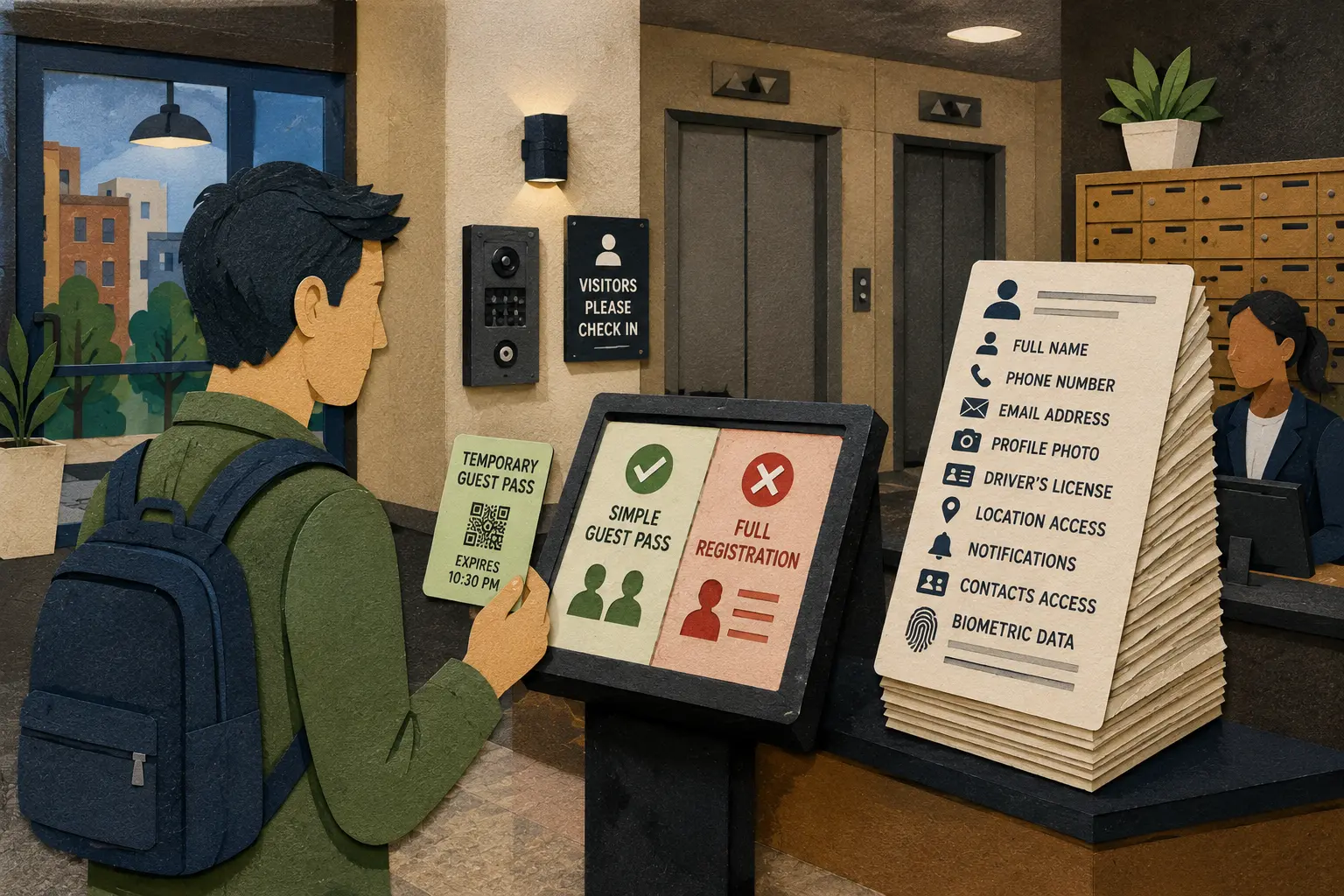
A Smaller-Data Route Through the Lobby
- The Door Should Not Need Your Life Story
- The Privacy Check in One Minute
- A Door App Is Still a Data-Collection Point
- Use the Need, Scope, and Exit Test
- Biometric Entry Deserves a Higher Bar
- Give Visitors a Real Alternative
- Keep the Visit Smaller Than the Data Trail
- Frequently Asked Questions
- References
The Privacy Check in One Minute
- Best for: Apartment residents, guests, offices, clinics, property managers, contractors, and anyone asked to install an entry app for a short visit.
- What this covers: Low-risk questions for one-time accounts, visitor passes, app permissions, access logs, and biometric entry.
- What this does not cover: Legal advice or a guarantee that a particular access system complies with every federal, state, or local rule.
- Main caution: A building can need a sensible access-control process without needing every available piece of personal information.
- When to get professional help: Ask the property manager, organization, or a qualified privacy professional for clarification when a request feels excessive, biometric data is involved, or nobody can explain how long records remain.
A Door App Is Still a Data-Collection Point
The modern lobby can be efficient. A resident sends an expiring guest pass. A contractor receives access during an approved time window. A clinic gives a patient the correct entrance and floor before the appointment. A front desk can see which visitor belongs in the building without keeping a paper sign-in sheet open on the counter.
The problem begins when a convenient door quietly becomes a permanent account.
The Federal Trade Commission's business guidance uses a simple security principle: keep only the information the business needs, protect what remains, and properly dispose of records that are no longer necessary. The same guidance tells companies developing mobile apps to make sure the app accesses only the data and functionality it needs.
That principle fits a lobby. A one-time guest visit may justify a temporary invitation and an expiration time. It does not automatically justify continuous location access, an indefinite profile, or a larger identity record than the visit requires.
A Short Visit Can Create a Long Data Trail
Depending on the system, an access flow may request or create:
- A guest name, phone number, or email address.
- The resident, office, or appointment being visited.
- Arrival and departure timestamps.
- Vehicle details for parking access.
- A profile photograph or identity-document image.
- Camera, location, Bluetooth, contact-list, or notification permissions.
- A facial image, fingerprint, or other biometric record in some systems.
- A permanent account that remains active after the visit.
Not every system collects every item. Some requests may serve a real security or operational need. The point is to notice when the data trail grows beyond the task.
The 6:25 p.m. Apartment-Lobby Scenario
Imagine visiting a relative for dinner in a mid-rise apartment building. You arrive at 6:25 p.m. The lobby sign points to an app download, but the visit lasts only two hours.
The app asks for a mobile number, email address, profile photo, precise location access, and notifications. The resident already sent your name to the front desk.
The useful response is not an argument beside the elevator. Ask whether the building offers an expiring QR pass, an intercom confirmation, or a staffed check-in. Ask which app permissions are actually required for entry. If location access is optional, leave it off. After the visit, review the app permissions and remove the app when it no longer serves a continuing need.
Use the Need, Scope, and Exit Test
A visitor should not need to read a 40-page privacy policy while standing near the mailboxes. A property manager should not need a major software migration to make the first improvement.
Use three layers: need, scope, and exit.
Layer 1: What Does the Building Actually Need?
Start with the purpose. The building may need to confirm that a visitor was invited, identify the host, and limit the pass to a specific time window.
Ask:
- Is this information needed for entry, or merely convenient for the vendor?
- Would an expiring guest link or QR pass solve the same problem?
- Is a permanent account necessary for a one-time visitor?
- Does the building offer a staffed or intercom fallback?
- Can the visitor complete the check-in without granting unrelated permissions?
A useful access system can explain why each field exists.
Layer 2: How Much Data Does the System Request?
The next question is proportionality. A guest staying for dinner, a dog walker entering twice a week, an employee with daily access, and a contractor working in a restricted room are not the same use case.
| Access situation | Smaller-data starting point | Additional data may need a clearer reason |
|---|---|---|
| One-time guest | Expiring guest pass tied to the host and visit window | Permanent profile, identity-document image, or background location access |
| Package or food delivery | Front desk, locker, call box, or approved handoff point | Broad access to resident details or a reusable building credential |
| Recurring service provider | Time-limited credential with a defined schedule | Indefinite access after the work arrangement ends |
| Office visitor | Reception check-in and host confirmation | Permanent mobile account for a single meeting |
| Higher-security location | Documented verification process matched to the risk | Treating an ordinary apartment lobby like a secure facility |
The last row matters. A higher-security site may reasonably require more verification than a dinner visit. Privacy-conscious design does not pretend every door has the same risk profile.
Layer 3: What Happens After the Visit?
Temporary access should have a visible ending.
For a visitor, that may mean checking whether the guest pass expired, removing optional permissions, and uninstalling an app that no longer serves a purpose. CISA advises mobile-device users to review app permissions, limit location permissions, keep apps updated, and delete apps they no longer use.
For a property manager or office administrator, the equivalent task is retention review. Identify which visitor records exist, where they are stored, who can access them, how long they remain, and how they are removed. The FTC's guidance also recommends scaling down access using the principle of least privilege.
The Five-Question Visitor Check
Before sharing more information, ask:
- What is the minimum information required for entry?
- Why does the app need each permission?
- Can I use an expiring pass, intercom, call box, or front desk instead?
- When does the pass or account expire?
- Who handles privacy questions when the request does not make sense?
The goal is not to make entry slower. It is to stop unnecessary collection from becoming invisible through repetition.
Biometric Entry Deserves a Higher Bar
A temporary guest code and a facial-recognition system are not interchangeable.
The FTC warned in 2023 that biometric technologies can create privacy and data-security concerns, along with potential bias and discrimination. Its policy statement points to risks such as unexpected collection, failure to assess foreseeable harms, weak vendor review, and inadequate monitoring.
A password can be reset. A temporary QR pass can expire. A fingerprint or facial image relates to a person's physical characteristics. That difference deserves a clearer purpose and a more careful review.
Illinois Shows Why Location Matters
U.S. privacy rules are not identical everywhere. Illinois provides a concrete example through its Biometric Information Privacy Act.
The Illinois law requires a private entity possessing biometric identifiers or biometric information to publish a retention schedule and destruction guidelines. It also requires written notice about collection or storage, the specific purpose and term of use, and a written release before collection. The law includes protection and disclosure rules as well.
That does not mean every visitor in every state has the same legal rights or process. It does mean that a building, employer, or vendor should not treat biometric entry as a decorative upgrade. Current state and local requirements deserve a real review before deployment.
Before Choosing Biometric Access
A property manager, employer, or building owner should ask:
- Is biometric entry necessary for this access problem?
- Can a badge, temporary pass, mobile credential, or staffed check-in solve it?
- What is stored: a raw image, a biometric template, or both?
- Who can reach the data, including vendors and contractors?
- When is the record deleted after access ends?
- What happens when the system makes a mistake?
- Which federal, state, and local rules apply to this location and use case?
The newest feature is not automatically the most proportionate one.
What Not to Assume
- “It is only a lobby app.” A lobby app can still create access logs, profiles, and permission requests.
- “The app asks for it, so the building must need it.” A field or permission can be optional, vendor-driven, or unrelated to a one-time visit.
- “Biometric entry is just a faster password.” Biometric data raises different privacy and security questions.
- “The records can be cleaned up later.” Old visitor data becomes harder to justify after the visit, contract, or access period ends.
- “Every visitor can install the app.” Guests may have limited battery, limited mobile data, accessibility needs, or a phone that does not support the required software.
Give Visitors a Real Alternative
A privacy-conscious process needs a usable fallback. “Do not install the app” is not practical advice when the guest is outside, the office meeting has started, and the front door offers no other path.
The lighter option depends on the building.
Compare the Main Access Options
| Access method | Best for | Advantage | Limitation |
|---|---|---|---|
| Expiring guest link or QR pass | One-time visits | Temporary and easy to send before arrival | Still needs a safe delivery channel and clear expiration |
| Intercom or call-box confirmation | Apartments and occasional visitors | Avoids forcing every guest into a permanent account | Can create delays during busy periods |
| Staffed front desk or reception | Offices, clinics, and larger residential buildings | Gives visitors a visible human fallback | Depends on staffed hours |
| Temporary badge or scheduled credential | Contractors and recurring service providers | Separates limited access from permanent resident or employee access | Needs expiration and return rules |
| Mobile app account | Residents, employees, or repeat users | Convenient when access is recurring | Poor fit for a one-time guest when a lighter route works |
| Biometric credential | Specific, reviewed higher-security uses | Can support controlled entry when justified | Requires stricter scrutiny, protection, and legal review |
The best process may use more than one option. A resident can use the app every day while a dinner guest receives an expiring pass.
A 15-Minute Property-Manager Review
- List every field requested from a one-time visitor.
- Remove fields that do not serve the entry purpose.
- Check whether temporary passes expire automatically.
- Identify which staff members and vendors can access visitor records.
- Publish one practical non-app fallback.
- Review whether location, camera, contact-list, or notification permissions are necessary.
- Separate one-time guest access from recurring contractor and employee access.
- Review retention and deletion rules with qualified legal and privacy guidance.
NIST describes its Privacy Framework as a voluntary tool for identifying and managing privacy risk while protecting individuals' privacy. A building does not need to adopt every framework document to benefit from the central idea: know what data the system processes and manage the risk intentionally.
Red Flags That Deserve a Pause
- A one-time visit requires a permanent account without explanation.
- The app requests precise location, contacts, photos, or camera access without a clear entry-related reason.
- A visitor cannot find any practical non-app route.
- A guest account remains active long after the visit.
- A biometric system appears without clear notice or an explained purpose.
- Nobody can explain who handles the records or when they are deleted.
- Staff share reusable building credentials casually because the official guest process is too difficult.
Safer Next Steps for Visitors
- Ask for the smallest workable route, such as an expiring pass, call box, or front desk.
- Review app permissions before enabling optional access.
- Avoid sharing reusable door codes in public messages or delivery notes.
- Remove permissions and delete the app when it no longer serves a continuing need.
- Raise unresolved concerns with the property manager, organization, or a qualified privacy professional.
Keep the Visit Smaller Than the Data Trail
A useful access system should get the right person through the right door without turning every short visit into a permanent profile.
Start with the need. Limit the scope. Confirm the exit. Use biometric tools only when the purpose and safeguards justify the extra risk. Give guests a real alternative.
The smartest lobby is not the one with the longest registration form. It is the one that can explain why it asks for each piece of information and when that information goes away.
Frequently Asked Questions
Q1. Is every building-access app a privacy problem?
No. An app can be useful when it solves a real access problem and requests information proportionate to that purpose. The practical questions are what data it collects, why it needs each permission, who can access the records, and when the account or pass expires.
Q2. Should a one-time apartment guest need a permanent app account?
Not automatically. Ask whether the building offers an expiring guest link, QR pass, intercom, call box, or staffed check-in. A recurring resident or employee credential and a short guest visit are different use cases.
Q3. Should I enable location access for a lobby app?
Ask whether the feature actually requires it. CISA advises users to review app permissions and limit location permissions. When precise location access is optional and unrelated to entry, leaving it off is a reasonable privacy choice.
Q4. Is biometric entry regulated the same way across the United States?
No. Requirements can vary by jurisdiction and use case. Illinois is one example of a state with specific biometric-information rules. A property manager, employer, or vendor should obtain qualified legal guidance before deploying or changing a biometric access system.
By: Rex Iriarte
About the author: Rex Iriarte is a Raxan.net contributor covering technology, small business, and practical digital habits.
Last updated: 2026-06-04
Disclosure: No paid placement influenced this post.
Disclaimer
This post provides general privacy and access-control information, not legal advice. Building requirements, privacy obligations, and biometric-data rules vary by location and use case. Ask the organization responsible for the system to explain its process, and use qualified legal or privacy guidance for a specific compliance question.
References
- Federal Trade Commission — “Protecting Personal Information: A Guide for Business.” https://www.ftc.gov/business-guidance/resources/protecting-personal-information-guide-business
- Federal Trade Commission — “FTC Warns About Misuses of Biometric Information and Harm to Consumers” (2023). https://www.ftc.gov/news-events/news/press-releases/2023/05/ftc-warns-about-misuses-biometric-information-harm-consumers
- Cybersecurity and Infrastructure Security Agency — “Privacy and Mobile Device Apps” (2022). https://www.cisa.gov/news-events/news/privacy-and-mobile-device-apps
- Illinois General Assembly — “740 ILCS 14/15: Retention; Collection; Disclosure; Destruction.” https://www.ilga.gov/documents/legislation/ilcs/documents/074000140K15.htm
- National Institute of Standards and Technology — “Privacy Framework.” https://www.nist.gov/privacy-framework



0 Comments