
The Door Is Asking for More Than It Needs
A short visit should not feel like opening a new bank account.
You arrive at a flat, office tower, clinic, or condominium lobby. The host says the entrance uses an app. The screen asks for your mobile number, email address, a photograph, notification permission, and perhaps an identity document. You only wanted to reach Lift B for a 40-minute appointment.
Building-access apps can make visitor entry smoother. They can also turn an ordinary door into a personal-data collection point. The practical question is not whether the app looks modern. It is whether the information requested is proportionate to the visit.
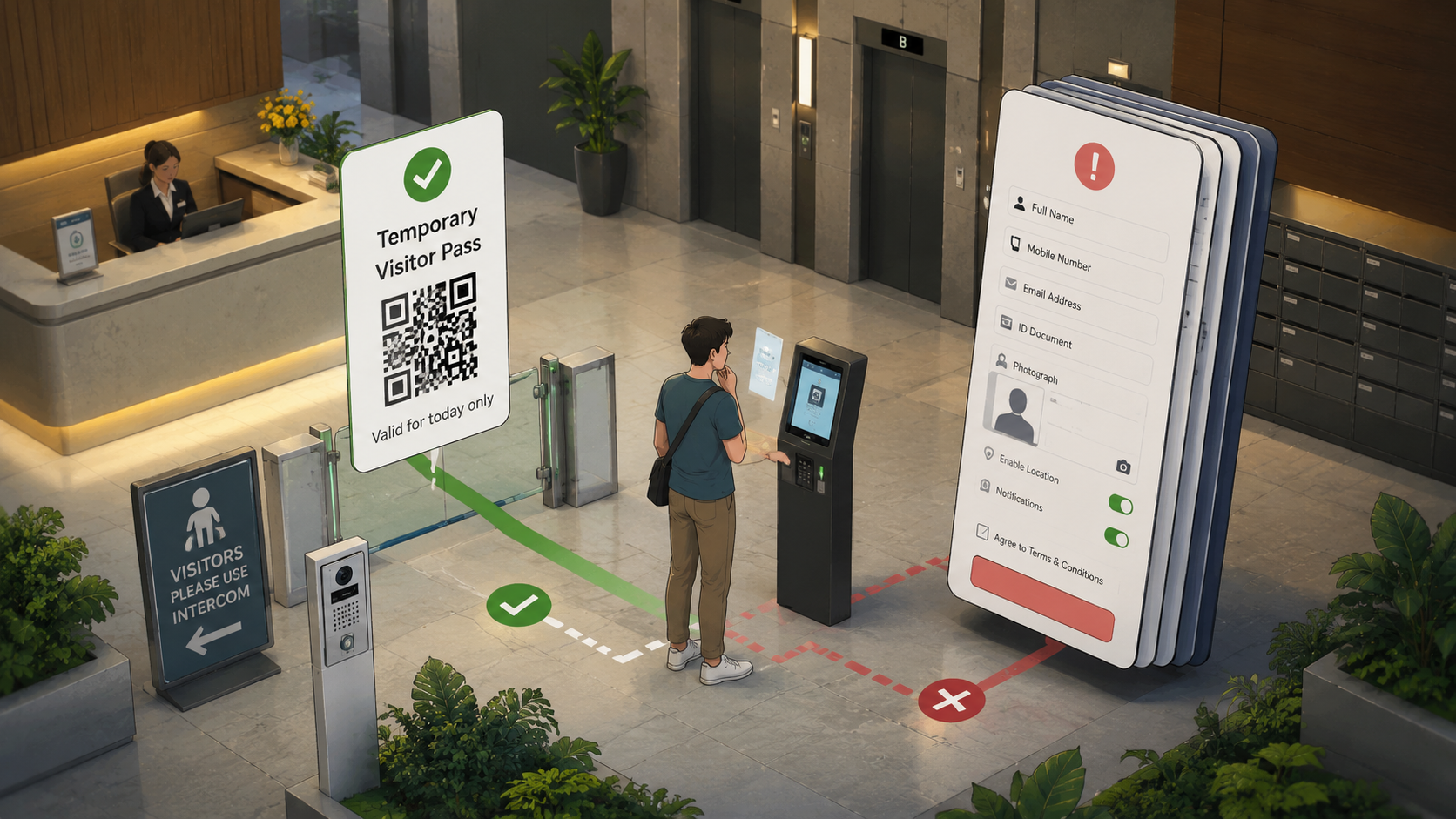
A Smaller-Data Route Through the Lobby
- The Door Is Asking for More Than It Needs
- The Privacy Cost in One Minute
- A Door App Is Still a Data-Collection Point
- Use the Three-Layer Access Check
- Give Visitors a Practical Alternative
- Convenience Works Better When the Data Request Is Smaller
- Frequently Asked Questions
- References
The Privacy Cost in One Minute
- Best for: Residents, visitors, offices, clinics, small businesses, building managers, and anyone asked to install an entry app for a short visit.
- What this covers: Low-risk questions to ask before sharing personal details, registering a visitor account, or enabling app permissions.
- What this does not cover: Legal advice or a guarantee that a particular access system complies with every applicable rule.
- Main caution: A building may have a legitimate reason to control access. That does not automatically justify collecting every available piece of personal data.
- When to get professional help: Raise concerns with the building manager, management corporation, or relevant official channel when personal data appears excessive, poorly protected, or used for an unexpected purpose.
A Door App Is Still a Data-Collection Point
The fashionable version of building access sounds harmless. A visitor registers once, receives a QR invitation, taps a phone near a reader, and enters through the correct lobby. No paper logbook. No repeated calls. No awkward conversation through an intercom while a delivery rider waits behind you.
That can be useful. The problem begins when convenience quietly expands the data request.
Singapore's Personal Data Protection Act recognises both the need to protect personal data and the legitimate need for organisations to collect, use, or disclose information for reasonable purposes. The Personal Data Protection Commission's guidance explains several practical obligations, including purpose limitation, notification, protection, and retention limitation.
Translated into lobby language: collect information for a sensible reason, explain the reason, protect the information, and stop retaining it when the reason no longer applies and there is no continuing legal or business need.
A Visit Can Create More Data Than Expected
A building-access flow may ask for or generate:
- A visitor's full name.
- A mobile number or email address.
- The host's unit, office, or appointment location.
- Arrival and departure times.
- Vehicle registration details.
- A QR invitation or visitor-pass record.
- A photograph, facial image, or biometric template in some systems.
- App permissions that may not be necessary for a one-time entry.
Not every system collects every item. Not every request is unreasonable. The useful habit is to notice when a short visit becomes a permanent account with a larger data trail than the situation appears to need.
The Management Corporation Still Has a Job to Do
The privacy question is not a demand to remove security from residential buildings. The official PDPC page for condominium and estate data management says a management corporation may collect data needed to manage the estate. It also states that the organisation should not collect information beyond what is necessary or use it for purposes the individual did not consent to.
That is the sensible middle ground.
A visitor-control system can help a building manage entry. It should not behave as if a guest visiting a relative for lunch has volunteered for indefinite tracking, marketing messages, or a permanent identity profile.
The 18:35 Lobby Scenario
Imagine visiting a friend after work. The building's public entrance is beside a covered walkway. You arrive at 18:35 and receive a message asking you to install an app before entering.
The app requests your name, mobile number, email address, profile photograph, notification access, and permission to use your location. Your friend only needs the lobby system to let you enter once and direct you to the correct lift bank.
The useful response is not an argument beside the guardhouse. It is a short set of questions:
- Is there a browser-based visitor pass or QR invitation?
- Which details are required for this visit?
- Is location permission necessary for entry?
- Will the visitor account expire after the visit?
- Is there a staffed or intercom-based fallback?
A modern entrance should be able to explain its own requirements.
Use the Three-Layer Access Check
A visitor should not need a law degree to use a lobby. A building manager should not need a complicated privacy dashboard to make a sensible first improvement.
Use three layers: need, scope, and exit.
Layer 1: What Does the Building Actually Need?
Start with the narrow purpose. The building may need to know that a visitor has been invited, which host approved the visit, and whether the visitor pass remains valid.
That does not automatically mean the building needs a full identity document, a permanent account, continuous location access, or a biometric enrolment.
Ask:
- Is this information required for entry or merely convenient for the vendor?
- Would a temporary QR invitation solve the same problem?
- Could the system use a short-lived visitor reference instead of a permanent profile?
- Does the building offer a practical option for people without the app?
Layer 2: How Much Data Does the System Request?
The next question is proportionality. A one-time visit and a recurring staff-access badge are different situations.
| Access situation | A smaller-data starting point | Additional data may need stronger justification |
|---|---|---|
| One-time guest visit | Host-approved QR invitation with an expiry time | Permanent account, full identity document, or unrelated app permissions |
| Delivery handoff | Public reception, locker, or approved collection point | Detailed resident information shared with every rider |
| Clinic appointment | Appointment confirmation and clear lobby directions | Personal details unrelated to entry or appointment handling |
| Contractor access | Time-limited registration tied to the approved job | Indefinite access after the job ends |
| High-security location | Documented verification process appropriate to the risk | Treating every ordinary lobby like a secured data centre |
The last row matters. A secured data centre may have stronger identity-verification needs than a residential lunch visit. Good privacy practice is not pretending that every doorway carries the same risk.
Layer 3: What Happens After the Visit?
Temporary access should have a visible end.
Ask whether the pass expires automatically. Check whether the visitor account remains active. Remove permissions that are no longer useful. Uninstall the app when it serves no continuing purpose, provided doing so does not interfere with a legitimate recurring need.
For building managers, the equivalent task is retention review. A visitor list should not become an attic filled with old personal data simply because deleting records is less exciting than installing the system.
The Five-Question Visitor Check
Before sharing more information, ask:
- What is the minimum information required for entry?
- Why is each requested permission needed?
- Can I use a temporary QR link, intercom, or staffed entrance instead?
- When will the visitor pass or account expire?
- Who should I contact when the request feels excessive or unclear?
The goal is not to make every visit slower. It is to prevent unnecessary data collection from becoming invisible through repetition.
Full NRIC Numbers Should Not Become a Lobby Shortcut
Identity documents deserve a stricter pause.
PDPC guidance has long treated NRIC numbers as sensitive because they can be used to unlock substantial information about an individual and may create risks such as identity theft or fraud when mishandled. In February 2026, PDPC announced stepped-up enforcement against misuse of NRIC numbers and linked to guidance requiring organisations to cease using NRIC numbers for authentication by 31 December 2026.
A building may still have a legitimate reason to verify identity in a specific situation. That does not make a full NRIC number an appropriate default password, account identifier, or routine lobby shortcut.
The Ordinary Condominium Example
PDPC guidance gives a practical example for visitors to a private condominium. It says a management corporation could check a visitor's NRIC or another photo ID and record a smaller set of information, such as the visitor's full name, partial NRIC number, contact details, or vehicle-registration number.
The same guidance suggests using a protected electronic visitor-management system rather than an open visitor logbook. It also says records should not be retained longer than the relevant purpose and legal or business need require.
That example does not dictate one perfect lobby system. It shows the direction of travel: verify reasonably, collect less where possible, protect the records, and remove them when the reason for keeping them ends.
What Not to Assume
- “It is only a lobby app.” A lobby app can still collect names, contact details, access logs, photographs, and other personal data.
- “The app requests the permission, so it must need it.” A requested permission may be optional, vendor-driven, or unrelated to a one-time visit.
- “A full NRIC number is the safest identifier.” Using a permanent national identifier as a default authentication shortcut creates avoidable risk.
- “Deleting old visitor data can wait.” Retention becomes harder to justify after the visit, project, or access period ends.
- “The visitor can simply install the app.” Older relatives, temporary workers, overseas visitors, and people with low battery or limited data may need another route.
Biometric Entry Deserves a Higher Bar
Facial recognition and fingerprint systems may be appropriate for some security applications. They should not be treated as decorative upgrades.
PDPC published a guide for responsible use of biometric data in security applications for management corporations, building owners, premises owners, and security-service companies. The guide discusses security cameras and biometric recognition systems, including facial and fingerprint recognition used for access control.
Biometric data differs from a temporary visitor code. A password can be replaced. A facial image or fingerprint relates to a person's physical characteristics. That deserves a clear purpose, careful protection, and a serious review of whether the system is proportionate to the setting.
Before Choosing Biometric Access
A building manager should ask:
- Is biometric enrolment necessary for this access-control problem?
- Can a badge, temporary QR pass, or staffed verification process solve it?
- What data is stored: raw images, biometric templates, or both?
- How does the system remove enrolment records when access ends?
- Which staff members and vendors can reach the data?
- What happens when the system makes an identification mistake?
The best system is not the one with the most futuristic demonstration. It is the one that fits the actual security need without collecting more than the building can responsibly protect.
Give Visitors a Practical Alternative
Privacy becomes performative when the official answer is “do not use the app” but the physical entrance offers no workable alternative.
A smaller-data design gives visitors a clear route. It also reduces support calls when a phone battery is low, a visitor does not have local mobile data, or an older relative would rather use an intercom.
Compare the Main Access Options
| Access method | Best for | Advantage | Limitation |
|---|---|---|---|
| Expiring QR invitation | One-time guests and short visits | Fast, temporary, and easy to send before arrival | Still needs a safe delivery channel and a clear expiry rule |
| Staffed entrance or reception | Clinics, offices, and buildings with regular visitors | Gives people a visible human fallback | Depends on staffed hours |
| Intercom confirmation | Residential visits and occasional guests | Avoids forcing every visitor to install an app | Can create delays during busy periods |
| Temporary visitor pass | Contractors and approved recurring visitors | Separates visitor access from permanent resident access | Needs return, expiry, and record-handling rules |
| Biometric access | Specific higher-security use cases | Can support controlled entry where justified | Requires stronger scrutiny, protection, and removal procedures |
| Permanent app account | Residents or workers with recurring access | Convenient for repeat use | Poor fit for a one-time visit when a lighter option works |
The point is not that one option wins every time. The point is that the visitor should not carry the entire burden of a building's technology choice.
A 15-Minute Building-Manager Review
- List the data requested from a one-time visitor.
- Remove every field that does not serve the entry purpose.
- Check whether passes expire automatically.
- Review which vendor and staff accounts can access visitor records.
- Publish one practical non-app route.
- Confirm that lobby signage points visitors to the correct fallback.
- Review whether NRIC handling aligns with current PDPC guidance.
- Schedule a retention review instead of keeping records by default.
A small review can remove a surprising amount of friction without weakening access control.
What to Do When the Request Feels Excessive
Do not argue with front-desk staff who may not control the system. Ask for the building manager, office administrator, or management corporation contact.
Safer Next Steps
- Ask for the purpose. Request a plain-language explanation for the information or permission.
- Use the smallest workable route. Prefer a temporary pass, public-facing entrance, or staffed fallback when available.
- Avoid sharing private access codes publicly. Keep visitor instructions useful without exposing security details.
- Check the app permissions after the visit. Remove permissions and uninstall the app when it no longer serves a recurring need.
- Raise unresolved concerns through the official route. For condominium or estate matters, PDPC provides an official data-management information page with steps for raising concerns.
Red Flags That Deserve a Pause
- A one-time visit requires a permanent account without explanation.
- The app asks for unrelated permissions.
- The building requests a full NRIC number as a routine password or default identifier.
- The system keeps an open visitor logbook where later visitors can see earlier records.
- A visitor account remains active long after the approved visit.
- The app requires biometric enrolment for an ordinary visit without a clear reason.
- Nobody can explain who handles the data or when it is removed.
Convenience Works Better When the Data Request Is Smaller
A useful building-access system should make entry easier without treating every door as an excuse to collect more information.
Ask what the building needs. Check the scope. Confirm the exit. Give visitors a workable alternative. Review old records instead of keeping them forever.
The smartest lobby is not the one with the longest registration form. It is the one that gets the right person through the right door while asking for no more data than the situation reasonably requires.
Frequently Asked Questions
Q1. Is every building-access app a privacy problem?
No. An access app can be useful when it solves a real entry problem and collects information proportionate to that purpose. The practical questions are what data it requests, why the data is needed, how long the records remain, and whether visitors have a workable alternative.
Q2. Should I share my full NRIC number for a routine visitor pass?
Do not assume a full NRIC number is necessary for every visit. Ask why it is required and whether a smaller-data option is available. Current PDPC guidance deserves a careful review whenever an organisation collects or uses NRIC numbers.
Q3. Is facial recognition appropriate for an ordinary lobby?
It depends on the security need and the building's ability to protect the biometric data responsibly. A temporary QR invitation, visitor pass, reception desk, or intercom may solve an ordinary access problem with a smaller data footprint.
Q4. What should I do when an access app asks for location permission?
Ask whether the permission is necessary for the entry process. A one-time visitor may not need to enable unrelated permissions. Review the permission after the visit and remove it when it no longer serves a clear purpose.
By: Rex Iriarte
About the author: Rex Iriarte is a Raxan.net contributor covering technology, small business, and practical digital habits.
Last updated: 2026-06-02
Disclosure: No paid placement influenced this post.
Disclaimer
This post provides general privacy and access-control information, not legal advice. Building requirements vary by setting, risk level, and applicable rules. Ask the organisation responsible for the access system to explain its process, and use official guidance or professional advice when a specific legal concern needs review.
References
- Personal Data Protection Commission — “Data Protection Obligations” (2023). https://www.pdpc.gov.sg/data-protection-obligations
- Personal Data Protection Commission — “Condo or Estate Data Management.” https://www.pdpc.gov.sg/individuals/e-services/report-a-data-protection-concern/condo-or-estate-data-management
- Personal Data Protection Commission — “Guide on the Responsible Use of Biometric Data in Security Applications” (2022). https://www.pdpc.gov.sg/help-and-resources/2022/05/guide-on-the-responsible-use-of-biometric-data-in-security-applications
- Personal Data Protection Commission — “PDPC to Step up Enforcement Action Against Misuse of NRIC Numbers and Issues New Advisory on Data Protection” (2026). https://www.pdpc.gov.sg/media-events/pdpc-to-step-up-enforcement-action-against-misuse-of-nric-numbers-and-issues-new-advisory-on-data-protection




0 Comments