
Why an Old Netflix Blu-ray Player Needs a Reality Check
A Blu-ray player with Netflix sounded like a neat all-in-one purchase when streaming apps were newer. One box could play Blu-ray discs, DVDs, CDs, and online video through the TV.
In 2026, that same listing needs a reality check. The Insignia NS-BRDVD4-style source is useful as a snapshot of older living-room tech, but it should not be rewritten as a fresh “buy this for Netflix” recommendation. Older apps can lose support, remotes go missing, firmware updates disappear, and some players are better as disc machines than streaming boxes.
Used Blu-ray Player Buying Map
- Why an Old Netflix Blu-ray Player Needs a Reality Check
- The 60-Second Used Blu-ray Player Decision
- What the Insignia-Style Listing Still Gets Right
- How to Check a Used Blu-ray Player Before Buying
- Streaming App Risk, Firmware, and Setup Mistakes
- What to Do Before You Put It in the TV Stand
- Used Blu-ray Player Questions People Ask
- References
The 60-Second Used Blu-ray Player Decision
- Best for: People with Blu-ray discs, DVDs, CDs, guest-room TVs, classroom TVs, or a simple movie shelf that still gets used.
- Main takeaway: Buy an older Blu-ray player for disc playback first. Treat built-in Netflix or other streaming apps as a bonus that may not work forever.
- Time, cost, or effort: Expect 10 to 20 minutes of testing if buying locally, plus another 15 minutes for TV setup and firmware checks at home.
- Best result to expect: A low-cost disc player that handles physical media well and connects cleanly over HDMI.
- When not to use this: Skip an older Blu-ray player if your main goal is reliable streaming. A current streaming stick or smart TV app is usually safer.
What the Insignia-Style Listing Still Gets Right
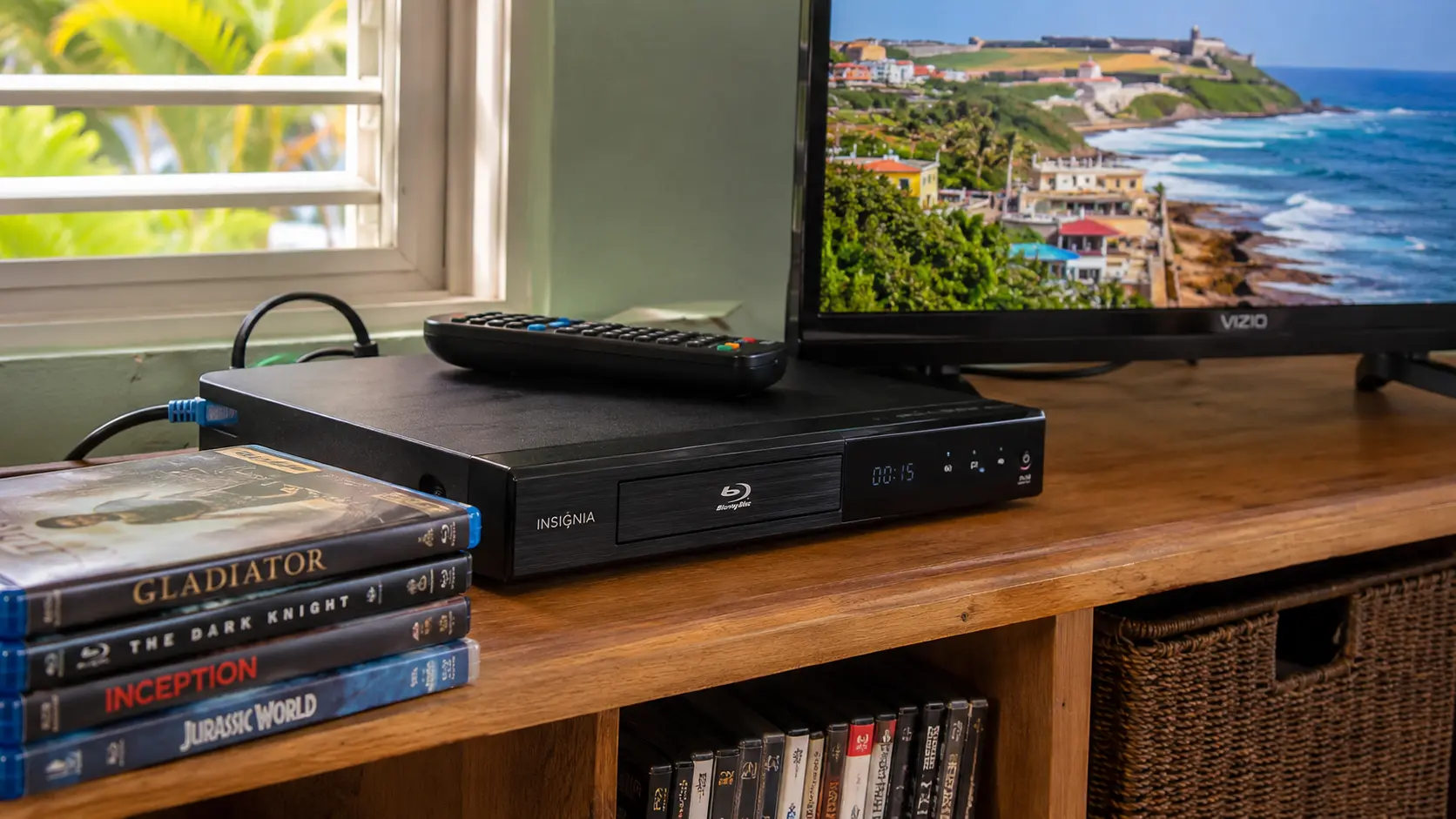
The source listing describes an Insignia NS-BRDVD4 full 1080p Blu-ray player with Netflix, Pandora, and CinemaNow-style online services. It also points to a practical feature that still matters: backward compatibility with DVDs and CDs.
The important part is separating disc value from app value. Blu-ray discs do not depend on a streaming company keeping an old app alive. Streaming apps do. Netflix’s own support guidance says some devices may show messages such as “Netflix is no longer available on this device” when support ends. That does not mean the Netflix account is broken. It means that device can no longer run the service.
Key terms worth knowing
- Blu-ray Disc: A high-definition disc format commonly used for 1080p movies and bonus features.
- Backward compatibility: The player can also handle older formats, often DVDs and CDs.
- Firmware: The player’s internal software, sometimes updated to fix playback or app issues.
- HDMI: The cable connection most people should use between the player and TV.
A realistic used-device scenario
Picture a used player for $15 to $35 at a yard sale, thrift shop, or online local listing. The seller says “it has Netflix,” but the remote is missing and the player has not been connected to the internet in years.
That can still be a fine buy if you only want to play discs. It is a bad buy if Netflix is the reason you are purchasing it.
How to Check a Used Blu-ray Player Before Buying
Start with the boring parts: power, tray, remote, HDMI, and disc playback. Those matter more than the marketing sticker on the front. If the disc tray sticks or the remote is gone, the player may still work, but the price should reflect the hassle.
Bring one commercial DVD and one Blu-ray disc if you are testing in person. A DVD alone does not prove the Blu-ray laser works. A Blu-ray alone does not prove older DVD playback works.
Practical steps before buying
- Check that the disc tray opens and closes without grinding or sticking.
- Confirm that the player includes the remote, power cable, and any needed adapter.
- Test one Blu-ray disc and one DVD if possible.
- Confirm that the HDMI port is not loose or damaged.
- Check whether the TV shows video at 1080p through HDMI.
- Treat built-in Netflix, Pandora, and other old apps as uncertain until tested.
Quick decision guide
- If you have a shelf of Blu-ray discs, a used player can be worth it if playback works.
- If you have mostly DVDs, a cheaper DVD player may be enough unless you want HDMI.
- If you want Netflix first, buy a current streaming device instead.
- If the remote is missing, price a replacement before buying.
- Skip the player if it has tray problems, fan noise, no HDMI output, or a seller who will not test it.
Streaming App Risk, Firmware, and Setup Mistakes
The biggest mistake is buying an old internet-connected Blu-ray player as if it were a modern streaming device. Streaming support changes. Apps may require newer security, newer software, or hardware features that older players cannot provide. Sony, for example, announced Netflix support ending in 2024 for certain 2013 and 2014 Blu-ray players and home theater systems. Other brands and models can face similar age-related limits.
That is why the safer rule is simple: let the Blu-ray player play discs, and let a modern streaming device handle apps. If the old Netflix app still works, nice. Do not build your setup around it.
Common mistakes
- Buying for the Netflix logo: The logo may be from an older app era. Test the service or ignore the feature.
- Testing only DVDs: DVD playback does not prove Blu-ray playback. Test both disc types.
- Ignoring the remote: Many settings and app screens need it. Price a replacement remote before buying.
- Using old composite cables: HDMI is usually the cleaner choice for HDTVs.
- Assuming all discs will play: Scratched discs, region issues, or firmware limits can cause problems.
Used Blu-ray player alternatives
| Option | Best for | Pros | Cons |
|---|---|---|---|
| Used Blu-ray player | Disc collections and guest-room TVs | Cheap, plays physical media, often HDMI | Streaming apps may be outdated |
| New basic Blu-ray player | Reliable disc playback | Easier returns, newer hardware | Costs more than thrift finds |
| 4K Ultra HD Blu-ray player | 4K discs and better home theater setups | Better format support | More expensive |
| Streaming stick | Netflix, YouTube, Hulu-style apps | Current apps, small, cheap | Does not play discs |
| Game console with disc drive | Gaming plus movies | One device for several jobs | Larger and higher power use |
What to Do Before You Put It in the TV Stand
Once the player is home, run a short setup test before hiding it behind furniture. Connect it directly to the TV with HDMI first. Avoid adding an older receiver, switch box, or long cable until you know the player works.
Test three things: a Blu-ray movie, a DVD, and audio through the TV speakers. Then check the settings menu for output resolution. If there is a firmware update option, review the manufacturer’s instructions before running it. Do not unplug the player during an update.
The Bottom Line for Older Blu-ray Players
An older Blu-ray player can still be useful, but the reason to keep or buy one has changed. The reliable value is physical media playback, HDMI output, and simple reuse of a working device. The risky value is old built-in streaming.
The Insignia NS-BRDVD4-style listing should not be treated as a fresh Netflix recommendation. It works better as a reminder to check the parts that matter: discs, remote, HDMI, firmware, and whether your streaming plan belongs on a newer device.
Build a Five-Minute Test Before You Buy
Before handing over money, ask for a quick test or buy only where returns are allowed. A working tray and a working HDMI picture are the first filters. Disc playback comes next. App support comes last.
Final buying checklist
- Test Blu-ray playback, not only DVD playback.
- Confirm the remote is included or easy to replace.
- Use HDMI for the first setup test.
- Check for obvious tray, fan, or loading problems.
- Treat old Netflix and Pandora apps as uncertain.
- Buy a current streaming stick if apps are the main goal.
- Keep receipts or return options until the player passes your home setup test.
Used Blu-ray Player Questions People Ask
Q1. Is an old Blu-ray player still worth buying?
A1. Yes, if you want disc playback and the unit has been tested. It is less attractive if streaming apps are the main reason. For Netflix and other current apps, a modern streaming device is usually a safer choice.
Q2. Can a Blu-ray player still play regular DVDs?
A2. Many Blu-ray players can play DVDs, but you should still test both formats before buying used. A player can read one type of disc and fail on another if the drive is worn or dirty.
Q3. Should I trust a used Blu-ray player that says it has Netflix?
A3. Only as a bonus. Older Netflix apps can lose support, and some players may no longer connect properly to the service. Buy the player for discs first, not for the streaming label.
Q4. What cable should I use with a 1080p Blu-ray player?
A4. Use HDMI when the TV supports it. HDMI carries video and audio through one cable and is the cleanest option for most HDTV setups.
Q5. What should I test before buying a used Blu-ray player?
A5. Test the tray, remote, HDMI output, Blu-ray playback, DVD playback, audio, and basic menu navigation. Check apps last because older streaming support is the least dependable part of the purchase.
By: Marcus Irizarry
Why trust this: This guide turns a thin product listing into a practical used-device checklist using the supplied source details, manufacturer setup material, and current streaming-support guidance.
Last updated: 2026-06-17
Disclosure: The source HTML included an affiliate-style Amazon reference, but no paid placement influenced this rewrite.
References
- Best Buy / Insignia — “NS-BRDVD4 Quick Setup Guide.” https://files.bbystatic.com/vq9xvdIG1N13keTCJ%2FMrbA%3D%3D
- Netflix Help Center — “Netflix is no longer available on this device.” https://help.netflix.com/en/node/112425
- Sony Support — “Netflix service ending on 2013-2014 Blu-ray Players and Blu-ray Player Home Theater Systems.” https://www.sony.ie/electronics/support/articles/00346521
- Blu-ray Disc Association — “Blu-ray Disc Format.” https://www.blu-raydisc.info/format-specifications/format-specifications.asp



0 Comments