
Why Small-Business Devices Need a Lifecycle, Not Random Fixes
A small-business laptop usually enters the company casually. Someone buys it in a hurry, signs in with a mix of personal and work accounts, installs what they need, and calls the IT consultant only when something breaks.
That approach creates expensive confusion later. Nobody knows who owns the device, what software was installed, where the recovery key lives, whether files are backed up, or what should happen when the employee leaves. A device lifecycle package turns that mess into a repeatable service: purchase guidance, setup, inventory, support, offboarding, wipe or retire planning, and replacement timing.
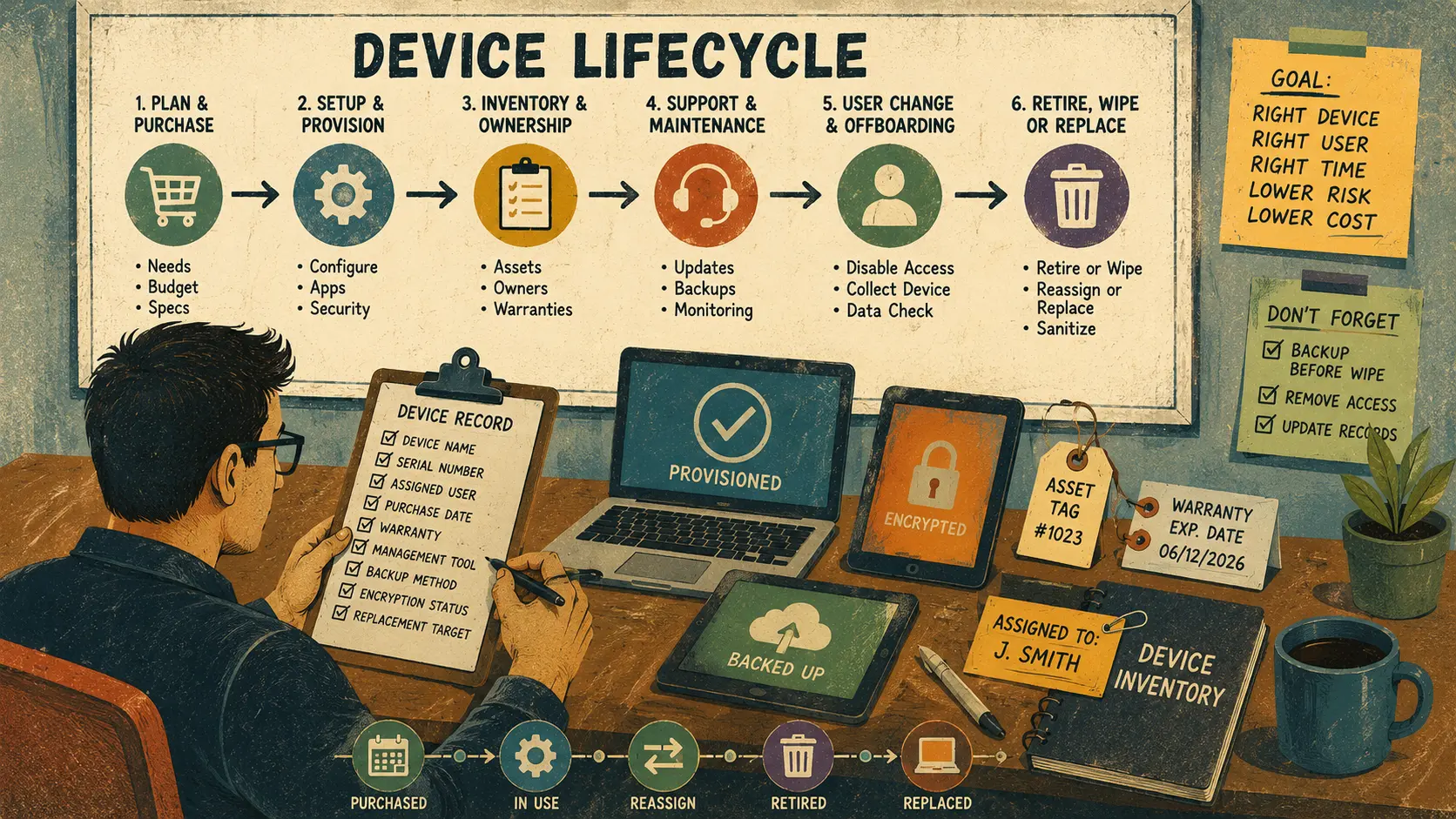
Device Lifecycle Service Map
- Why Small-Business Devices Need a Lifecycle, Not Random Fixes
- Device Lifecycle Package at a Glance
- What a Device Lifecycle Package Actually Covers
- Build the Package Around Six Stages
- Risks, Limits, and When to Escalate
- Make the Lifecycle Easy to Sell
- Next Step: Create the First Device Record
- FAQs
- References
Device Lifecycle Package at a Glance
- Best for: Solo IT consultants, micro-MSPs, and small-business tech providers supporting 5 to 75 devices.
- What this covers: A practical service framework for tracking devices from purchase through setup, support, offboarding, wipe, retirement, and replacement.
- What this does not cover: Legal retention rules, regulated compliance design, forensic recovery, or guaranteed data destruction.
- Main caution: Do not wipe, retire, recycle, or reassign a device until ownership, backup status, management status, and data-retention needs are clear.
- When to get professional help: Escalate when the business handles regulated data, legal holds, suspected theft, employee disputes, sensitive client files, or incident-response concerns.
What a Device Lifecycle Package Actually Covers
A device lifecycle package gives the client one clear path for every laptop, desktop, tablet, and business phone. It answers the same questions every time a device appears, changes hands, breaks, or leaves the business.
The value is not only technical. It protects billable hours, cash flow, uptime, and reputation. Instead of getting dragged into emergency work after a lost laptop or messy employee exit, the consultant has a known record and a safer process.
Scope and key terms
- Device lifecycle: The full path from buying a device to retiring it.
- Asset inventory: A current list of business devices, owners, users, and status.
- Provisioning: The setup process that prepares a device for a specific user or role.
- Offboarding: The process used when a user leaves, changes roles, or returns equipment.
- Retire action: Removing company management or company data from a managed device, depending on the tool and configuration.
- Wipe action: Resetting or erasing a device, usually for loss, reassignment, disposal, or serious cleanup.
- Sanitization: A more formal data-removal process used when media must be cleared, purged, destroyed, or otherwise protected based on data sensitivity.
A small-business client does not need to hear every technical term during the sales call. They need the practical promise: “We’ll know what you own, who uses it, how it was set up, when it should be replaced, and what to do before it leaves your control.”
Mini scenario: the missing sales laptop
A 12-person sales office has a laptop assigned to a field rep. The rep leaves with little notice, and the owner asks the IT consultant, “Can we wipe it?”
Without a lifecycle record, the answer is slow. Is the device company-owned? Is it enrolled in Microsoft Intune, another MDM tool, or no management tool at all? Are company files backed up? Is there a legal hold? Does the owner want a full wipe, company-data removal, account disablement, or a police report because the device is missing?
With a device lifecycle package, the consultant checks the record first. The record shows device owner, assigned user, serial number, management status, BitLocker recovery location, backup method, last seen date, and offboarding checklist. The consultant can respond with a safer plan instead of guessing under pressure.
Build the Package Around Six Stages
A device lifecycle package should be simple enough for a busy business owner to understand, but structured enough that the consultant can repeat it.
Safer next steps for each stage
- Purchase planning. Define what the business should buy before someone panic-orders the cheapest laptop. Set minimum RAM, storage, warranty, screen size, docking needs, and business-grade support expectations.
- Provisioning and setup. Apply the business baseline: user account, updates, encryption status, browser defaults, security tools, remote support approval, printer access, cloud storage, and required apps.
- Inventory and ownership. Record device name, serial number, purchase date, assigned user, role, location, warranty, management status, and replacement target date.
- Support and maintenance. Schedule check-ins for updates, backup verification, device health, storage pressure, battery condition, and recurring user complaints.
- User change or offboarding. Disable or secure accounts, collect the device, confirm data status, remove access, document the return condition, and decide whether to reassign, rebuild, or retire.
- Retire, wipe, or replace. Use the correct path for the device: retire from management, wipe for reassignment, sanitize for disposal, or replace when support cost exceeds business value.
Device record fields to track
| Field | Why it matters |
|---|---|
| Device name | Helps match support tickets to the correct machine |
| Serial number | Needed for warranty, insurance, and asset control |
| Assigned user | Shows who is responsible for daily use |
| Business owner | Clarifies who approves wipe, replacement, or reassignment |
| Purchase date | Helps plan warranty and replacement timing |
| Warranty status | Reduces surprise repair costs |
| Management tool | Shows whether remote actions are possible |
| Backup method | Protects against accidental loss during repair or wipe |
| Encryption status | Helps protect lost or stolen devices |
| Replacement target | Turns surprise purchases into budget planning |
For tracking, a solo consultant can start with a spreadsheet. As the client grows, the same fields can move into Odoo, Zoho, any other ERP, a PSA tool, an RMM platform, or a simple asset-management app. The tool matters less than the discipline of keeping the record current.
Quick decision guide
- If the client has fewer than 10 devices, start with a simple inventory and setup checklist.
- If the client has 10 to 25 devices, add replacement planning, warranty tracking, and a standard offboarding process.
- If the client has 25 or more devices, recommend managed enrollment, role-based baselines, and recurring lifecycle reviews.
- If the client has regulated data or legal-retention concerns, do not improvise wipe or disposal rules. Get the proper compliance and legal guidance.
- Skip remote wipe promises if the device is not enrolled, not reachable, not encrypted, or not under the client’s management authority.
Risks, Limits, and When to Escalate
Device lifecycle work touches security, privacy, business records, employment transitions, and client data. That does not mean every small office needs enterprise complexity. It does mean the consultant should avoid casual wipe advice.
A remote wipe can be the right answer for a company-owned, properly managed device. It can also be the wrong answer if the business needs records preserved, if the user owns the device, if there is a dispute, or if important data exists only on that machine.
What not to assume
- Do not assume ownership. A device bought by an employee, reimbursed by the company, or used for both personal and work data needs a careful review before wipe or retire actions.
- Do not assume backups exist. Cloud sync is not the same as a complete backup, and not every folder is automatically protected.
- Do not assume remote wipe is available. Remote actions depend on enrollment, connectivity, permissions, and the management platform.
- Do not assume disposal is just recycling. Storage media may still contain sensitive data unless handled through a documented sanitization process.
- Do not assume replacement is wasteful. A $650 laptop that steals five hours of support every quarter may cost more than a planned replacement.
Risk table for client conversations
| Situation | Safer consultant response | Why it matters |
|---|---|---|
| Employee leaves suddenly | Pause, confirm ownership and data-retention needs, then follow offboarding checklist | Prevents accidental data loss or privacy problems |
| Laptop is lost | Disable accounts, check management status, confirm backup, then consider remote actions | Protects access before focusing only on the device |
| Device is being resold | Confirm data is backed up, wipe or sanitize properly, remove from accounts and management | Reduces risk of exposed business data |
| Device is old and slow | Compare support time, battery health, warranty, and replacement cost | Avoids endless tune-ups on a bad asset |
| Device has suspected malware | Treat as security triage, not normal lifecycle work | Protects the network and client data |
Make the Lifecycle Easy to Sell
Business owners do not buy “asset inventory” because the phrase sounds like homework. They buy fewer emergencies, cleaner handoffs, safer employee exits, and less wasted money on bad hardware.
Package the offer around outcomes:
- Device setup that does not become a mystery later
- A device list the owner can actually understand
- Employee exit steps that do not depend on memory
- Replacement planning before a laptop dies during payroll week
- Clear records for insurance, warranty, and support
Simple package structure
| Package | Best for | What to include | What to exclude |
|---|---|---|---|
| Starter Device Inventory | Small offices with unmanaged devices | Device list, assigned user, serials, warranty notes, backup status, risk notes | MDM rollout, wipe execution, compliance policy |
| New Device Onboarding | New hires or replacement laptops | Purchase spec, setup baseline, app install, account access, handoff notes | Data migration unless scoped |
| Offboarding and Reassignment | Returned employee devices | Account checklist, backup confirmation, rebuild or reassign path, condition notes | Legal advice, HR decisions, forensic review |
| Quarterly Lifecycle Review | Clients with recurring support | Inventory update, warranty review, replacement queue, backup spot-check, issue trends | Full security audit or compliance certification |
A consultant can price these as one-time projects or recurring add-ons. A practical starting point might be a per-device setup fee, a per-device inventory fee, and a quarterly review fee. The exact number depends on market, travel, management tools, documentation depth, and client risk.
The key is to charge for the system, not just the touch time. The client is not only paying for you to set up a laptop. They are paying to avoid not knowing what happened to that laptop later.
Next Step: Create the First Device Record
Start with one client and one device. Build the smallest useful record, then repeat it.
Do not wait for the perfect asset platform. A spreadsheet with the right fields beats a fancy tool that nobody updates. Once the client understands the value, the record can move into Odoo, Zoho, any other ERP, a PSA, an RMM, or an MDM-connected inventory system.
Device lifecycle checklist for consultants
- Record device name, serial number, purchase date, warranty, and assigned user.
- Confirm whether the device is company-owned, employee-owned, or mixed-use.
- Document backup method before major setup, wipe, repair, or reassignment.
- Record encryption status and recovery-key location where appropriate.
- Standardize setup by role, not by random user preference.
- Track the management tool used, such as Intune, another MDM, RMM, or manual process.
- Create an offboarding checklist before the first employee exit.
- Separate retire, wipe, rebuild, and sanitization into different service paths.
- Recommend replacement based on support cost, risk, age, warranty, and user role.
- Review the inventory at least quarterly for active clients.
Keep Devices From Becoming Client Surprises
The strongest IT service packages reduce confusion before it turns into panic. Device lifecycle work does exactly that.
A small business may start with five laptops and no process. A year later, it has nine devices, two former employees, three unknown chargers, a lost tablet, and one laptop nobody wants to wipe because nobody knows what is on it. The consultant who builds the lifecycle early becomes more than the repair person. They become the person who keeps the client’s equipment, access, and replacement planning under control.
FAQs
Q1. What is a device lifecycle package?
A1. A device lifecycle package is a repeatable IT service that tracks a device from purchase to retirement. It usually includes purchase guidance, setup, asset inventory, support notes, user changes, wipe or retire planning, and replacement timing.
Q2. Is device lifecycle management only for larger companies?
A2. No. Small businesses often need it more because they do not have a dedicated IT department. Even a 5-person office can lose time and data confidence when nobody knows who owns a device, where files are backed up, or whether a returned laptop is safe to reuse.
Q3. What is the difference between retiring and wiping a device?
A3. In common device-management language, retiring usually removes company management and company data while leaving the device itself and personal data intact when supported by the platform. Wiping is more aggressive and may reset or erase the device. The exact behavior depends on the management tool, enrollment type, operating system, and selected action.
Q4. How often should a small business review its device inventory?
A4. For active clients, a quarterly review is a practical starting point. Review sooner after hiring, employee exits, lost devices, office moves, major software changes, or hardware purchases.
Q5. Should an IT consultant handle device disposal?
A5. Only if the scope is clear. Disposal may involve backup confirmation, account removal, management unenrollment, data sanitization, recycling records, or a certified disposal vendor. Sensitive or regulated data should be handled through a documented process.
By: Rex Iriarte
About the author: Written for solo IT consultants and micro-MSPs who need practical service packaging, client handoff structure, and safer device-management workflows.
Reviewed by: Editorial review only. No credentialed legal, compliance, or cybersecurity certification review is claimed.
Last updated: 2026-06-23
Disclosure: No paid placement influenced this post.
Disclaimer
This article provides general educational guidance for IT service packaging. It is not legal, compliance, forensic, or individualized cybersecurity advice. Before wiping, retiring, recycling, or reassigning a device, confirm authorization, ownership, backup status, management status, and any data-retention requirements that may apply.
References
- Microsoft Learn — “Remote Device Action: Wipe.” https://learn.microsoft.com/en-us/intune/intune-service/remote-actions/device-wipe
- Microsoft Learn — “Remote Device Action: Retire.” https://learn.microsoft.com/en-us/intune/device-management/actions/retire
- NIST — “SP 800-88 Rev. 1, Guidelines for Media Sanitization.” https://csrc.nist.gov/pubs/sp/800/88/r1/final
- NIST — “The NIST Cybersecurity Framework (CSF) 2.0.” https://nvlpubs.nist.gov/nistpubs/CSWP/NIST.CSWP.29.pdf
- Federal Trade Commission — “Cybersecurity for Small Business.” https://www.ftc.gov/business-guidance/small-businesses/cybersecurity



0 Comments