
A Quote Should Not Start With Guesswork
A client says the office needs “better Wi-Fi.” That sounds simple until the first questions uncover two floors, 18 employees, a warehouse scanner, a guest network, unreliable internet service, and a deadline before a new location opens.
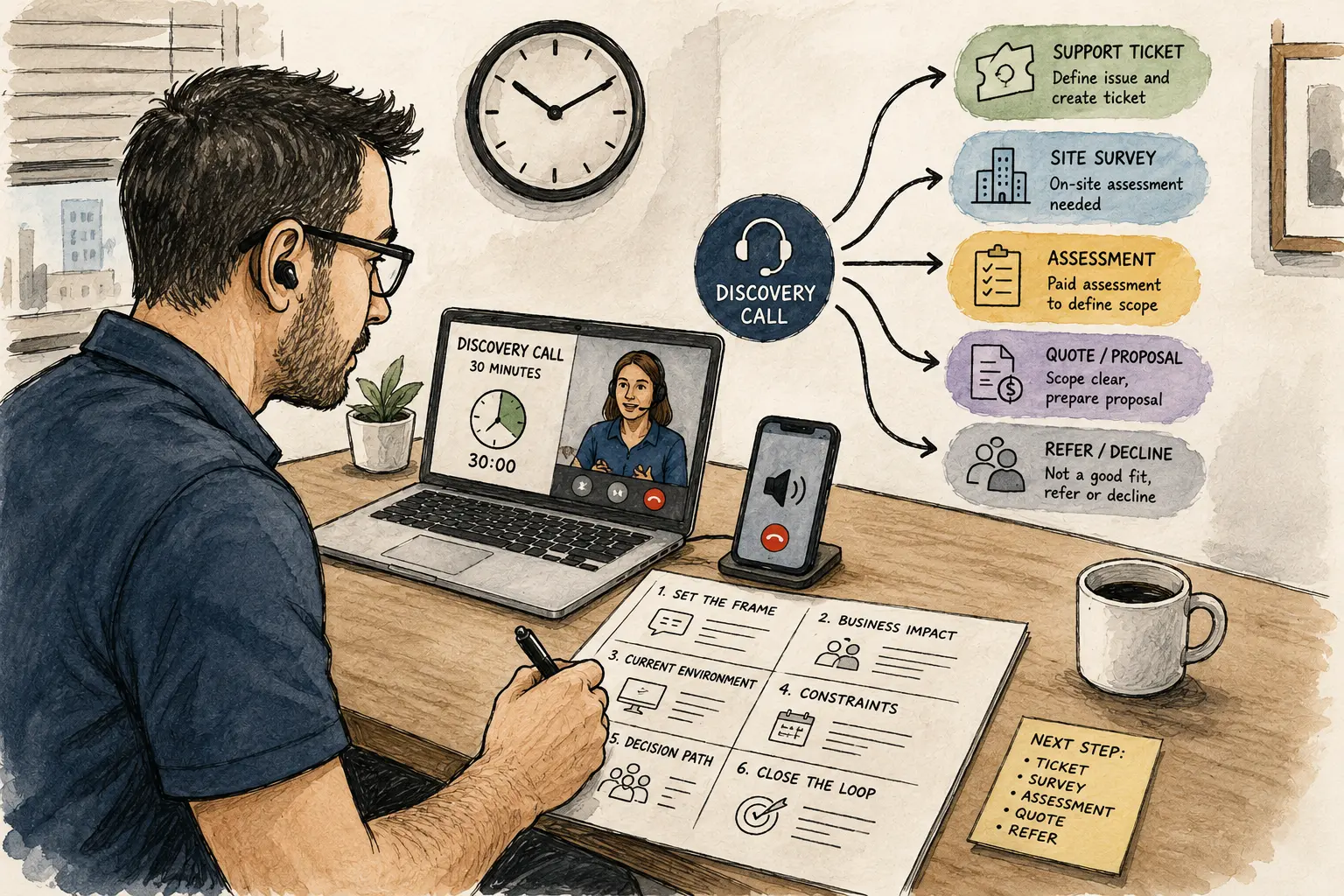
A 30-minute IT discovery call gives you space to uncover those details before you promise a price, block time on the calendar, or start recommending equipment. The call is not a free repair session. It is a structured conversation that determines whether the request needs a support ticket, a site survey, a paid assessment, a project quote, or a polite referral.
Your Discovery-Call Roadmap
- A Quote Should Not Start With Guesswork
- The 30-Minute Call at a Glance
- Use Six Blocks to Control the Conversation
- Ask Questions That Change the Quote
- Keep Discovery Separate From Free Troubleshooting
- End the Call With One Clear Path
- A Better Quote Begins With a Better Call
- Suggested Follow-Up Articles
- Frequently Asked Questions
- References
The 30-Minute Call at a Glance
- Best for: Solo IT consultants, micro-MSPs, freelance sysadmins, and network installers reviewing a new project or a support request that may be larger than it first appears.
- Main takeaway: Use six timed blocks to identify the business problem, technical environment, constraints, decision path, and next step.
- Time, cost, or effort: Reserve 30 minutes. Add a separate paid assessment or site survey when the environment is too complex to quote responsibly.
- Best result to expect: A clear route forward, better quote assumptions, fewer forgotten details, and less unpaid follow-up.
- When not to use this: Skip the discovery call for a clearly defined support ticket that already fits an existing service-catalog item.
A discovery call is a qualification step. Salesforce describes it as a call to learn more about a prospect’s business, needs, and goals while checking whether the opportunity is a good fit. For an IT services business, that definition needs one extra layer: the call must reveal enough technical context to choose the next step without pretending that a remote conversation can replace hands-on investigation.
Use Six Blocks to Control the Conversation
A discovery call can expand quickly. The client remembers another printer problem, a cloud subscription question, a slow laptop, and a security concern that somebody mentioned three months ago. All of those items may matter, but they do not belong in one improvised conversation.
Use six blocks and state the boundary near the beginning:
“I’ll use the first part of the call to understand the business problem and the current setup. Near the end, I’ll summarize the next step and let you know whether this is ready for a quote or needs a separate assessment.”
The six-block call structure
| Minutes | Call Block | Purpose | Useful Question |
|---|---|---|---|
| 0–3 | Set the frame | Confirm the request and explain the call boundary | “What would make this call useful for you today?” |
| 3–8 | Business impact | Understand the operational problem | “What work becomes slower, harder, or impossible when this issue happens?” |
| 8–15 | Current environment | Identify users, devices, locations, vendors, and known limitations | “Which systems, offices, or teams are involved?” |
| 15–21 | Constraints | Surface deadlines, budget expectations, access limits, and vendor dependencies | “Is there a date, event, or business deadline driving the request?” |
| 21–26 | Decision path | Identify the point of contact and approval process | “Who needs to review or approve the next step?” |
| 26–30 | Close the loop | Summarize findings and assign one next action | “Based on what we covered, here is the next step I recommend.” |
This structure is short enough for a busy client and disciplined enough for a solo operator. It also creates a natural stopping point when the conversation begins drifting into troubleshooting.
Key terms that keep the call useful
- Business impact: The work, revenue, time, or client experience affected by the problem.
- Technical scope: The users, systems, locations, devices, and vendors involved.
- Constraint: A deadline, access limitation, budget boundary, policy requirement, or dependency.
- Decision path: The people and approvals required before work can begin.
- Next step: The single action that moves the request forward after the call.
Mini scenario: the “simple” computer replacement
A small accounting office asks for a quote to replace four aging desktop computers. That sounds like a standard workstation deployment.
During the call, the technician learns that the office uses a specialized tax application, one computer connects to an older scanner, two employees work from home on Fridays, and the client wants the change completed before the next filing deadline. The job is no longer four identical computer setups.
The correct next step is not an instant fixed-price quote. It is a short paid assessment or a scoped follow-up that confirms software compatibility, data-transfer needs, scanner support, remote-user requirements, and the installation schedule.
Ask Questions That Change the Quote
The best questions change your understanding of scope, priority, risk, or next steps. Avoid asking questions simply because they sound professional.
HubSpot’s current discovery-call guidance recommends open-ended questions focused on the prospect’s obstacles, processes, and goals. For a small IT provider, that means asking plain-language questions first and technical follow-ups second.
Use this discovery worksheet
| Area | Core Question | Why It Matters |
|---|---|---|
| Goal | “What are you trying to improve or prevent?” | Separates the requested tool from the actual outcome |
| Impact | “Who is affected, and what work is interrupted?” | Reveals urgency and business importance |
| Current setup | “What are you using today?” | Establishes the starting point |
| Users | “How many people, devices, or locations are involved?” | Changes labor, scheduling, and support planning |
| Timeline | “Is there a deadline or business event behind this request?” | Reveals whether rush planning is needed |
| Vendor dependencies | “Which internet, cloud, software, or hardware providers are involved?” | Identifies external coordination work |
| Access | “Who can approve access to the systems involved?” | Prevents delays after the project begins |
| Prior attempts | “Has anyone already tried to fix or change this?” | Exposes partial work, failed attempts, or undocumented changes |
| Budget context | “Are you looking for a basic fix, a long-term solution, or options at different price levels?” | Helps shape the proposal without forcing an early number |
| Decision process | “Who reviews the recommendation and approves the work?” | Prevents proposals from disappearing into an unknown inbox |
| Communication | “Who should receive updates during the work?” | Creates a clean contact path |
| Next step | “Would a quote be responsible now, or does this need an assessment first?” | Keeps the close honest |
The budget question does not need to become an interrogation. Some clients do not know the right budget yet. The goal is to learn whether they want a temporary repair, a staged improvement, or a longer-term solution.
Ask one follow-up when the answer is vague
When the client says, “The network is slow,” do not jump to equipment recommendations. Ask:
- Is the issue constant or intermittent?
- Does it affect wired devices, Wi-Fi devices, or both?
- Is one application slow, or does everything feel slow?
- Does the problem affect one user or the entire office?
- Did anything change shortly before the issue began?
Those answers may reveal a support ticket, an ISP issue, an overloaded Wi-Fi environment, or a project that needs a site survey. The discovery call does not need to solve the problem. It needs to route the work responsibly.
Keep Discovery Separate From Free Troubleshooting
A discovery call can become expensive when it loses its boundary. The client shares a screen, asks for quick fixes, introduces a second issue, and adds another employee to the call. Thirty minutes later, the technician has provided support without creating a ticket, tracking time, or defining scope.
Common mistakes and the correction
- Starting with a product recommendation: The client asks for a new router, so the conversation becomes a hardware discussion. Ask about the business problem and environment first.
- Trying to solve the issue live: A discovery call becomes unpaid remote support. Move active troubleshooting into a support ticket or paid session.
- Ignoring the deadline: A technically simple request may still require rush scheduling, equipment availability checks, or phased delivery.
- Skipping the decision-maker: The quote reaches someone who cannot approve the work. Ask who reviews recommendations and who signs off.
- Leaving without a next action: The call produces notes but no movement. End with one assigned next step and a realistic timing expectation.
Choose the right path after the call
| Discovery Result | Best Next Step | Typical Example | Tradeoff |
|---|---|---|---|
| Clearly defined support issue | Create a support ticket | One user cannot print to a known office printer | Fast, but keep the ticket limited to the defined issue |
| Small project with known scope | Prepare a quote | Configure two new workstations using a standard setup checklist | Efficient, but list assumptions and exclusions |
| Environment needs verification | Schedule a site survey | Wi-Fi reliability issues across two floors | Adds time before quoting, but reduces guessing |
| High uncertainty or multiple dependencies | Offer a paid assessment | Email migration involving unknown mailboxes, archives, and vendors | Requires a separate approval, but protects both sides |
| Request falls outside your service model | Refer or decline | Specialized data recovery or unsupported legacy system | You may lose a job, but avoid a bad fit |
A paid assessment is not a punishment for asking questions. It is the correct product when the investigation itself has value.
End the Call With One Clear Path
The last four minutes matter. A discovery call that ends with “I’ll look into it” creates uncertainty for both sides. Summarize the problem, state the next step, identify the owner, and set a realistic follow-up point.
Use this closing script
“Based on what we covered, the main issue is the office Wi-Fi reliability across two floors, with the warehouse scanners and guest network also in scope. I recommend a site survey before an equipment quote. I’ll send the assessment outline and scheduling options. Once that is approved, we can document the current setup and prepare the project recommendation.”
The script is direct. It separates the known problem from the next action and avoids promising an answer before the environment has been checked.
Record the result in your system
Store the discovery summary in Odoo, ERPNext, Zoho One, or any other ERP or CRM that supports opportunities, notes, meetings, and follow-up activities. Odoo CRM supports opportunities, meetings, and next activities. ERPNext uses opportunities as part of the sales pipeline and can connect opportunity records to quotation workflows.
The software is not the method. The method is ending the call with a defined status.
Use five possible statuses
- Support ticket: Ready for troubleshooting
- Quote-ready: Scope is clear enough to prepare a proposal
- Assessment required: More investigation is needed before quoting
- Waiting on client: A specific detail, approval, or document is missing
- Declined or referred: The work does not fit your service model
A Better Quote Begins With a Better Call
A useful discovery call does not need to feel complicated. Reserve 30 minutes, use six timed blocks, ask questions that change the quote, and stop before the conversation becomes a free repair session. The client should leave knowing the next step. You should leave knowing whether the request belongs in a ticket, a site survey, a paid assessment, a proposal, or a referral.
Build Your Discovery Worksheet
Create the worksheet before the next project request arrives. A simple document is enough for version one. After five calls, remove the questions that produce little value and add the follow-ups that repeatedly uncover hidden scope.
Quick launch checklist
- Add the six timed blocks to your call notes.
- Write the 12 discovery questions in plain language.
- Add the five closing statuses.
- Prepare one sentence that explains the call boundary.
- Test the worksheet against three recent quotes.
- Review the worksheet after five live calls.
Frequently Asked Questions
Q1. Is 30 minutes enough for an IT discovery call?
A1. Thirty minutes is enough to understand the business problem, identify the main systems and constraints, and choose the next step. It is not enough for a detailed technical assessment of a complex environment. When the unknowns remain significant, schedule a paid assessment or site survey.
Q2. Should an IT discovery call be free?
A2. A short qualification call can be free when its purpose is to understand the request and recommend the next step. Hands-on troubleshooting, detailed network analysis, migration planning, and solution design should move into a defined paid service.
Q3. Should a price be discussed during the discovery call?
A3. Discuss pricing structure when it helps set expectations. Avoid promising a fixed project total before the scope is clear. For uncertain work, explain that the next step is an assessment or a quote with documented assumptions.
Q4. Does the discovery worksheet need to be inside an ERP?
A4. No. A document or spreadsheet works for the first version. Later, store the summary in Odoo, ERPNext, Zoho One, or any other ERP or CRM that fits your operation and supports follow-up activities.
By: Marcus Irizarry
Why trust this: This post is written for solo IT operators and micro-MSPs, using a practical client-discovery framework and current CRM documentation.
Last updated: 2026-06-10
Disclosure: No paid placement influenced this post.
References
- Salesforce: What Is a Sales Cycle? 7 Critical Stages — Describes the discovery call as a step for learning about the prospect’s business, needs, goals, and fit.
- HubSpot: 28 Questions to Ask on a Discovery Call During the Sales Process — Explains the role of open-ended discovery questions focused on obstacles, processes, and goals.
- Odoo Documentation: CRM — Documents CRM opportunities, pipelines, meetings, and next activities.
- ERPNext Documentation: Opportunity — Documents opportunities as part of the sales pipeline and their connection to quotation workflows.



0 Comments