
The Screen Has Entered Its Celebrity Era
There was a time when a car screen knew its place. It showed the radio station, maybe a tiny map, maybe the temperature if it had been promoted. Humble work. Respectable work.
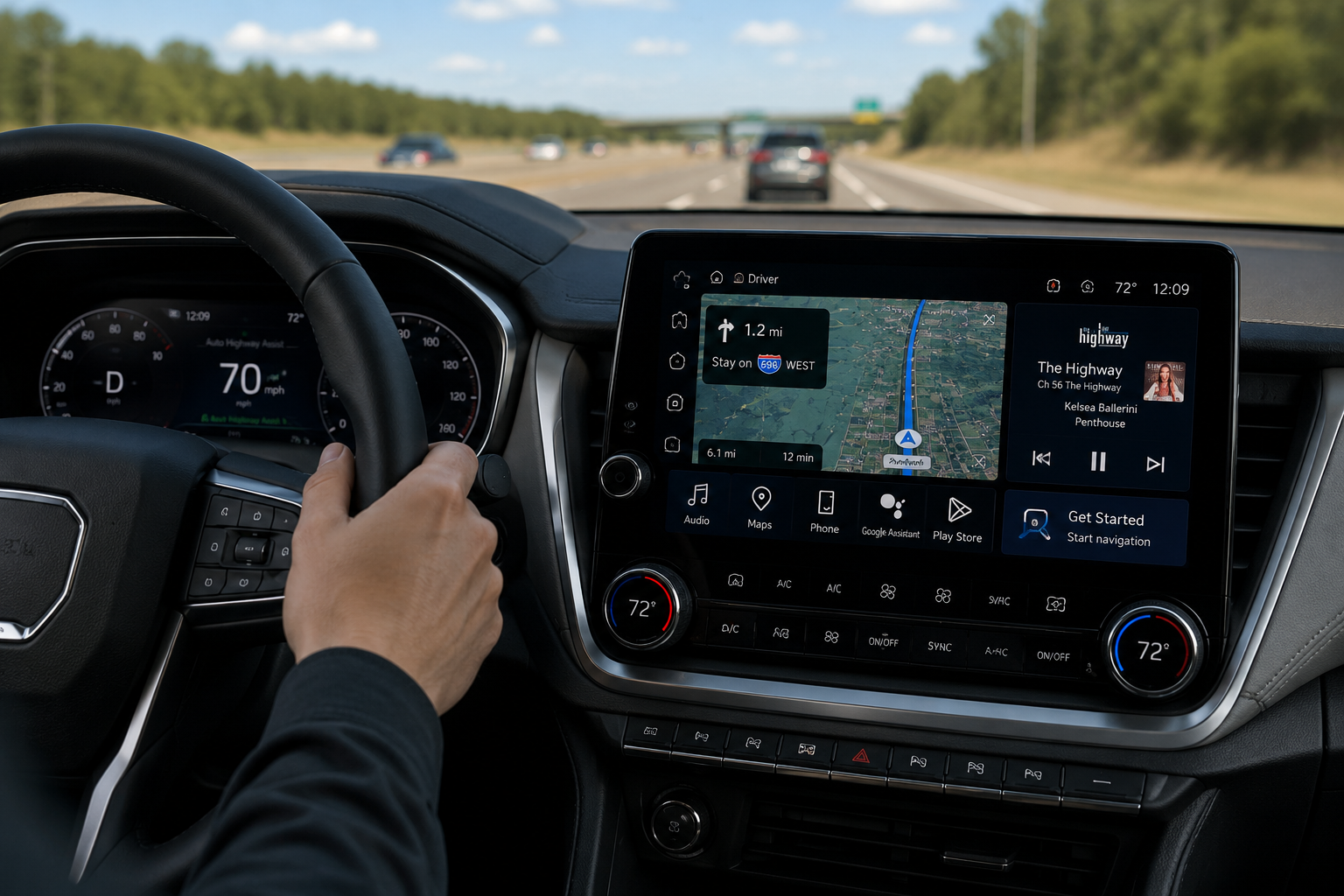
Now the car screen lights up like it has a manager, a publicist, and a three-season streaming deal. It wants to navigate, entertain, customize, announce, suggest, animate, sync, update, and possibly emotionally support you through the Taco Bell drive-thru.
That is the strange new energy of car screen software. The dashboard is no longer a dashboard. It is a tiny stage, and the screen is standing in the middle whispering, “Finally, everyone is looking at me.”
The Dashboard Drama Map
- The Screen Has Entered Its Celebrity Era
- Quick Take Before Your Dashboard Starts Monologuing
- The Car Screen Is No Longer Just a Radio With Ambition
- When the Dashboard Becomes the Main Character
- How to Keep Car Software From Running the Whole Trip
- FAQ: Car Screens and Dashboard Software
- References
Quick Take Before Your Dashboard Starts Monologuing
- Core claim: Modern car screens are useful, but they are also becoming too central to basic driving comfort.
- What people usually get wrong: They treat a bigger screen as automatically better, even when a physical knob would solve the problem faster.
- Why it matters: Navigation, music, climate, calls, messages, driver settings, and vehicle status are all competing for attention.
- Who this affects: Anyone who has tried to change the fan speed and accidentally opened a settings universe.
- Bottom-line opinion: A car screen should help the drive, not audition for emotional leadership.
The Car Screen Is No Longer Just a Radio With Ambition
The old in-car interface had simple social rules. Knob means volume. Button means defrost. Lever means air direction. Everybody had a job. Nobody needed a product launch.
Modern dashboards are different. CarPlay puts directions, calls, messages, music, and apps on the built-in display. Android Auto offers phone-connected navigation, communication, media, and voice help through the car screen. Google’s 2026 automotive updates point toward richer interfaces, immersive navigation, and Gemini features for Android Auto and cars with Google built-in.
None of that is automatically bad. A good car screen can prevent phone fumbling. A good map can save a missed exit. A good voice assistant can keep your hands where they belong. The useful part is real.
The funny part is that the screen now behaves like it discovered driving.
The myths car screens quietly sell
- “More screen means more control.”
- “Fewer buttons means simpler design.”
- “A bigger map always means a better trip.”
- “If it has voice control, distraction is solved.”
- “If the interface looks expensive, it must be easier.”
What the real pattern suggests
The pattern is not subtle. Cars are becoming software rooms with wheels. The screen is where the phone connects, where navigation lives, where entertainment hides, where settings multiply, and where the car tries to explain itself after an update.
That creates a weird emotional shift. You used to get into a car and operate a machine. Now you get into a car and negotiate with an interface. The car still has tires, brakes, seats, and cup holders, but the center screen acts like the lead character because so many daily actions now pass through it.
The dashboard has become the place where tech companies, automakers, safety concerns, convenience features, and driver habits all squeeze into one glowing rectangle. Mira, that is a lot of responsibility for a thing you also use to skip a song.
A normal parking-lot scenario
Imagine sitting in a grocery store parking lot at 5:42 p.m. You only want three things: directions home, less air blowing on your face, and music that does not sound like a podcast host trapped in a tunnel.
The screen opens with a map. Then a phone notification appears. Then a media widget offers a playlist. Then the car displays an update prompt. Then you tap the wrong tile and enter a climate menu with the emotional complexity of tax software. The car has not failed. That is the problem. Everything technically works. It just made you attend a dashboard meeting before merging into traffic.
When the Dashboard Becomes the Main Character
The issue is not that car screens exist. The issue is what gets moved behind them. Navigation belongs on a screen. Music browsing can live there. Backup cameras obviously need a display. But some controls should not require a tiny touchscreen treasure hunt while the vehicle is moving.
Climate controls are the big example. When fan speed, temperature, seat heat, defrost, mirror settings, and drive modes all move into menus, the screen becomes less like a tool and more like a gatekeeper. The car is no longer asking, “What do you need?” It is asking, “Would you like to explore?”
Driver distraction research and safety guidance have long focused on visual-manual tasks, the kind that make a driver look away, reach, tap, read, and confirm. NHTSA’s in-vehicle distraction guidelines have emphasized limiting tasks that pull eyes and hands away from driving. IIHS also notes that manipulating a cellphone while driving is linked to increased crash risk, which is a useful reminder that screen interaction is not automatically harmless just because the screen is bolted into the car.
Where the simple take fails
- “Touchscreens are modern”: Modern does not always mean faster when the road is moving and your finger is bouncing.
- “Voice control fixes it”: Voice helps, but it can still misunderstand, take time, or require visual confirmation.
- “Drivers should just learn the system”: Learning helps, but basic controls should not require training like a small aircraft.
- “Physical buttons are old-fashioned”: A good knob is not nostalgic. It is fast, tactile, and hard to mis-tap.
What not to do
Do not treat the car screen like a tablet just because it looks like one. A car is not your couch. The screen may offer apps, animations, widgets, assistant features, and settings, but the driving context changes the rules.
Also do not explore menus while the car is moving. That includes “just checking” where the new update moved the setting. That tiny search mission can wait. Park first, then let the screen explain its personality.
How to Keep Car Software From Running the Whole Trip
The practical answer is not to hate car screens. It is to demote them. The screen can be useful, but it should not own every decision inside the cabin.
Set up your layout while parked. Put navigation, media, and call controls where you can understand them quickly. Remove or ignore clutter you do not use. If your system allows shortcuts, favorites, widgets, or dashboard customization, use those to reduce taps, not to create a digital trophy shelf.
Then decide which controls need muscle memory. Volume, defrost, hazard lights, temperature, and windshield clearing should be easy to reach without a screen adventure. If your car buries some of those in software, learn the fastest safe path while parked. Not at a red light. Not while rolling through a school zone. Parked.
Quick reality-check list
- Set up CarPlay, Android Auto, Bluetooth, maps, and media before driving.
- Keep your default screen simple: map, audio, and phone are usually enough.
- Learn where defrost, hazard lights, volume, fan speed, and temperature live.
- Use steering wheel controls when they are simpler than the center screen.
- Turn off unnecessary notifications on the car display.
- Do not browse settings, apps, or update prompts while moving.
- After a major software update, spend 5 minutes parked finding what changed.
Dashboard control triage
| Screen behavior | Best response | Why it helps | Watch out for |
|---|---|---|---|
| Navigation and route guidance | Keep it visible | Maps are one of the screen’s best uses | Avoid typing while driving |
| Music and podcasts | Use presets or voice | Reduces scrolling | Browsing playlists can become a trap |
| Climate controls | Prefer physical controls when available | Faster and less glance-heavy | Menus can hide urgent controls |
| Messages and calls | Use voice or wait | Keeps attention closer to driving | Confirmations can still distract |
| Apps and entertainment | Park first | Keeps driving context clear | Some parked features may tempt misuse |
| Software updates | Review while parked at home | Avoids surprise interface changes | Updates may move familiar controls |
The Screen Can Be Helpful Without Becoming the Star
The best car screen is not the one with the most personality. It is the one that helps you drive, then gets out of the way. A map that is easy to read is useful. A music control that takes one tap is useful. A voice assistant that understands a simple request is useful.
The worst car screen acts like every trip is a product demo. It glows, animates, suggests, updates, rearranges, and somehow makes the driver feel like a guest in their own vehicle.
Cars can have smart screens. They can have better maps, better phone integration, and better software. But the star of the drive should still be the driver, not a dashboard tablet with main character energy.
FAQ: Car Screens and Dashboard Software
Q1. Are big car screens always more distracting?
A1. Not always. A larger screen can make maps easier to read and reduce phone handling. The problem starts when common controls require more taps, more reading, or more time looking away from the road.
Q2. Is CarPlay or Android Auto safer than using a phone directly?
A2. They can be safer when they reduce phone handling and use simplified driving interfaces. That does not mean every interaction is safe at every moment. Set up routes, audio, and messages before driving whenever possible.
Q3. What should I change first on a new car screen?
A3. Start with the home layout. Put navigation, audio, and phone controls within easy reach, then turn down unnecessary alerts. After that, learn where climate, defrost, hazard lights, and volume controls are before your first stressful drive.
By: Andrew Eyes
Why trust this: This commentary uses current official car-software feature pages, driver-distraction guidance, and practical consumer settings advice without claiming insider access.
Last updated: 2026-05-20
Disclosure: No paid placement influenced this post.
References
- Apple: “CarPlay” (accessed 2026-05-20). https://www.apple.com/ios/carplay/
Supports the discussion of CarPlay features such as directions, calls, messages, and music on a car’s built-in display. - Google Blog: “Do more and have more fun with the next generation of Android Auto and cars with Google built-in” (2026). https://blog.google/products-and-platforms/platforms/android/android-in-cars-updates/
Supports the discussion of 2026 Android-in-car updates, refreshed interfaces, navigation features, parked entertainment, and Gemini features. - Android: “Android Auto” (accessed 2026-05-20). https://www.android.com/auto/
Supports the discussion of Android Auto as a phone-connected driving interface with apps and hands-free help. - NHTSA: “Distracted Driving” (accessed 2026-05-20). https://www.nhtsa.gov/risky-driving/distracted-driving
Supports the safety framing around distraction and attention while driving. - IIHS: “Distracted driving” (accessed 2026-05-20). https://www.iihs.org/research-areas/distracted-driving
Supports the discussion of cellphone manipulation and crash-risk context.




0 Comments